
ClickUp vs Trello: a connected workspace or a visual task board?
ClickUp and Trello can both organize work on a board. ClickUp surrounds that board with a hierarchy of tasks, documents and conversations. Trello keeps the card workflow central and adds capture, scheduling and extensions around it. The right choice depends on how much work should live outside the board.

ClickUp
Full profile & featuresBest fit
Teams keeping detailed tasks, working documents and project conversations in one configurable workspace.
$7paid plans from
USD / user / month, billed annually · Unlimited

Trello
Full profile & featuresBest fit
Teams whose work is clearest as cards moving through a small set of visual stages.
$5paid plans from
USD / user / month, billed annually · Standard
The decision
Our verdict
Choose Trello when the team mainly needs a visual flow of cards with dates, checklists and discussion. Choose ClickUp when project tasks, briefs and conversations should be connected inside one workspace. ClickUp Unlimited can cost less than Trello Premium while offering a broader suite, but breadth also brings more setup decisions; use the package the team will maintain well.
ClickUp: strengths & tradeoffs
Why choose it
- A task can stay connected to the brief or document explaining the work.
- Lists, boards, planning views, Docs and Chat support several work habits in one workspace.
- Free Forever allows unlimited members, with defined storage and feature limits.
Weigh up
- Spaces, folders, lists and overlapping surfaces need an agreed setup to remain coherent.
- A workspace upgrade and AI add-ons can cost more than the headline per-user subscription.
Trello: strengths & tradeoffs
Why choose it
- Cards and lists provide a compact way to explain what is queued, underway and finished.
- Inbox and Planner connect incoming work with personal scheduling.
- Power-Ups and automation can extend a board when the process needs more than its basic columns.
Weigh up
- Free workspaces are limited to ten collaborators and ten boards.
- Expanded views require Premium, and multi-board guests can become paid users.
ClickUp vs Trello at a glance
How work is organized[1][5]
- ClickUp
- A workspace holds Spaces, folders and lists of tasks. Docs, conversations and other surfaces connect around that task structure.
- Trello
- A workspace contains boards, lists and cards. The lists usually represent workflow stages, with dates and detail kept on the cards.
Paid planning step[2][6]
- ClickUp
- Unlimited includes unlimited Gantt charts, custom fields and native time tracking. Business adds advanced dashboard cards and 5,000 monthly automation executions.
- Trello
- Premium is the relevant comparison tier for Timeline, Calendar, Dashboard and workspace views. Standard remains an option when the board, custom fields and Planner cover the job.
Features: how the work gets done
These differences matter when the team moves from a useful view to an everyday working process. The recommendations below follow the kind of work each product organizes.
Work structure[1][5][6]
- ClickUp
- Tasks support subtasks, checklists, relationships and custom fields. The workspace hierarchy can separate different projects while retaining detailed assignments.
- Trello
- Boards show cards arranged in lists, with owners, dates and checklists on the card. Standard adds custom fields and advanced checklists for more structure.
Our take: Trello makes the list-to-list card flow the main work surface. ClickUp offers more hierarchy and task detail when a board is only one part of the project.
Scheduling and views[2][6]
- ClickUp
- List, Board and Calendar show different perspectives on tasks. Unlimited adds unlimited Gantt charts and native time tracking for teams that need scheduling and effort data.
- Trello
- The board is the central view. Standard provides full Planner access; Premium adds Calendar, Timeline, Table, Dashboard and Map views plus workspace-level views.
Our take: ClickUp Unlimited includes Gantt and native time tracking. Trello Premium adds expanded views, including Timeline, but those planning capabilities should be assessed separately.
Intake, documents and discussion[1][5]
- ClickUp
- Docs, comments, Chat and Whiteboards keep written context and discussion near the work. In our recorded launch workflow, the brief linked to its approval task.
- Trello
- Inbox captures incoming work from email, Slack and Microsoft Teams. Card descriptions, attachments and comments keep context with the card; Power-Ups extend the workflow.
Our take: ClickUp is a natural fit when a living brief and its assignment must stay linked. Trello keeps context on cards and adds Power-Ups where the board needs an external tool.
Reporting and coordination[2][6]
- ClickUp
- Dashboards summarize workspace work. Business adds advanced dashboard cards and higher automation capacity; it is a different reporting package from Unlimited.
- Trello
- Premium adds dashboard and workspace views for examining board work. Choose a broader project-management system if formal portfolio, goal or resource coordination is the main requirement.
Our take: A Trello buyer may only need board reporting. A ClickUp buyer needing advanced dashboard cards should assess Business rather than assuming they are all in Unlimited.
Automation and AI[1][4][7][6]
- ClickUp
- Rules and automations connect task changes to actions. Brain and agent capabilities add AI with their own offer/usage limits. Check generated claims against the underlying task data.
- Trello
- Automation connects card events to actions. Standard includes 1,000 monthly workspace command runs; Premium advertises unlimited command runs. Paid tiers also add AI capture capabilities.
Our take: Trello automation commands and ClickUp automation executions are different units. Included AI also has its own scope and limits; do not equate an AI badge with unlimited agent work.
Pricing & the cost of your team
Public USD rates checked October 16, 2026. Annual rates require annual billing; the monthly alternatives are shown separately. Compare the tier that includes the required planning and coordination features.
Paid subscription rates[2][6]
- ClickUp
- Unlimited is $7 per user/month annually or $10 monthly. Business is $12 annually or $19 monthly; Enterprise is quoted.
- Trello
- Standard is $5 per user/month annually or $6 monthly. Premium is $10 annually or $12.50 monthly; Enterprise pricing depends on user count.
The planning package[2][6]
- ClickUp
- Unlimited includes unlimited Gantt charts, custom fields and native time tracking. Business adds advanced dashboard cards and 5,000 monthly automation executions.
- Trello
- Premium is the relevant comparison tier for Timeline, Calendar, Dashboard and workspace views. Standard remains an option when the board, custom fields and Planner cover the job.
Who becomes billable[2][6]
- ClickUp
- An upgrade applies to the workspace, including its members. Guest roles and permissions affect which collaborators become billable.
- Trello
- The workspace is upgraded. Workspace members and guests on more than one board are billable on Standard/Premium; a one-board guest is treated differently.
What changes the total[2][6]
- ClickUp
- Brain/AI add-ons and differing workspace offers have their own pricing and allowances. Check the full account offer before treating the seat rate as an all-in cost.
- Trello
- Check each Power-Up or external service for separate charges, alongside collaborator/guest roles and the required tier for views. The Standard seat rate does not include Premium views.
A 10-person planning budget
Assume ten billable workspace users. ClickUp Unlimited includes Gantt planning, while Trello Premium supplies expanded views such as Timeline and Calendar. They solve related planning jobs with different features; the example is not an identical-feature comparison.
ClickUp Unlimited
$840/ year
10 seats × $7 × 12 months
Trello Premium
$1,200/ year
10 seats × $10 × 12 months
Base subscription for ten billable people, billed annually. Excludes taxes, AI usage/add-ons, external services, marketplace purchases, promotions and negotiated discounts. Check the final account quote, permissions and guest roles before purchase.
Connect the tools you already use
A connection name is only the beginning. Check which event starts the workflow, what information moves, and whether the connection is one-way, two-way or dependent on a paid tier.
Files and connected information[3][2][6]
- ClickUp
- Google Drive, Outlook and Google Calendar are listed integrations, with different file, email and calendar capabilities.
- Trello
- Power-Ups connect other services to a board; file, calendar and synchronization capabilities depend on the selected connection.
Custom workflows and limits[3][2][6]
- ClickUp
- Unlimited includes unlimited integrations, while API and automation usage retain separate allowances. Verify the exact event and sync direction required.
- Trello
- Power-Ups and built-in automation serve different purposes. Free allows unlimited Power-Ups per board, while automation command allowances depend on the tier.
Who each product fits
For a content team, choose between a board that tracks production and a workspace that also houses the working brief and conversation. Keeping the board understandable is valuable; consolidating the surrounding work can be valuable too.
Data and setup needs[1][5]
- ClickUp
- Choose it when tasks remain the center and extra structured data belongs around those tasks rather than in separate business tables.
- Trello
- Choose it when each card is a sufficient unit of work. A relational system is a better starting point when several kinds of records must stay connected.
The interface and everyday use
ClickUp
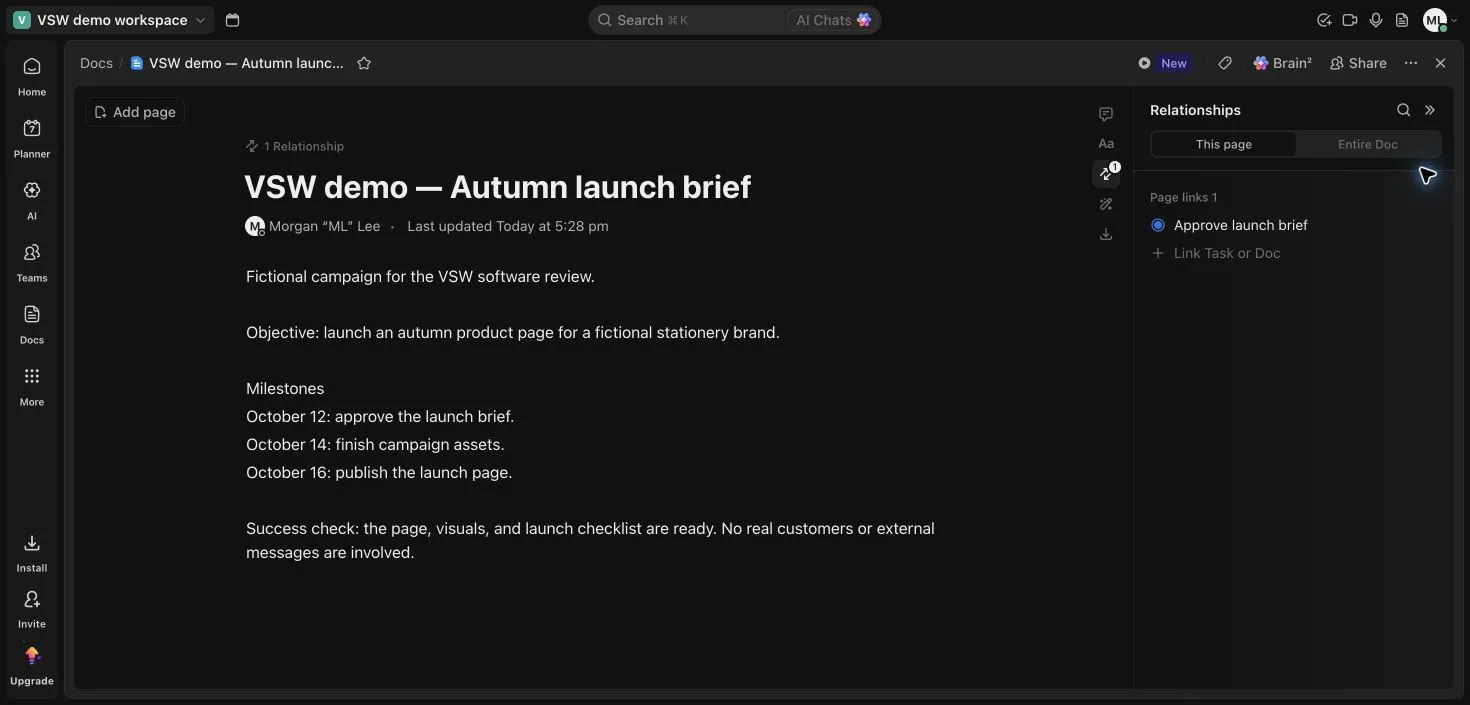
Our recorded launch workflow showed the same tasks in List and Board and connected a brief to the approval task. That makes ClickUp useful when the work and its explanation need to travel together. The range of Docs, Chat, tasks and other surfaces also creates setup choices: a shared convention helps the team know where each kind of information belongs.
Explore ClickUp in detailTrello
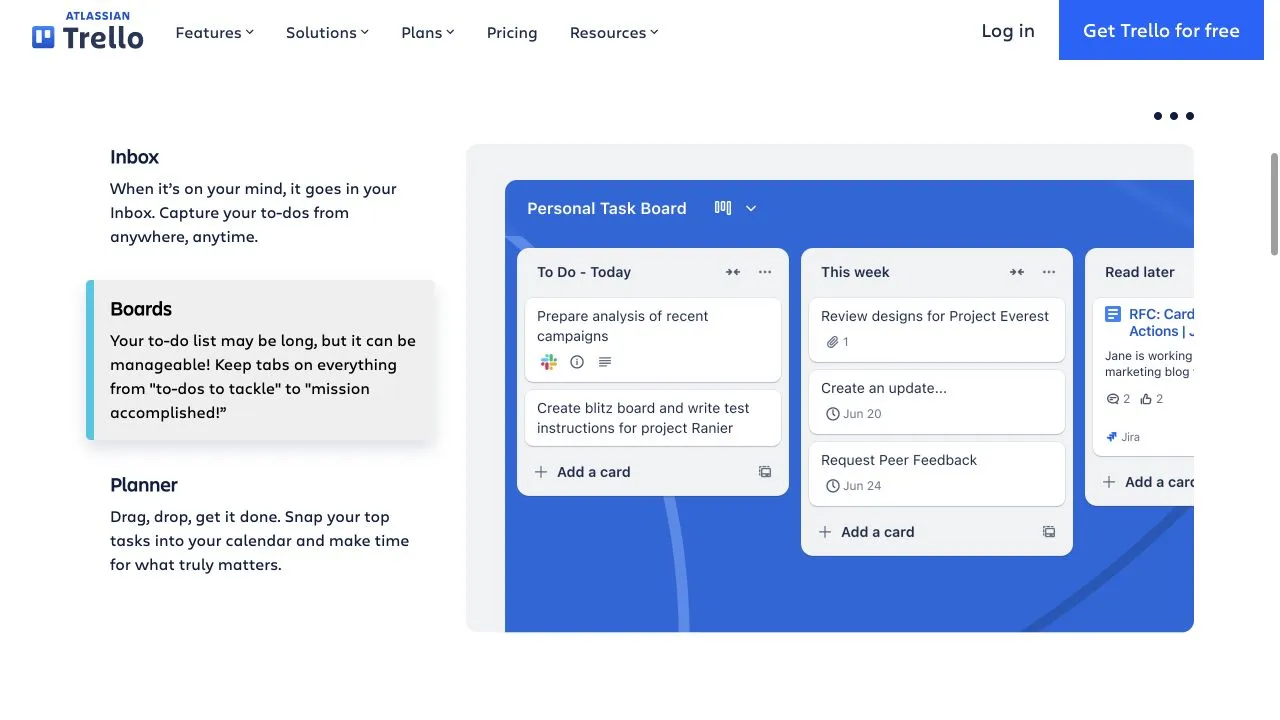
Trello keeps the visual focus on cards grouped into lists. Card detail can hold the checklist, date and discussion while the board shows the process. Inbox and Planner provide adjacent capture and scheduling surfaces. This layout is useful when the board itself explains the workflow; additional views and Power-Ups add depth as the process grows.
Explore Trello in detailSupport & governance
Match the help resources and administration controls to the people responsible for running the workspace. The lowest paid tier does not imply enterprise governance.
Permissions and governance[2][1][6][5]
- ClickUp
- Enterprise lists SAML SSO, SCIM, audit logs and custom roles. Decide which controls the organization requires before choosing a base subscription.
- Trello
- Premium adds workspace administration; Enterprise includes organization-wide controls, SSO and user provisioning with Atlassian Guard Standard.
Other approaches to consider
 Airtable
Teams building a shared operational system around related content, clients, assets or projects.
View profile  Asana
Teams coordinating assigned work, deadlines and project progress, with a route into portfolios and goals.
View profile  monday.com — Work Management
Teams organizing a repeatable process through shared boards, configurable columns and visible status.
View profileRelated comparisons
All comparisons

Airtable vs ClickUp
Compare Airtable and ClickUp on linked records, tasks, docs, planning, automation and team cost, with real interface evidence and plan details.

Airtable vs Trello
Compare Airtable and Trello on records, cards, planning views, automation and team cost, with clear fit guidance and authentic product images.

Asana vs ClickUp
Compare Asana and ClickUp on tasks, documents, planning, reporting, AI and subscription cost, with recorded workflow evidence and practical tradeoffs.
Asana vs Trello
Compare Asana and Trello on tasks, cards, scheduling, reporting, free limits and paid costs, with workflow evidence and clear reasons to choose each.

monday.com — Work Management vs Trello
Compare monday.com and Trello on boards, cards, planning views, reporting, automation and seat costs, with clear buying guidance and authentic images.
ClickUp vs monday.com — Work Management
Compare ClickUp and monday.com on tasks, planning, AI, integrations and cost, with real interface evidence and guidance for choosing the right plan.
ClickUp vs Trello FAQs
Why compare ClickUp Unlimited with Trello Premium?
Those are useful tiers when the team requires expanded planning views. ClickUp Unlimited includes Gantt and native time tracking; Trello Premium adds Timeline, Calendar, Dashboard and other views. Trello Standard has a lower entry price but a different planning package.
Which costs less for ten planning users?
At annual base rates, ten ClickUp Unlimited users cost $840 per year and ten Trello Premium users cost $1,200. The subscriptions differ in features. AI, external services, guest billing, tax and discounts can change the actual total.
Which should I choose for briefs and documents?
ClickUp has a dedicated Docs surface that can link to the task responsible for approval or delivery. Trello keeps descriptions, attachments and comments on cards, with Power-Ups for extensions. Choose based on how much working context should live inside the main tool.
Which free plan can support more members?
ClickUp Free Forever permits unlimited members within its storage and feature quotas. Trello Free allows up to ten collaborators and ten boards per workspace. Neither free plan includes every paid planning or administration capability.
Sources & our approach
Versusware's AI-assisted editorial analysis combines official capabilities, plan and billing sources checked October 16, 2026 with the existing product evidence. ClickUp observations and images come from the October 7, 2026 launch workflow in a Free Forever workspace with feature/AI trial allowances. Trello uses the existing official vendor gallery, sourced October 14, 2026; its product images remain identified as vendor previews. Recommendations are our analysis of workflow fit, structure and subscription requirements. The full profiles retain their methodology and detailed findings.
How we review software- [1] ClickUp feature directoryChecked 2026-10-16
- [2] ClickUp pricing and limitsChecked 2026-10-16
- [3] ClickUp integration catalogChecked 2026-10-16
- [4] ClickUp AI feature availabilityChecked 2026-10-16
- [5] Trello product tourChecked 2026-10-16
- [6] Trello prices, collaborators and plan featuresChecked 2026-10-16
- [7] Trello automationChecked 2026-10-16