Skip to content

Airtable

freemium

Build shared workflows around connected records.

Inside Airtable

5 screenshots

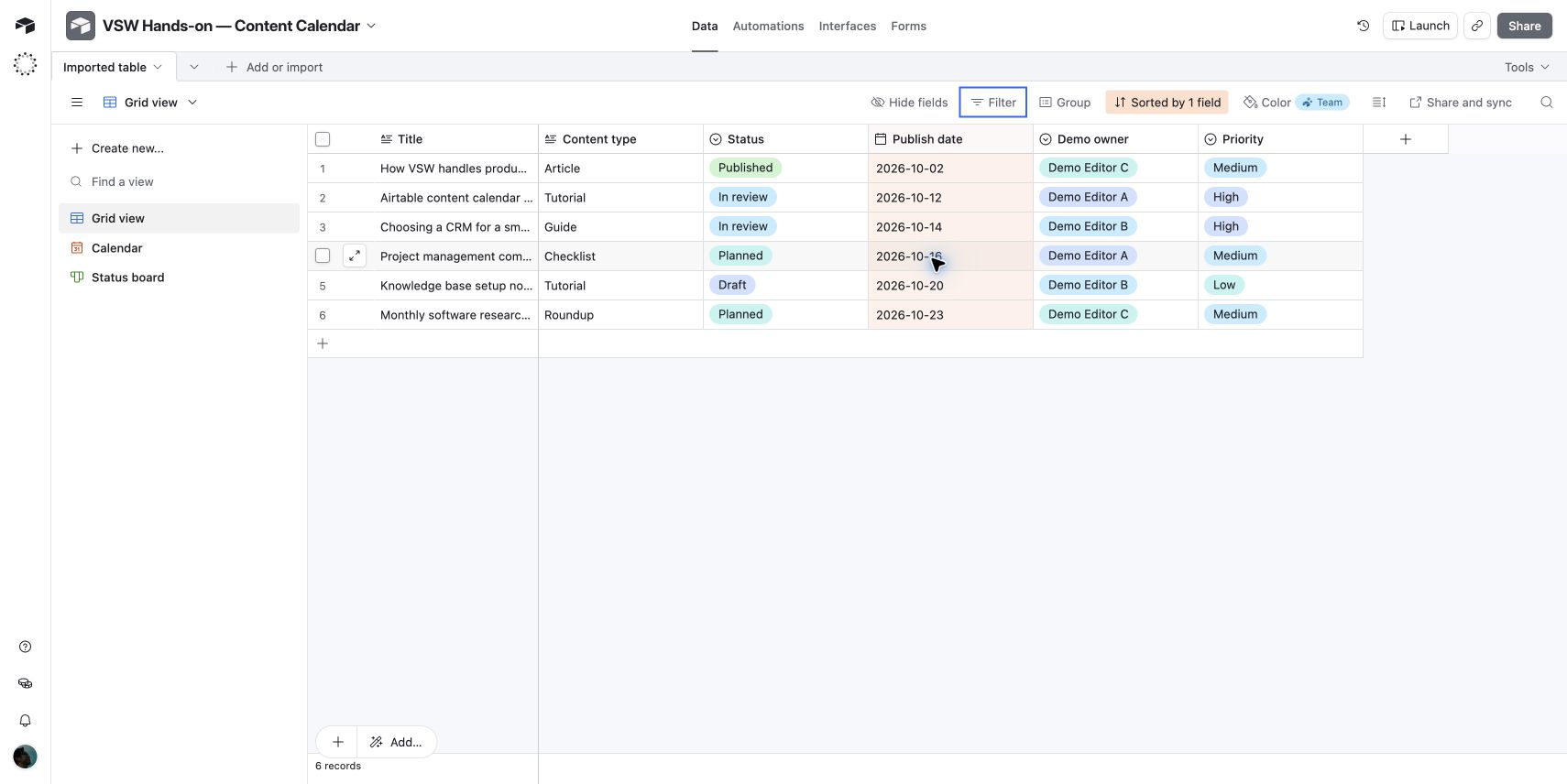
Grid view · Six demo records sorted by publish date.

1 / 5

What is Airtable?

Airtable connects spreadsheet-style records with calendars, boards, custom interfaces, and automations. In our content-calendar test, edits stayed in sync across the grid, calendar, and status board.

Free plan
Available
Paid plans from
$20per user / month
Billed annually

What stands out

  • Shared records can support multiple workflow interfaces.

Plan limits

  • Calendar date ranges and multiple date fields require an upgrade from Free.
No verified community reviews yet
Read our hands-on review

Assistant-led hands-on testing with six fictional content-calendar records. This editorial evaluation is separate from customer reviews and does not contribute to community ratings.

Tested paste import, inferred field types, grid, calendar, status board, cross-view edits, sorting, and filtering. Test environment: Airtable Free plan.

Screenshots captured on Oct 5, 2026 with fictional records and demo owners.

Airtable uses structured, related records as the foundation for workflows and applications. Teams can build interfaces for different audiences and automate repeatable steps around shared data.

What we found in our hands-on test

Airtable worked well for this small content-calendar workflow: one set of records could be browsed as a grid, a publishing calendar, and a status board. The most useful behavior was being able to update a record once and see the change reflected in another view. The evaluation focuses on a six-record content-calendar workflow.

A practical route from spreadsheet data

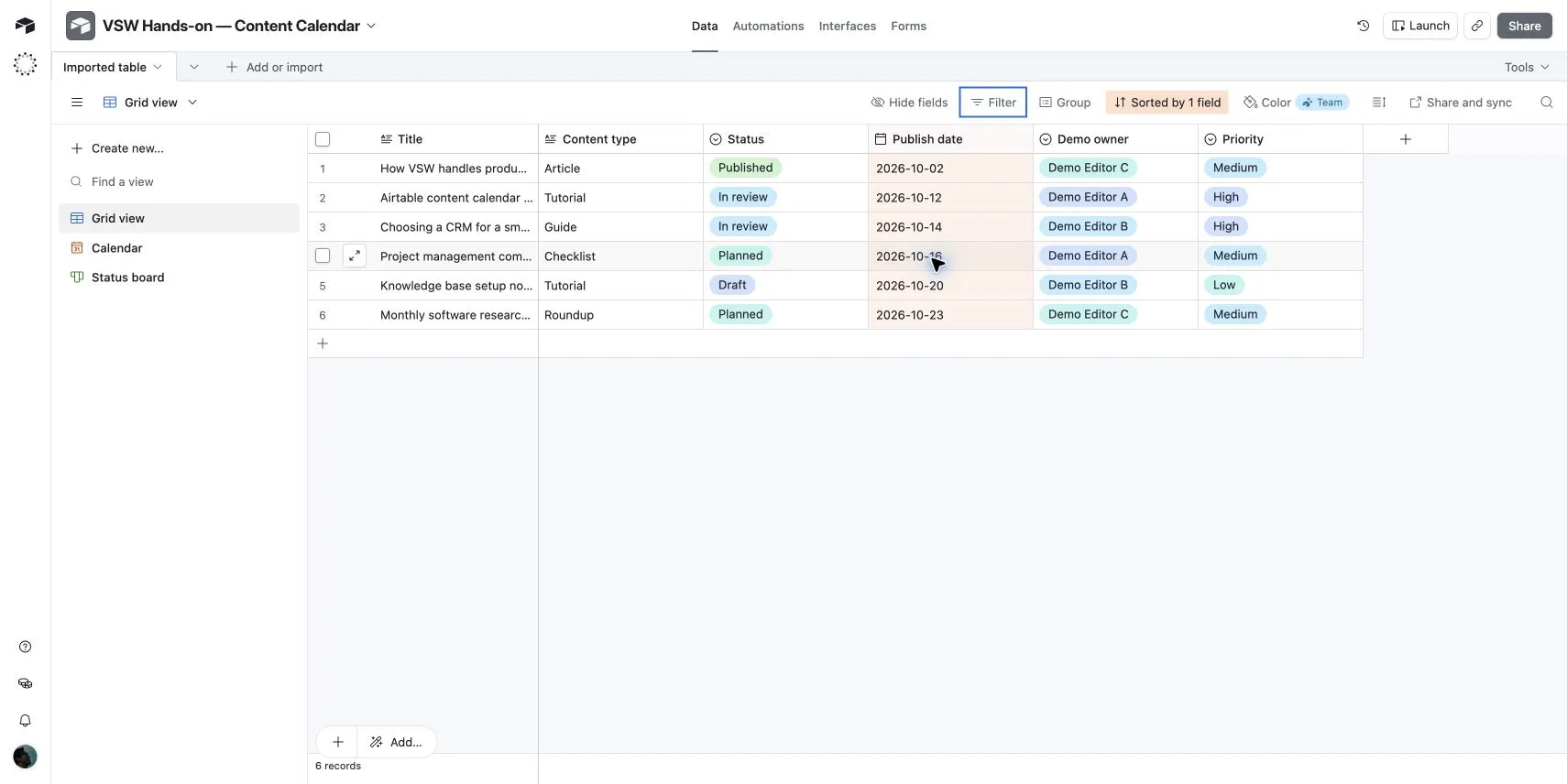
Pasting tab-separated data imported all six rows and six columns. Airtable detected Publish date as a date and Status, Demo owner, and Priority as single-select fields. Title and Content type were detected as long text, rather than single-select fields.

Three views of the same content plan

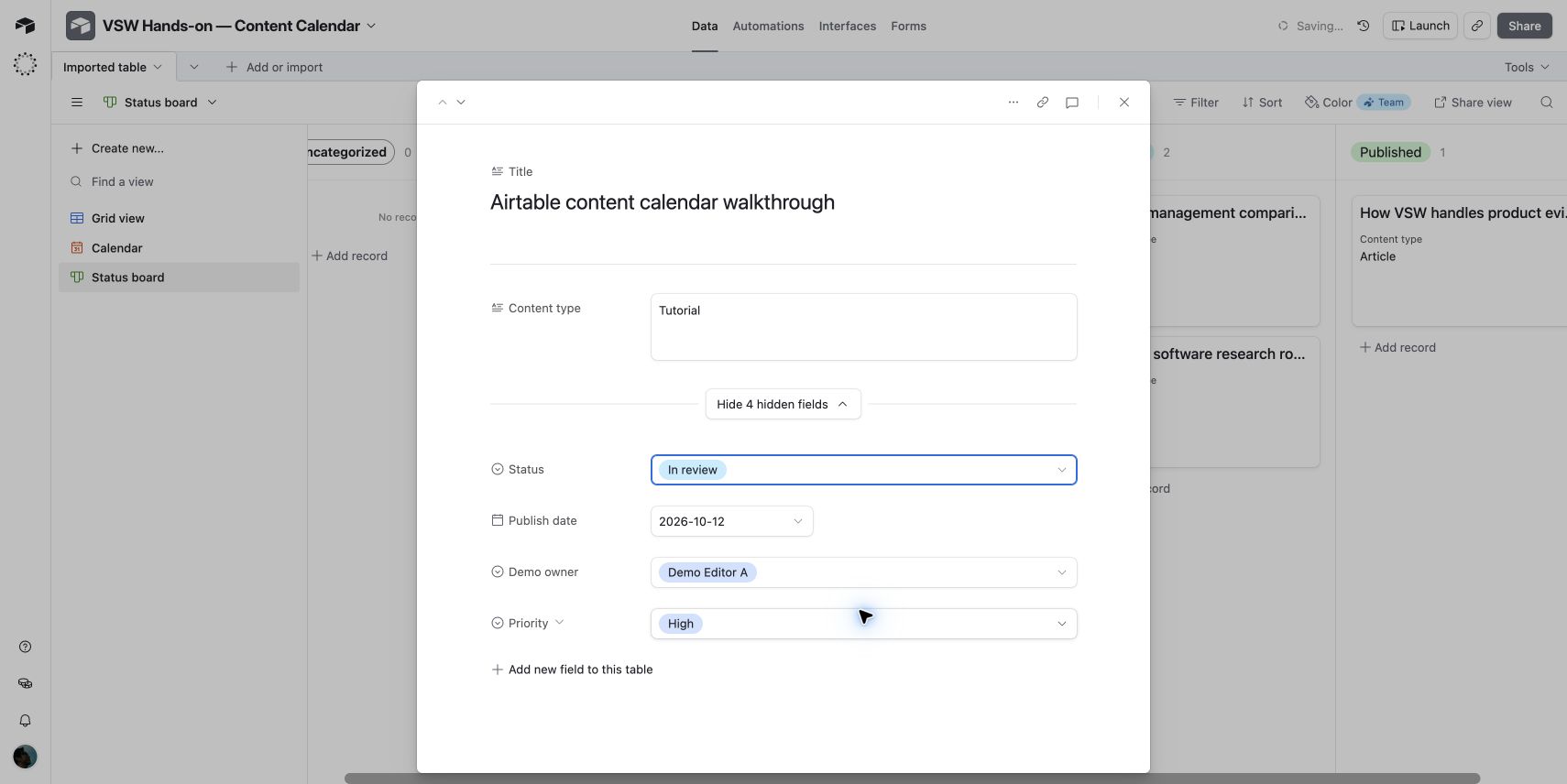
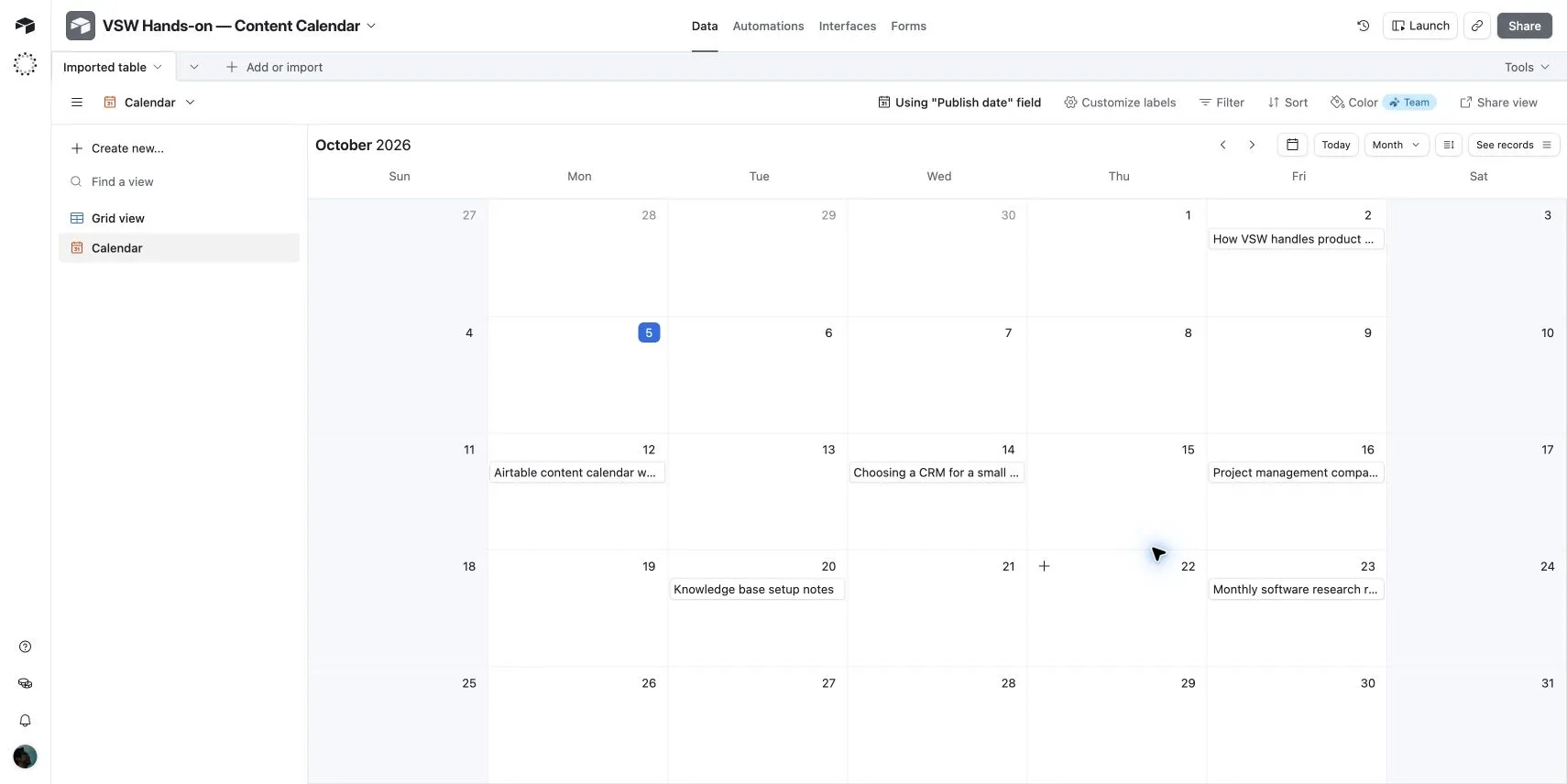
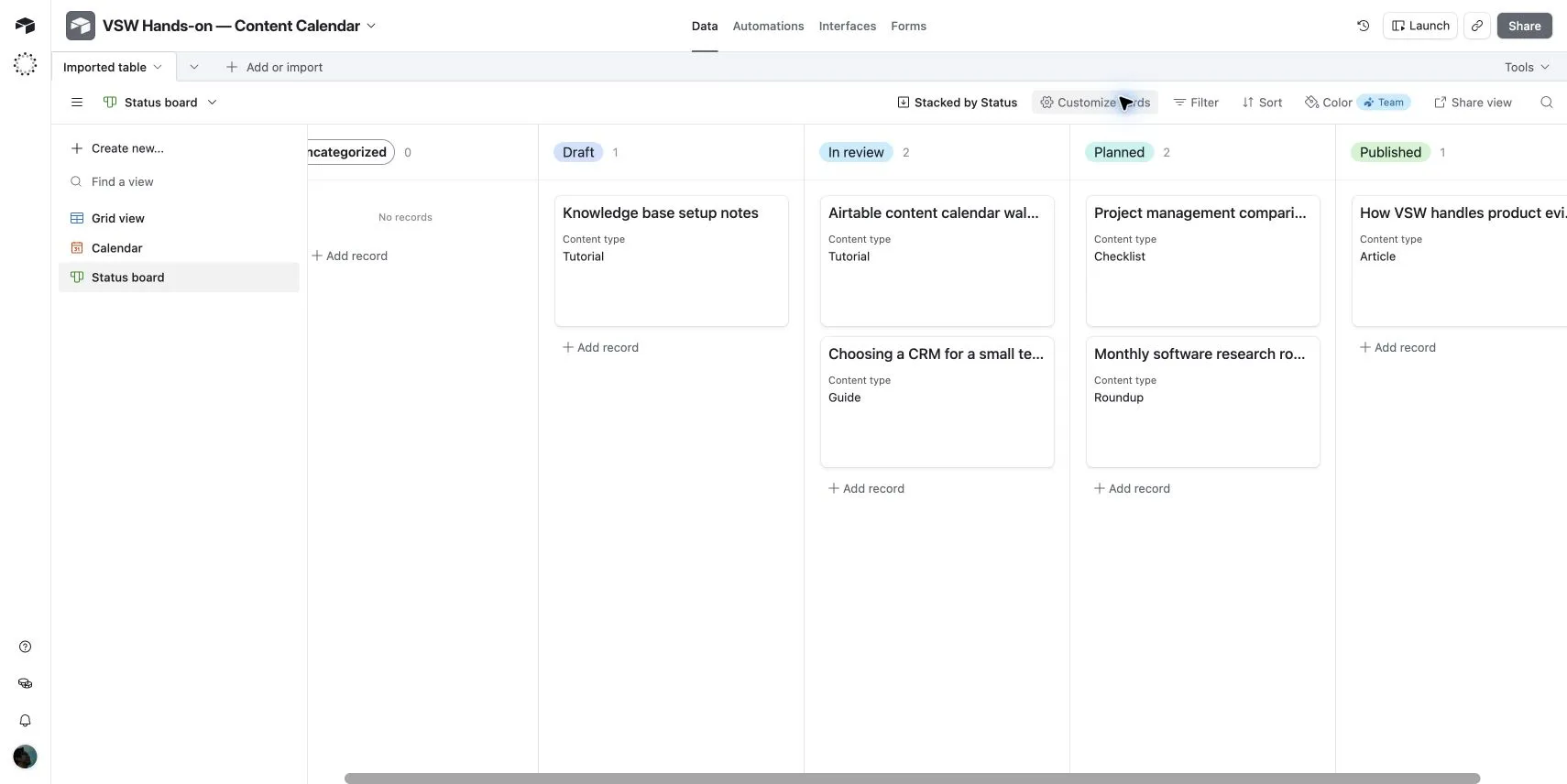
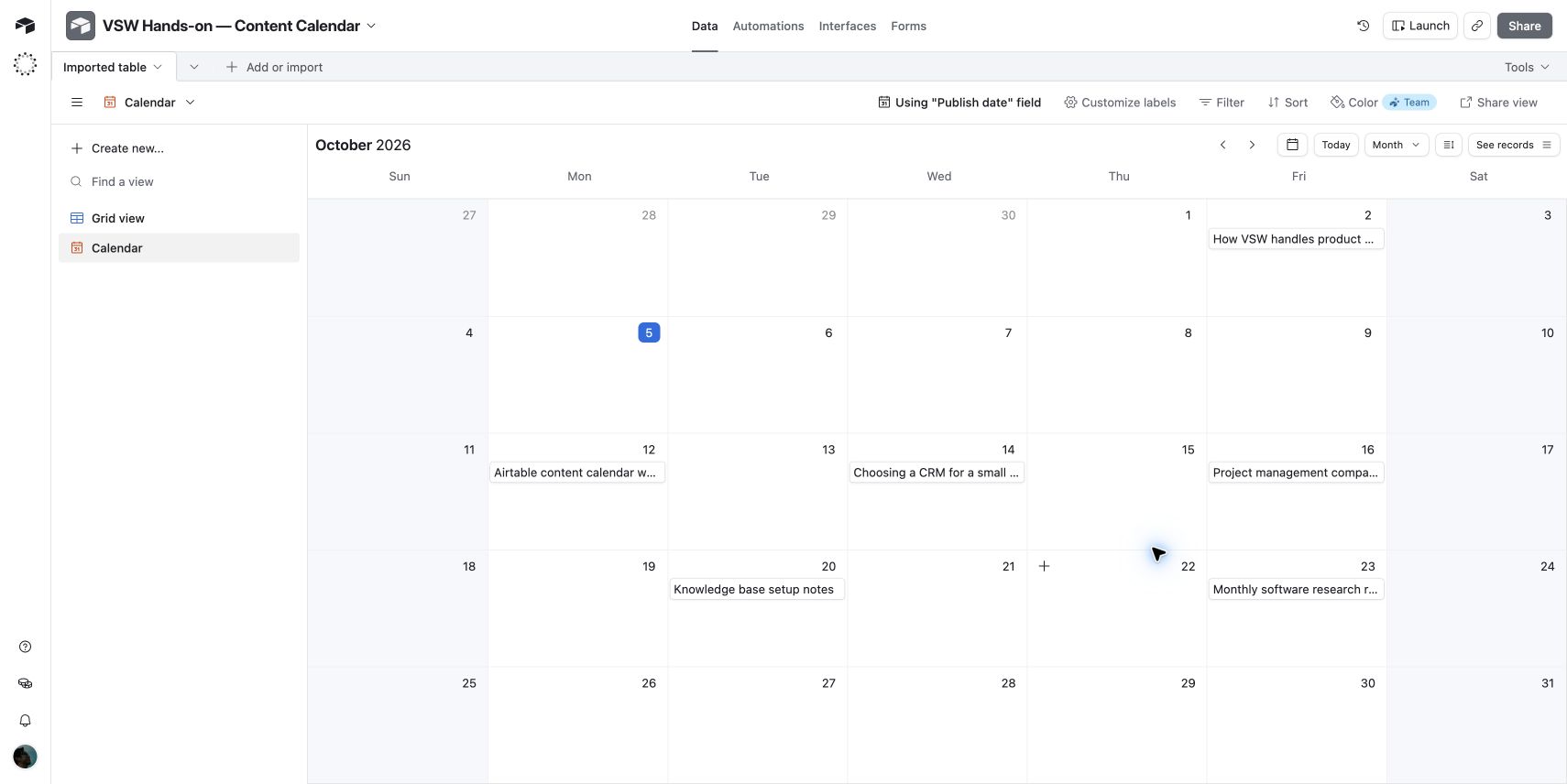
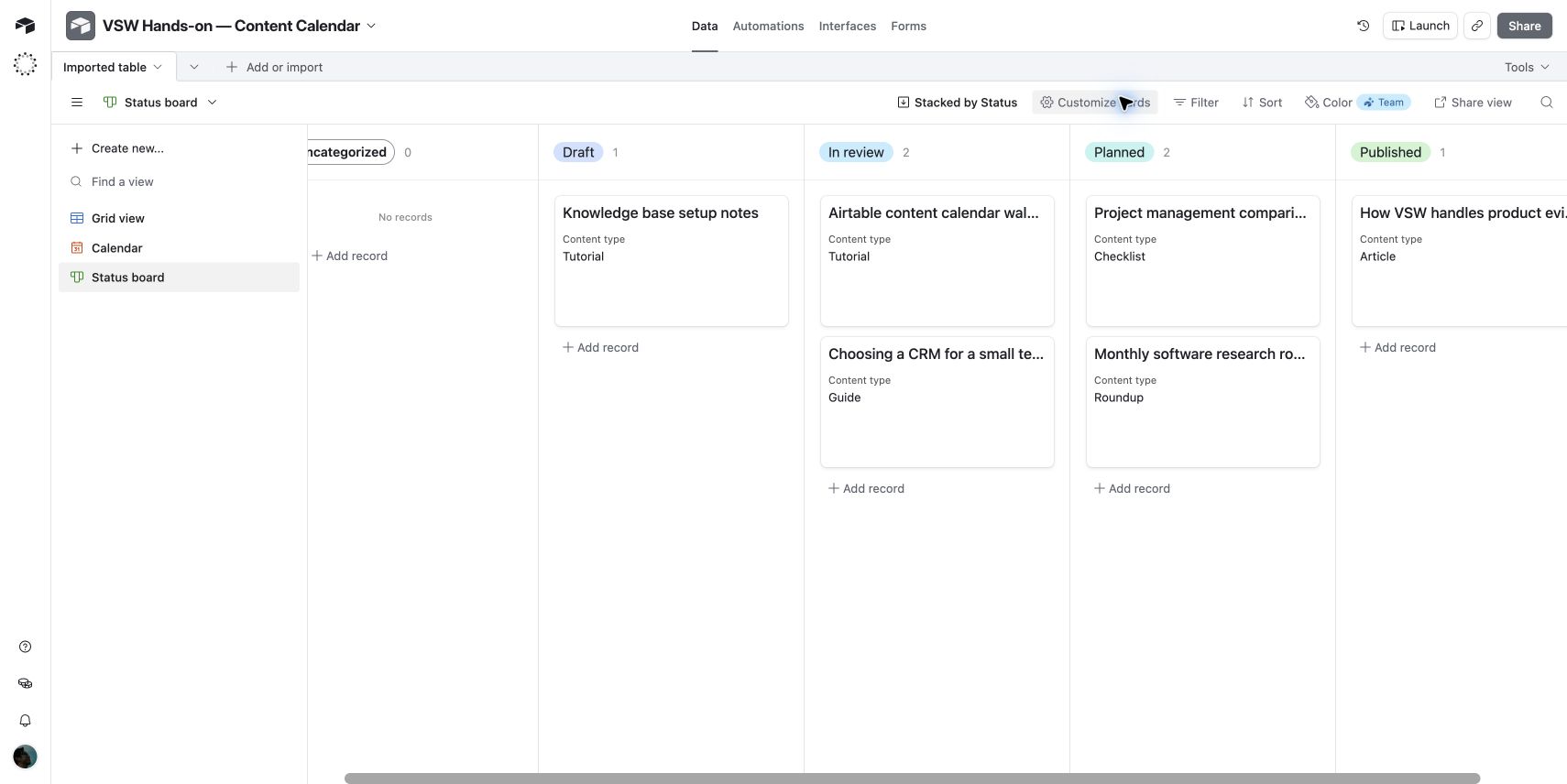
The calendar placed the six records on their October dates. The Kanban view grouped them by Status. Changing the Airtable walkthrough record from Draft to In review updated the board counts from two Draft and one In review to one Draft and two In review; the grid showed the same changed status.

Basic organization worked

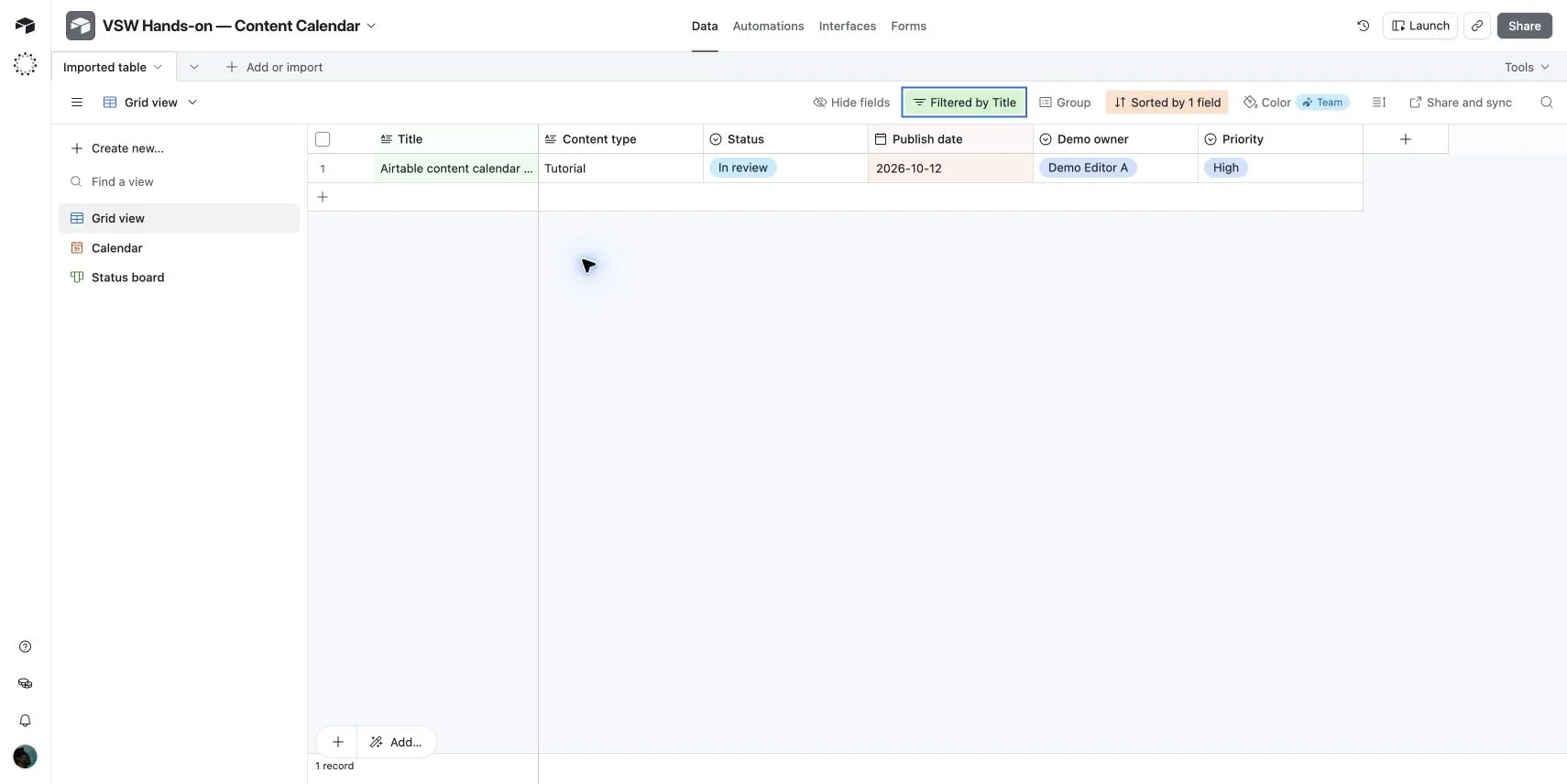
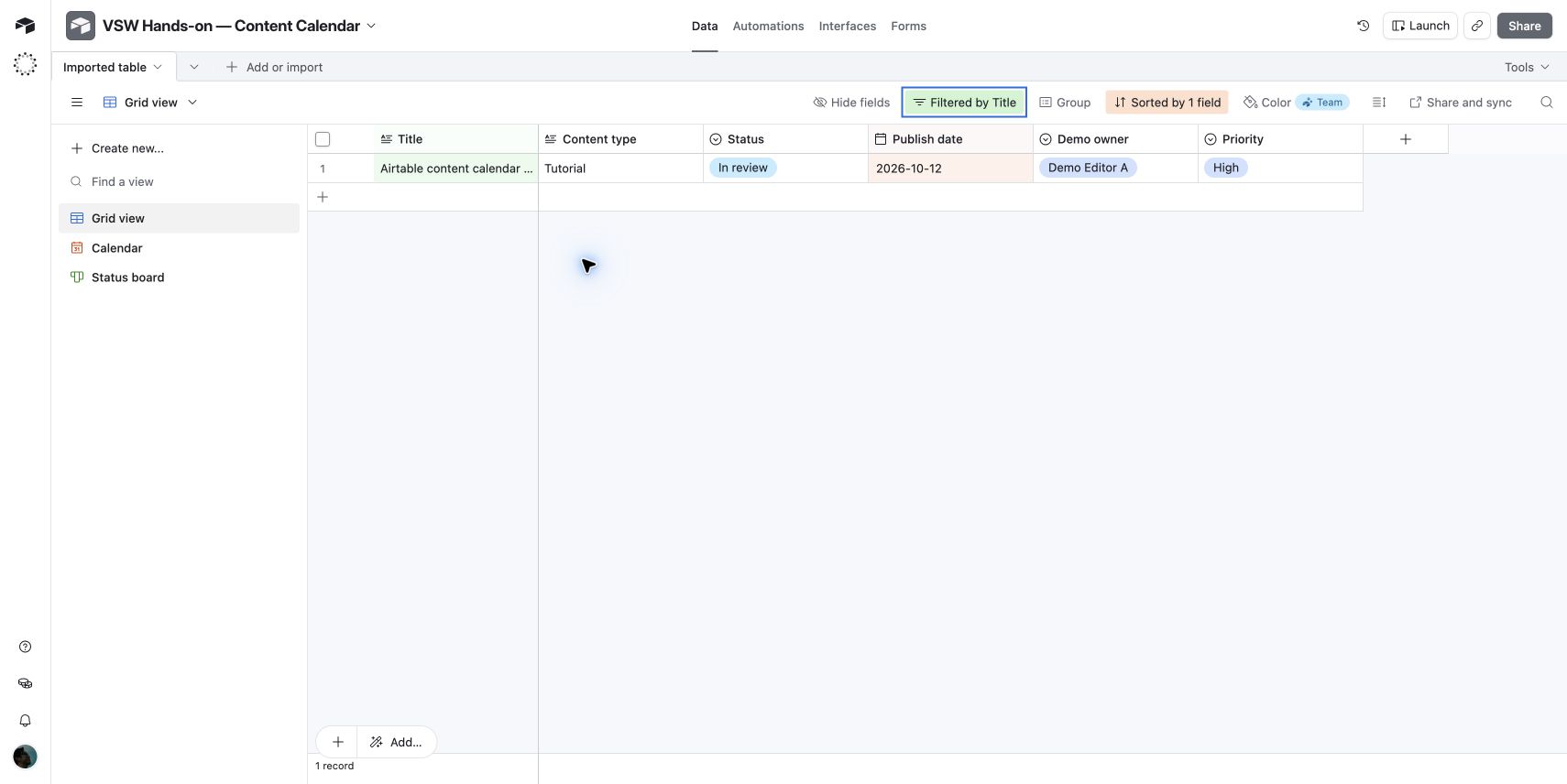
Sorting Publish date from earliest to latest placed the October 2 record first. A Title contains Airtable filter reduced the grid from six records to one. Removing the condition restored all six.

Setup and Free-plan limits

The paste-data shortcut in the Omni welcome panel created a new base after prompting to save the previous one. The record detail opened with four fields hidden until expanded. Calendar setup offered an upgrade for date ranges and multiple date fields; the single-date calendar worked without upgrading. The interface labels Timeline, Gantt, and row colors as Team features.

What this test does not cover

We did not test multi-user collaboration, permissions, automations, integrations, AI output quality, mobile use, or performance at scale. This six-record exercise is an initial workflow evaluation, not a long-term reliability assessment.

Airtable and the Airtable trademark are registered trademarks of Formagrid Inc dba Airtable. Versusware is not endorsed by, sponsored by, or affiliated with Airtable.

Airtable features

11 features · 3 categories

Data & records

4
  • Linked records

    Airtable links records across tables, so a project can connect to its tasks, clients, or assets without keeping separate copies of the same information.

    Airtable linked recordsChecked
  • Custom field types

    Free plan tested

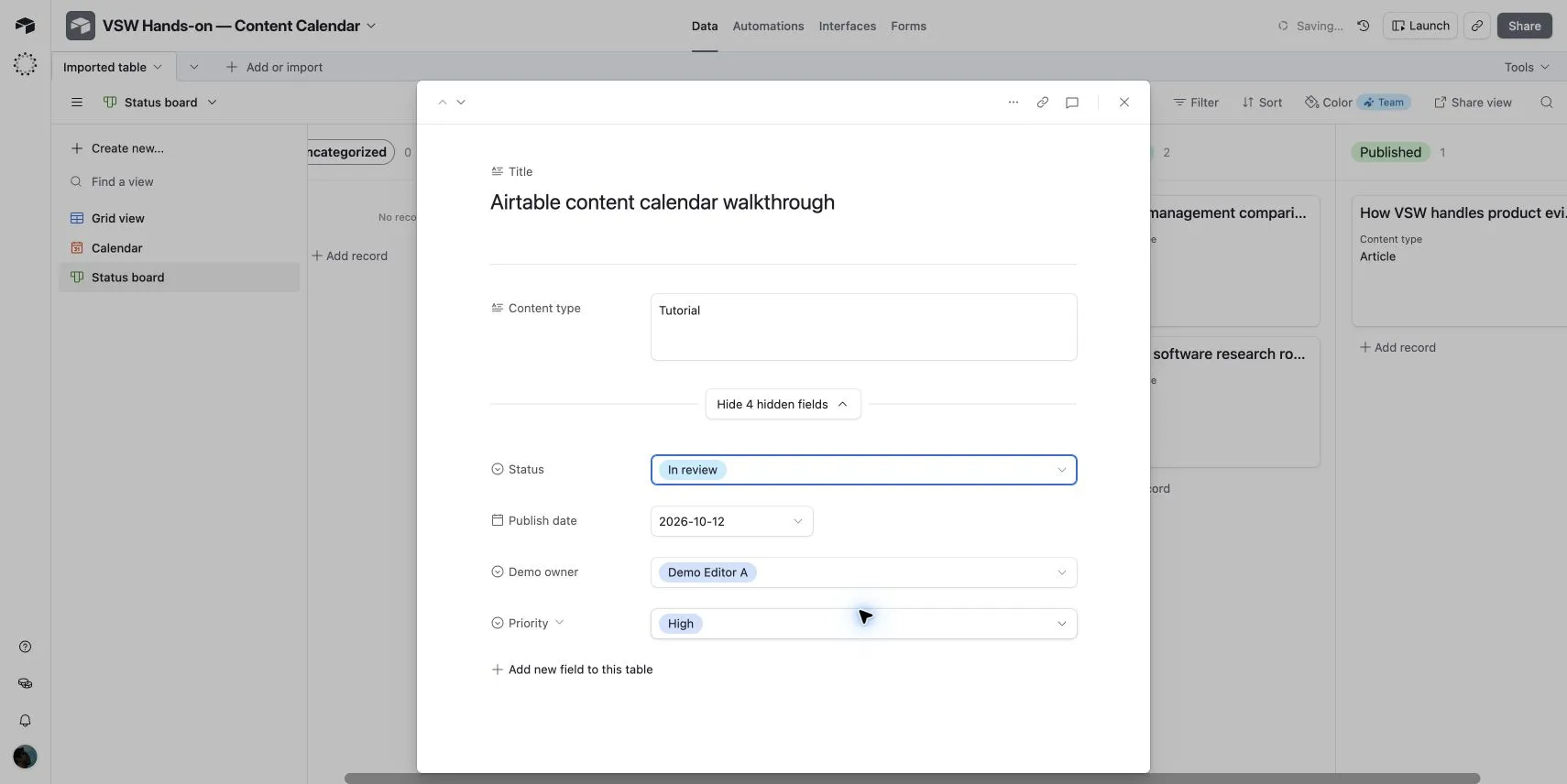
    Airtable records hold typed fields, including dates and single-select values for status, owner labels, and priority.

    In our test: Our demo record contained a publish date and single-select status, demo owner, and priority fields.

    Airtable record detail showing status, publish date, demo owner, and priority fields View full screen
    Record detail · Status, date, demo owner, and priority.
  • Spreadsheet paste import

    Free plan tested

    Paste tab-separated spreadsheet data into Airtable to create records and infer field types.

    In our test: Six rows and six columns imported. Dates were recognized; Title and Content type became long-text fields.

    Airtable grid showing six demo content records sorted by publish date View full screen
    Grid view · Six demo records sorted by publish date.
  • Sorting & filtering

    Free plan tested

    Sort Airtable records by a field or narrow a view with conditions, such as a title containing a specific word.

    In our test: Sorting put the earliest publish date first. A title filter reduced six records to one; removing it restored all six.

    Airtable grid filtered to the single content record with Airtable in its title View full screen
    Filtered grid · One record matches Airtable.

Views & planning

4
  • Grid view

    Free plan tested

    Airtable displays records in rows and fields in columns for browsing and editing a workflow in one table.

    In our test: The grid showed all six content records and reflected a status edit made in the board view.

    Airtable grid showing six demo content records sorted by publish date View full screen
    Grid view · Six demo records sorted by publish date.
  • Calendar view

    Free + paid options

    Airtable places dated records on a calendar, making publishing schedules and deadlines visible alongside the underlying data.

    Plan detail: One date field on Free; date ranges and multiple date fields on Team and higher.

    In our test: All six demo records appeared on their October publish dates using a single date field.

    Airtable October 2026 calendar displaying demo content records by publish date View full screen
    Calendar view · Content scheduled by publish date.
    Airtable plan featuresChecked
  • Kanban view

    Free plan tested

    Airtable groups records into board columns by a field such as status, while keeping the same records available in other views.

    In our test: Changing a record from Draft to In review updated the board counts and the status shown in the grid.

    Airtable Kanban board grouping demo content records by status, including Draft and In review View full screen
    Board view · Status updated from Draft to In review.
  • Timeline & Gantt views

    Team and higher

    Airtable offers Timeline and Gantt views for planning work across start and end dates.

    Airtable plan featuresChecked

Workflows & apps

3
  • Custom interfaces

    Free + paid options

    Airtable Interface Designer creates focused pages for dashboards, approvals, and record updates using the data in a base.

    Plan detail: Interfaces are on all plans. Sharing an interface separately from its base requires a paid plan.

    Airtable Interface DesignerChecked
  • Forms

    Free + paid options

    Airtable forms collect submissions into a table. A public form link lets people submit information without an Airtable account.

    Plan detail: The form builder is on all plans; custom logos and removing Airtable branding require a paid plan.

    Airtable form builderChecked
  • Automations

    Free + paid options

    Airtable automations use triggers and actions to update records, send messages, or connect steps in a workflow.

    Plan detail: Free includes 100 runs per workspace per month. It excludes the Run a script action; automated emails are limited to base collaborators.

    Airtable automation limitsChecked

Plans & pricing

Compare the Free, Team, Business, and Enterprise Scale plans. Paid self-serve plans are billed per workspace, based on billable collaborators.

Prices in USD

Free

For small, lightweight workflows.

$0

no subscription charge

  • 1,000 records per base
  • 1 GB attachments per base
  • Up to 5 editors or creators

The plan used in our hands-on review.

Team

More capacity and advanced views.

$20

per user / month · billed annually

  • 50,000 records per base
  • 20 GB attachments per base
  • Timeline and Gantt views

Commenters and higher permission levels are billable.

Business

Shared workflows with central administration.

$45

per user / month · billed annually

  • 125,000 records per base
  • 100 GB attachments per base
  • Two-way sync and an admin panel

Editors and higher permission levels are billable. A private company email domain is required.

Enterprise Scale

Governance for larger organizations.

Custom

contact Airtable sales

  • Organization-wide administration
  • Advanced security and controls
  • Enterprise-scale applications

A sales-led plan with a tailored quote.

Source: vendor pricing · Updated

View official pricing

Airtable FAQs

Is Airtable free?

Yes. The Free plan includes 1,000 records and 1 GB of attachments per base, with up to five editors or creators. Read-only collaborators are unlimited.

Airtable plan limits

How much do Airtable's paid plans cost?

With annual billing, Team is $20 and Business is $45 per billable collaborator per month. With monthly billing, they cost $24 and $54 respectively. Enterprise Scale has custom pricing. All prices are in USD.

Airtable pricing and billing

Can I use Airtable for project management?

Yes. Records can hold tasks, owners, dates, and status. In VSW's content-calendar test, the same records appeared in grid, calendar, and Kanban views, and a status edit carried across views.

Can I bring spreadsheet data into Airtable?

Yes. In VSW's test, pasting tab-separated spreadsheet data imported six rows and six columns. Airtable recognized the publish dates and created single-select fields for status, owner, and priority.

Which calendar and planning features need a paid plan?

The Free plan supports a calendar based on one date field. Calendar date ranges, multiple date fields, Timeline, and Gantt views are available on Team and higher plans.


Compare Airtable plan features

Community reviews

Write a review

Be the first to share your experience.

Customer reviews are checked before publication.

Sources & editorial

How we review software

VSW editorial · Assistant-led testing. Hands-on testing and official vendor sources. Editorial research is separate from customer ratings.