
ClickUp vs monday.com: which fits your team?
Both can turn a scattered project into assigned work with visible deadlines. The useful distinction is how your team wants to organize that work: a connected workspace with tasks and documents, or boards built around the process you want everyone to follow.

ClickUp
Full profile & featuresBest fit
Teams connecting detailed project work, documents and conversations in one workspace.
$7paid plans from
USD / user / month, billed annually · Unlimited

monday.com — Work Management
Full profile & featuresBest fit
Teams coordinating repeatable processes through visual boards, statuses and dashboards.
$9paid plans from
USD / seat / month, billed annually · Basic · 3-seat minimum
The decision
Our verdict
Choose ClickUp when tasks, briefs and team conversations need to live together and you have someone to shape the workspace. Choose monday.com when a shared board is the center of the process and clear status reporting matters most. For either, choose the plan around the views, automation volume and permissions you need before comparing the headline price.
ClickUp: strengths & tradeoffs
Why choose it
- Docs can stay connected to the tasks they explain.
- Lists, boards and planning views support different ways of working.
- The free plan accommodates unlimited members.
Weigh up
- Spaces, folders, lists and overlapping work surfaces need a clear setup convention.
- Workspace upgrades and separately priced AI can change the total cost.
monday.com — Work Management: strengths & tradeoffs
Why choose it
- A board puts owners, dates and progress in a shared view.
- The same items can be viewed as a table or Kanban board.
- Automation and integrations can connect steps across a process.
Weigh up
- Timeline, Gantt and integrations start at Standard; Basic is not the equivalent planning package.
- Seat bundles, action quotas and AI credits need to be included in the buying decision.
ClickUp vs monday.com — Work Management at a glance
Features: how the work gets done
Both cover the project-management basics. These are the differences that matter when the work becomes more detailed.
Tasks and ownership[3][4]
- ClickUp
- Tasks can carry subtasks, checklists, relationships and custom fields. That is useful when an assignment needs more context than a single row.
- monday.com — Work Management
- Items carry owners, statuses, dates and other columns on a board. Subitems break a larger item into smaller steps while retaining the board's shared structure.
Our take: Favor ClickUp for task-centered detail; favor monday.com when the shared process is easiest to describe as columns on a board.
Scheduling and views[6][7]
- ClickUp
- Move between List, Board and Calendar, then use Gantt to see work against a schedule. Unlimited removes the free plan's Gantt usage limit.
- monday.com — Work Management
- Keep the board as the source of work and add Timeline, Gantt or Calendar on Standard and above.
Our take: Compare the tier that includes your required planning view, rather than the lowest paid tier.
Documents and collaboration[8][9]
- ClickUp
- Docs, comments, Chat and Whiteboards keep written context and conversations near project work. In our launch workflow, the brief linked directly to its approval task.
- monday.com — Work Management
- Board updates support item-level discussion, and workdocs provide a shared document surface alongside boards.
Our take: ClickUp is a natural shortlist when consolidating documents and conversations is part of the project.
Reporting and automation[1][2]
- ClickUp
- Dashboards summarize work across the workspace. Business adds advanced dashboard cards and 5,000 automation executions per month.
- monday.com — Work Management
- Dashboards summarize board data. Standard provides 250 automation actions and 250 integration actions monthly; Pro raises each allowance to 25,000.
Our take: Estimate the actions a recurring workflow will consume. A feature being available does not make its usage unlimited.
AI in daily work[10][12]
- ClickUp
- Brain can answer questions about workspace content and help produce summaries. In our recorded launch workflow it returned task statuses and dates, but also added a dependency claim the task relationships did not support.
- monday.com — Work Management
- Sidekick provides a conversational way into board work, while AI columns and workflows bring AI into processes. In our recorded workflow, Sidekick answered a bounded question about the launch board.
Our take: For decisions involving dates or dependencies, check the underlying tasks and board items rather than relying on a generated answer alone.
Pricing & the cost of your team
Prices below are public USD base subscription rates checked on October 15, 2026. Annual billing is a commitment, not a monthly cancellation price. This comparison covers monday work management; CRM, dev and service are separate products.
Extras to budget[11][2]
- ClickUp
- AI subscriptions and usage allowances depend on the offer available to the workspace.
- monday.com — Work Management
- AI credits, marketplace apps and separately subscribed monday products can add to the seat cost. The current pricing page also shows promotional credit discounts.
A 10-person planning budget
These tiers both include Gantt planning. They are useful starting points for a planning budget, with different reporting, collaboration and usage allowances.
ClickUp Unlimited
$840/ year
10 seats × $7 × 12 months
monday.com — Work Management Standard
$1,440/ year
10 seats × $12 × 12 months
Base seats only. Excludes AI credits/add-ons, taxes, marketplace purchases, promotions and negotiated discounts. Confirm the full checkout total and required features before purchase.
Connect the tools you already use
Both connect to common workplace tools. Check the particular trigger, action and sync direction your process requires; a logo in a directory does not establish an identical integration.
Who each product fits
Choose around the work your team needs to coordinate. These are editorial fit recommendations based on the product structure and plan requirements.
The interface and everyday use
ClickUp
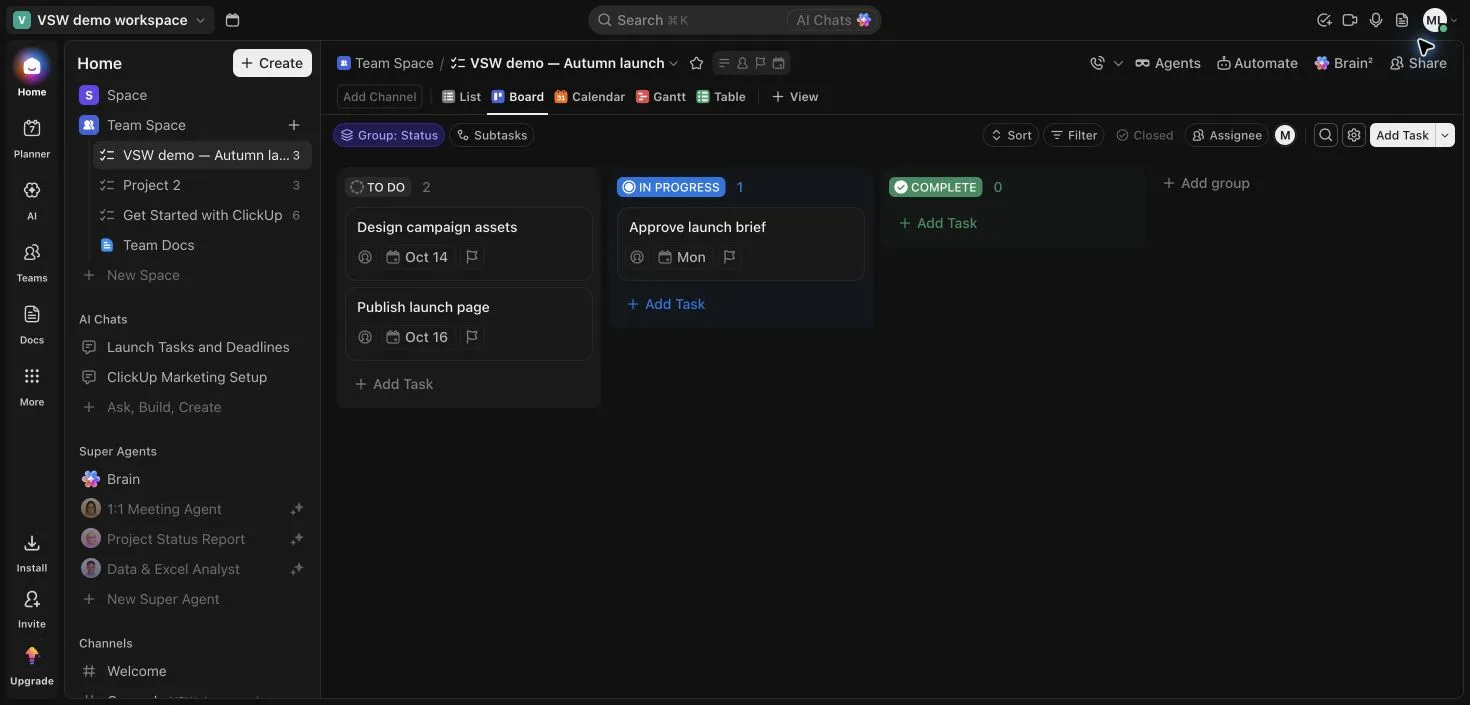
ClickUp's Board made the launch work easy to scan by status, while the linked brief kept the assignment's context close. The broader workspace offers many possible surfaces, so deciding which ones the team will actually use matters.
Explore ClickUp in detailmonday.com — Work Management
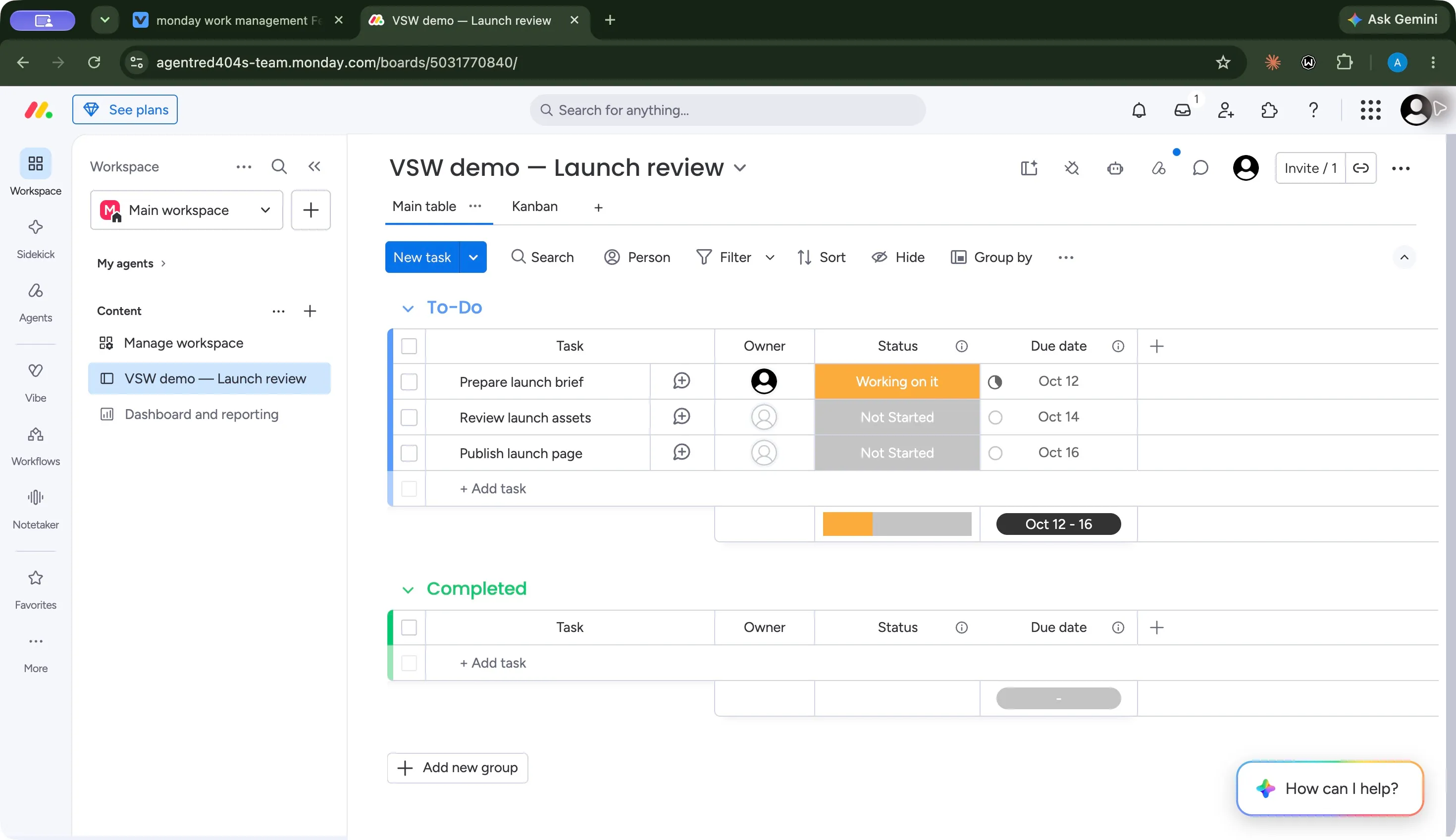
monday.com's main table put status and dates in a compact row for each launch task. Kanban presented those same saved items as cards. When adding dashboards, check each widget's scope and filters so its summary matches the work you intend to report.
Explore monday.com — Work Management in detailSupport & governance
The buying question is what help and governance your plan includes, especially when the workspace becomes a company-wide system.
Help and onboarding[15][1][16][2]
- ClickUp
- A searchable Help Center and 24/7 support are advertised. Enterprise adds live onboarding training and a customer success manager.
- monday.com — Work Management
- A Help Center and support contact flow are available, with academy and training resources linked. Enterprise adds tailored onboarding and support.
Governance[17][1][18][2]
- ClickUp
- Enterprise lists SAML SSO, SCIM, audit logs and custom roles. Its security page describes SOC 2 Type 2 and ISO certifications.
- monday.com — Work Management
- Enterprise lists advanced governance and multi-level permissions. Review the security documentation and the controls included in the quote.
Other approaches to consider
 Asana
Explore another task and project-management approach when coordinating ownership and delivery is the main job.
View profile  Trello
Consider a card-and-board approach when a compact Kanban workflow covers the work.
View profile  Airtable
Consider a database-oriented approach when related records matter as much as tasks.
View profileRelated comparisons
All comparisons

Airtable vs ClickUp
Compare Airtable and ClickUp on linked records, tasks, docs, planning, automation and team cost, with real interface evidence and plan details.

Airtable vs monday.com — Work Management
Compare Airtable and monday.com on data structure, boards, planning, integrations and seat costs, with workflow evidence and a practical buying verdict.

Asana vs ClickUp
Compare Asana and ClickUp on tasks, documents, planning, reporting, AI and subscription cost, with recorded workflow evidence and practical tradeoffs.
Asana vs monday.com — Work Management
Compare Asana and monday.com on tasks, boards, planning, reporting, automation and cost, with current plan requirements and real workflow evidence.

ClickUp vs Trello
Compare ClickUp and Trello on task structure, docs, boards, planning, automation and subscription costs, with clear team-fit guidance and product images.
monday.com — Work Management vs Trello
Compare monday.com and Trello on boards, cards, planning views, reporting, automation and seat costs, with clear buying guidance and authentic images.
ClickUp vs monday.com — Work Management FAQs
Is ClickUp cheaper than monday.com?
ClickUp Unlimited starts at $7 per user/month with annual billing, compared with $9 per seat/month for monday work management Basic. For Gantt planning, monday.com requires Standard at $12 per seat/month annually. Seat requirements, AI charges and required features affect the total.
Which has the more useful free plan for a team?
ClickUp Free Forever allows unlimited members and tasks, with storage and feature limits. monday.com's Free plan allows up to two seats, three boards and three docs. ClickUp is the more practical starting point if you need more than two free members; the right fit still depends on the workflow.
Should I choose ClickUp or monday.com for project management?
Choose ClickUp when detailed tasks, linked documents and conversations belong in the same workspace. Choose monday.com when a visual board, consistent status columns and shared process reporting are the center of the team's work. Compare planning views, permissions and action quotas at the tier you would actually buy.
Does this comparison cover monday CRM or monday dev?
This page compares ClickUp with monday work management. monday CRM, monday dev and monday service have their own subscriptions and feature sets, so their pricing should be assessed separately.
Sources & our approach
Versusware's editorial analysis combines official product and plan documentation checked October 15, 2026 with our recorded desktop launch workflows from October 7, 2026. Interface observations and screenshots come from those workflows. Sources support current product facts; the recommendations are our analysis of workflow fit and cost. See each full profile for its plan context, findings and evidence.
How we review software- [1] ClickUp pricingChecked 2026-10-15
- [2] monday.com pricingChecked 2026-10-15
- [3] ClickUp task managementChecked 2026-10-15
- [4] monday.com project boardsChecked 2026-10-15
- [5] Understanding monday.com's Free planChecked 2026-10-15
- [6] ClickUp project viewsChecked 2026-10-15
- [7] monday.com plan and seat requirementsChecked 2026-10-15
- [8] ClickUp DocsChecked 2026-10-15
- [9] monday.com workdocsChecked 2026-10-15
- [10] ClickUp BrainChecked 2026-10-15
- [11] ClickUp AI plans and usage limitsChecked 2026-10-15
- [12] monday.com AI platformChecked 2026-10-15
- [13] ClickUp integration catalogChecked 2026-10-15
- [14] monday.com integration catalogChecked 2026-10-15
- [15] ClickUp Help CenterChecked 2026-10-15
- [16] monday.com supportChecked 2026-10-15
- [17] ClickUp securityChecked 2026-10-15
- [18] monday.com security documentationChecked 2026-10-15