Skip to content

Asana

freemium

Connect projects, AI teammates, strategy, and team knowledge.

Inside Asana

8 screenshots

List · Six launch tasks with dates and workflow sections.

1 / 8

What is Asana?

Asana brings daily work, AI tools, goals, documents, and people into connected workspace areas. We tested a six-task launch workflow and a Dash project summary, then inspected each navigation area to separate usable tools from previews and additional products.

Free plan
Available
Paid plans from
$10.99per user / month
Billed annually

What stands out

  • List and board reflected the same task section after an edit.
  • Task dates persisted after a reload.
  • Completed-only filtering isolated the finished task.
  • Dash found the unfinished demo work and correctly identified the next deadline.

Plan limits

  • Timeline and custom fields require a paid plan after the trial.
  • Completing a parent task does not finish its remaining subtasks.
  • Some visible areas have separate access requirements; Meetings was coming soon in our account.
No verified community reviews yet

VSW verdict

Asana combines practical project tracking with a broader workspace for AI, strategy, knowledge, and people. Our launch workflow stayed consistent across views, and Dash retrieved the right unfinished work. Compare plan and product access carefully: a navigation entry does not guarantee that its tools are included or ready to use.

Read our hands-on review

Assistant-led testing in Chrome on macOS: six fictional launch tasks, two subtasks, one Dash retrieval request, and inspection of Work, Agents, Strategy, Knowledge, People, and More. This editorial evaluation contributes no community rating.

14-day Advanced trial. Tested task entry, descriptions, subtasks, section changes, dates, reload persistence, list/board/calendar, completion filters, basic Timeline display, and a Dash summary. Other workspace areas were inspected, with additional capabilities documented from official sources. Agent execution, automations, collaboration, integrations, Enterprise tools, and additional products were not tested.

Screenshots captured on Oct 7, 2026 with fictional records and demo owners.

Asana’s workspace extends from tasks and projects to AI assistance, strategy, knowledge, and people. The feature groups above follow those areas, separating observed behavior from documented capabilities.

What we found in our hands-on test

We used a fictional six-task launch checklist on an Advanced trial. The useful part was continuity: the announcement task stayed in Doing across list and board views, and its revised deadline survived a reload.

Quick task entry, with some onboarding cleanup

The first-project setup supplied three sample tasks with date ranges and priority/status fields. We renamed those tasks and pasted three newline-separated task names into the list, which created three additional tasks. The sample self-assignments were removed before the final list capture.

A change in one view remained visible in another

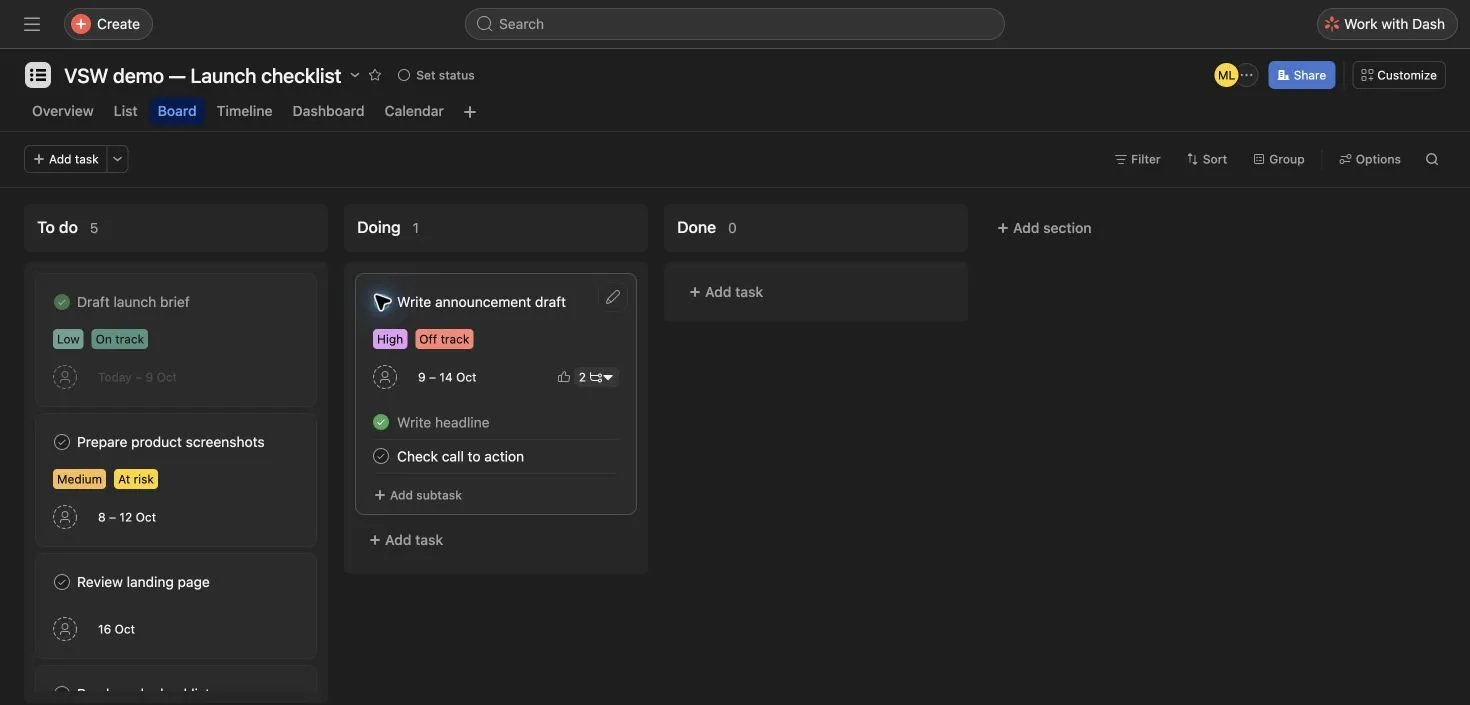
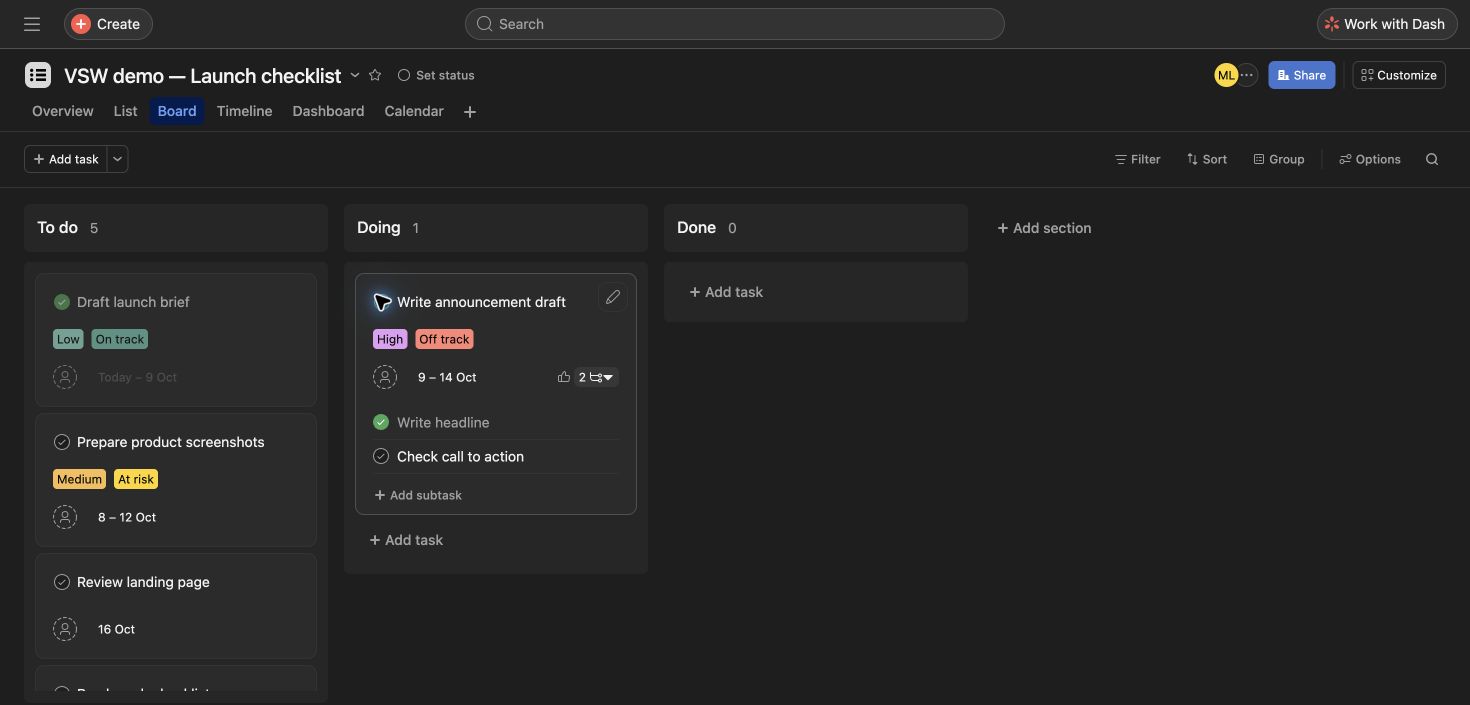
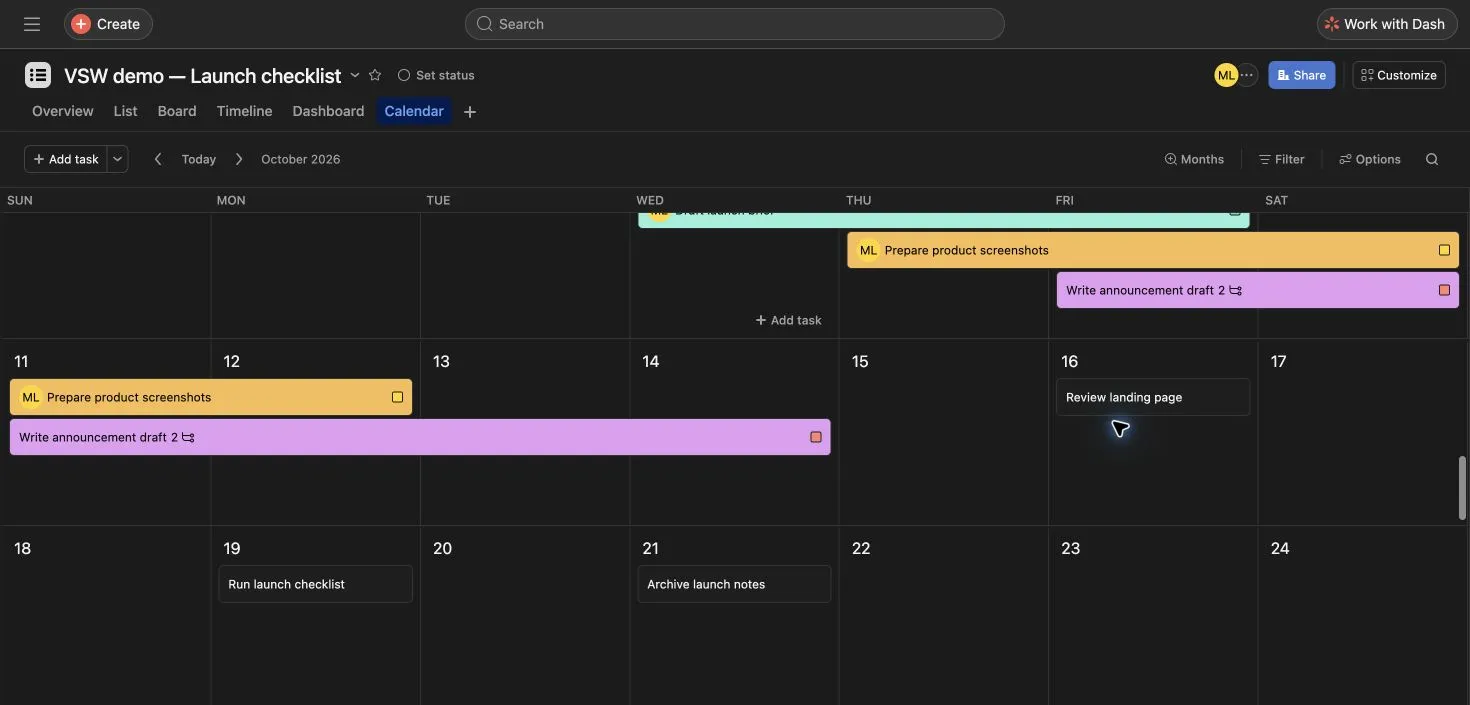
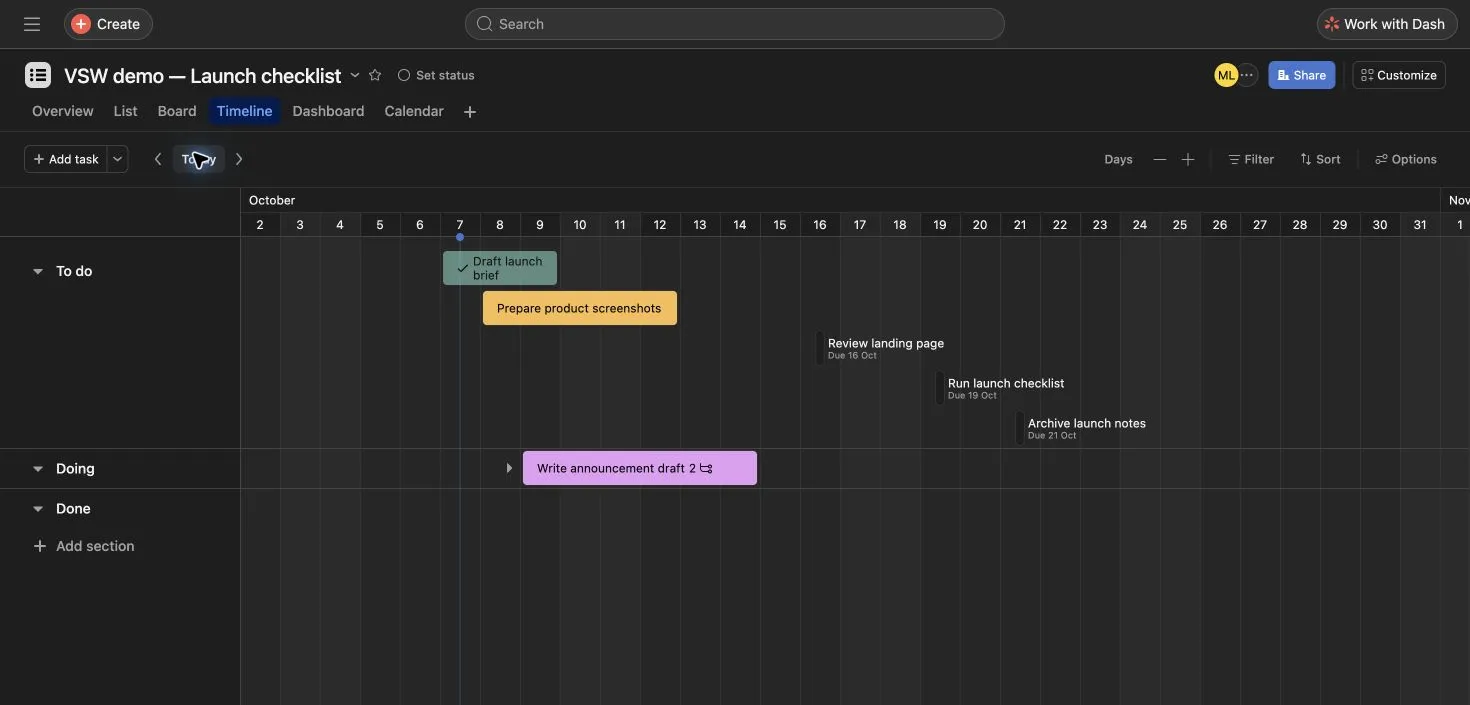
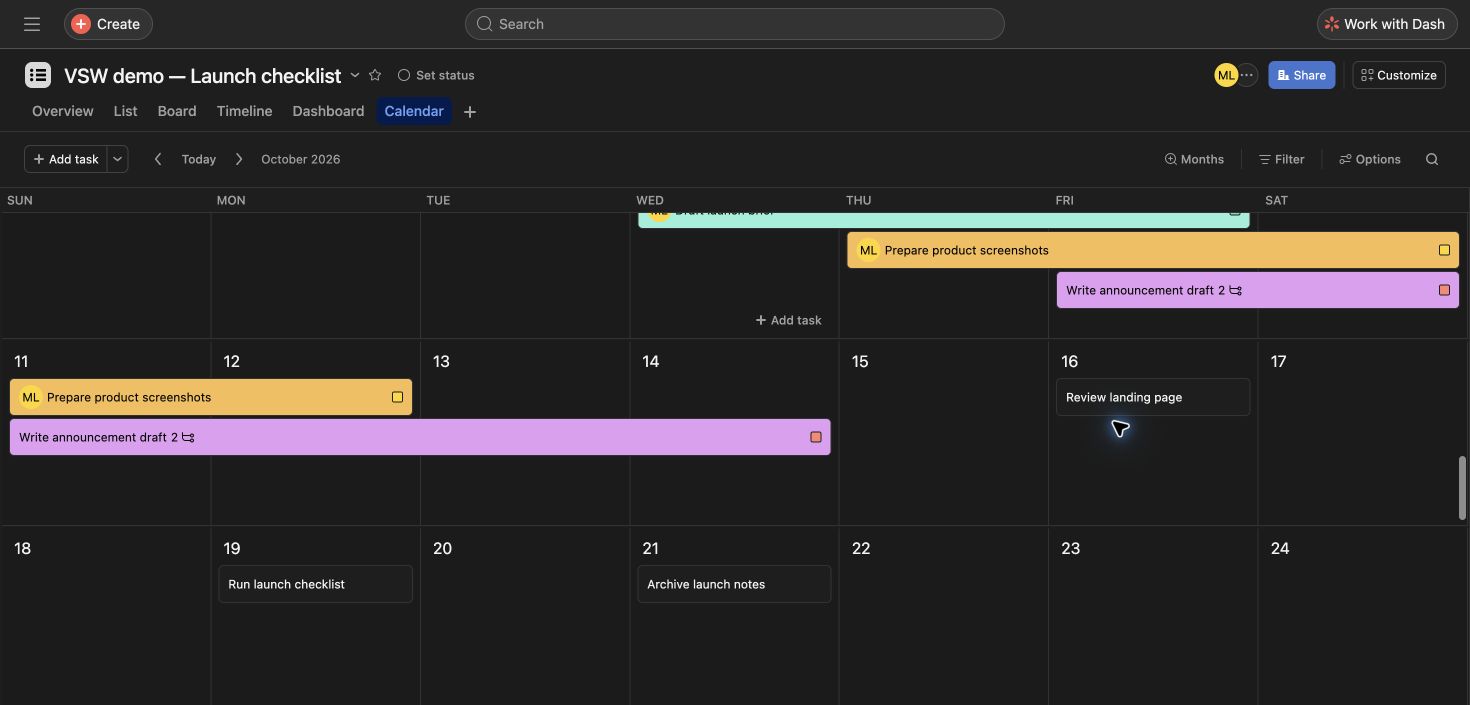
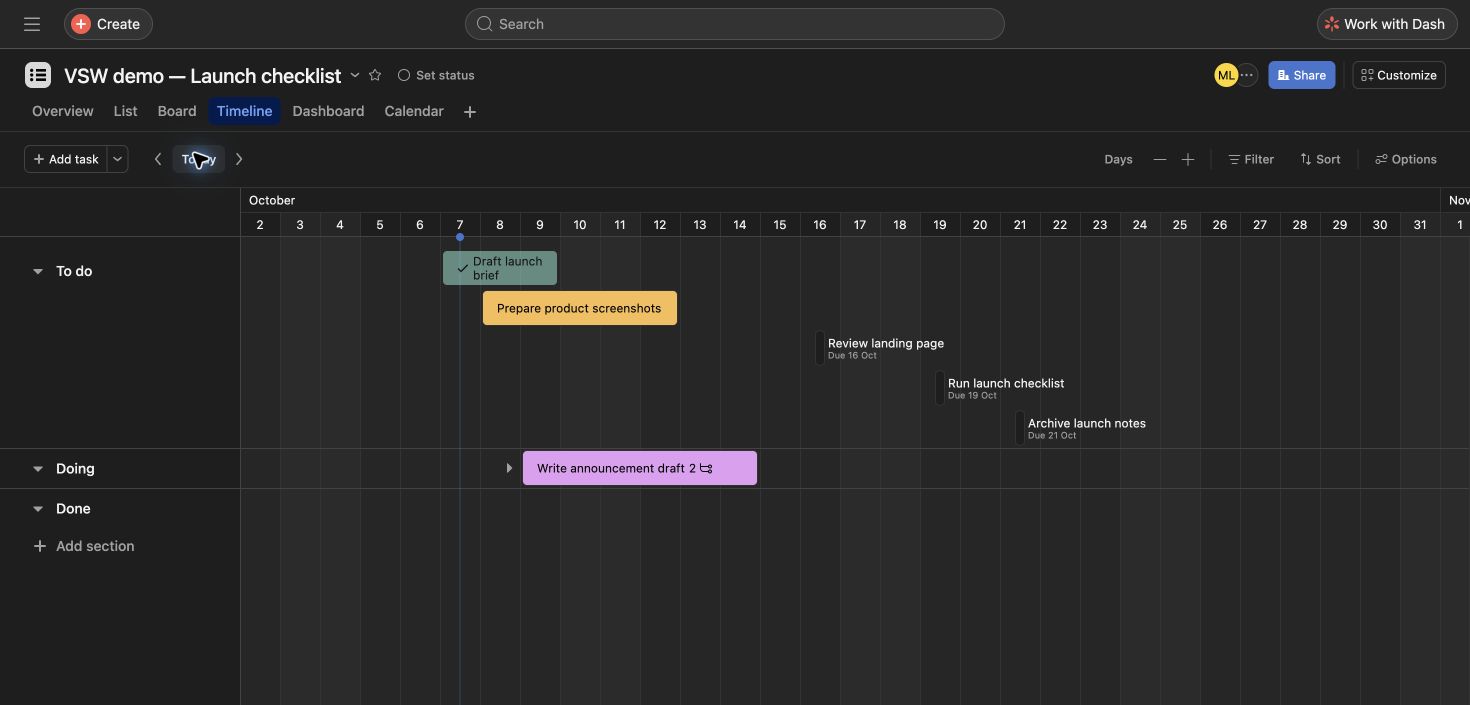
We moved Write announcement draft from To do to Doing using its section picker. The board then showed five tasks in To do and one in Doing. After reloading, the list still placed the announcement in Doing, while the calendar retained its October 14 deadline and the landing-page review’s October 16 date. Timeline also displayed the same six-task schedule on the trial.

Completion needs a separate check from workflow stage

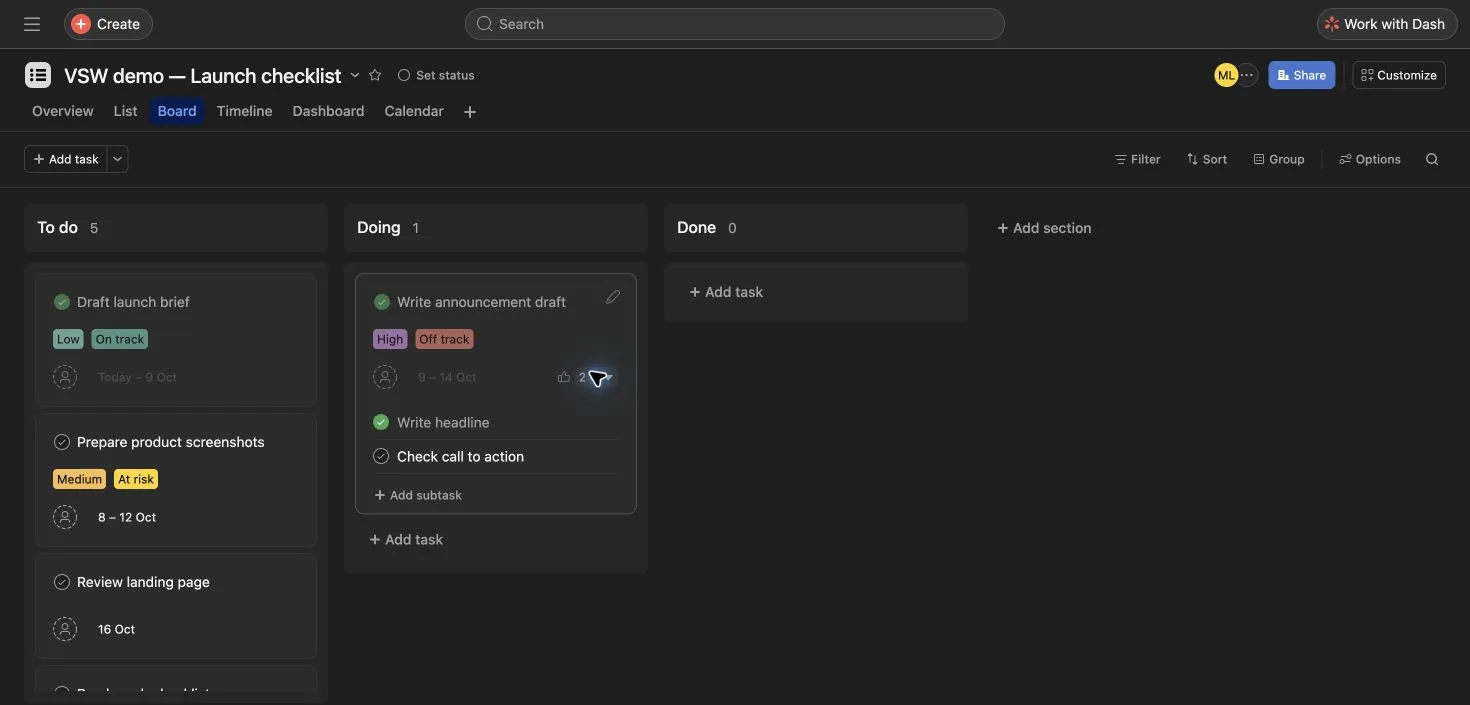
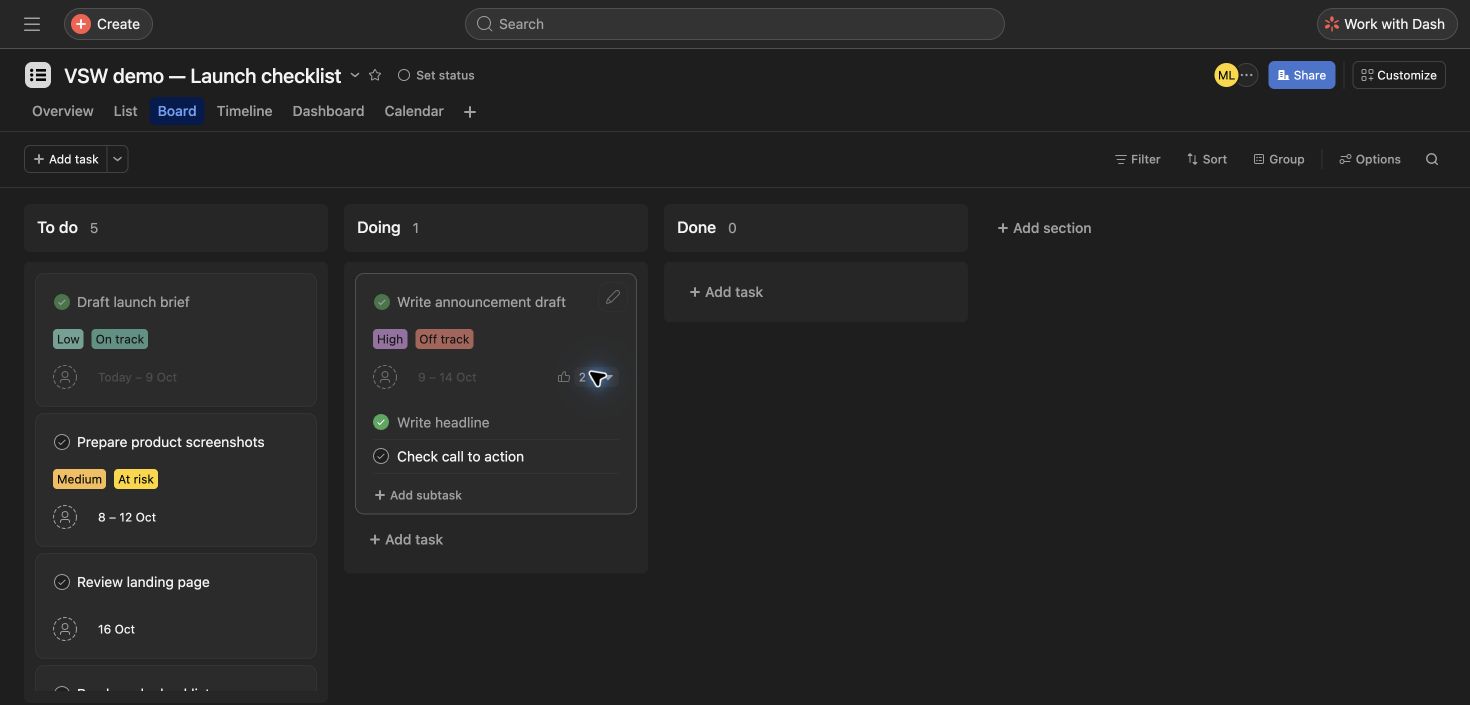
We added a description and two subtasks to the announcement. Completing Write headline left Check call to action open. Completing the parent task did not finish that remaining subtask or move the parent into Done. We reopened the parent afterwards. For this setup, completion, section, and the sample Status field were separate controls.

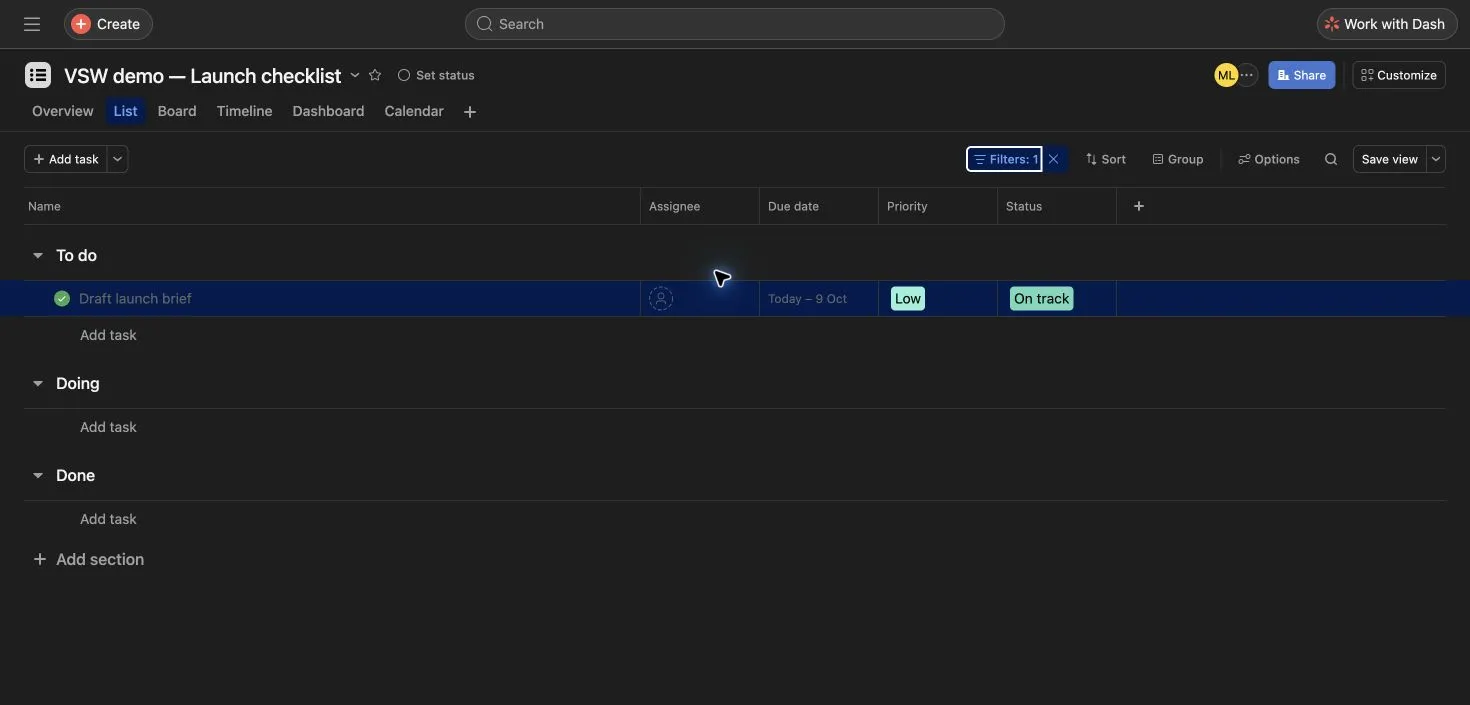
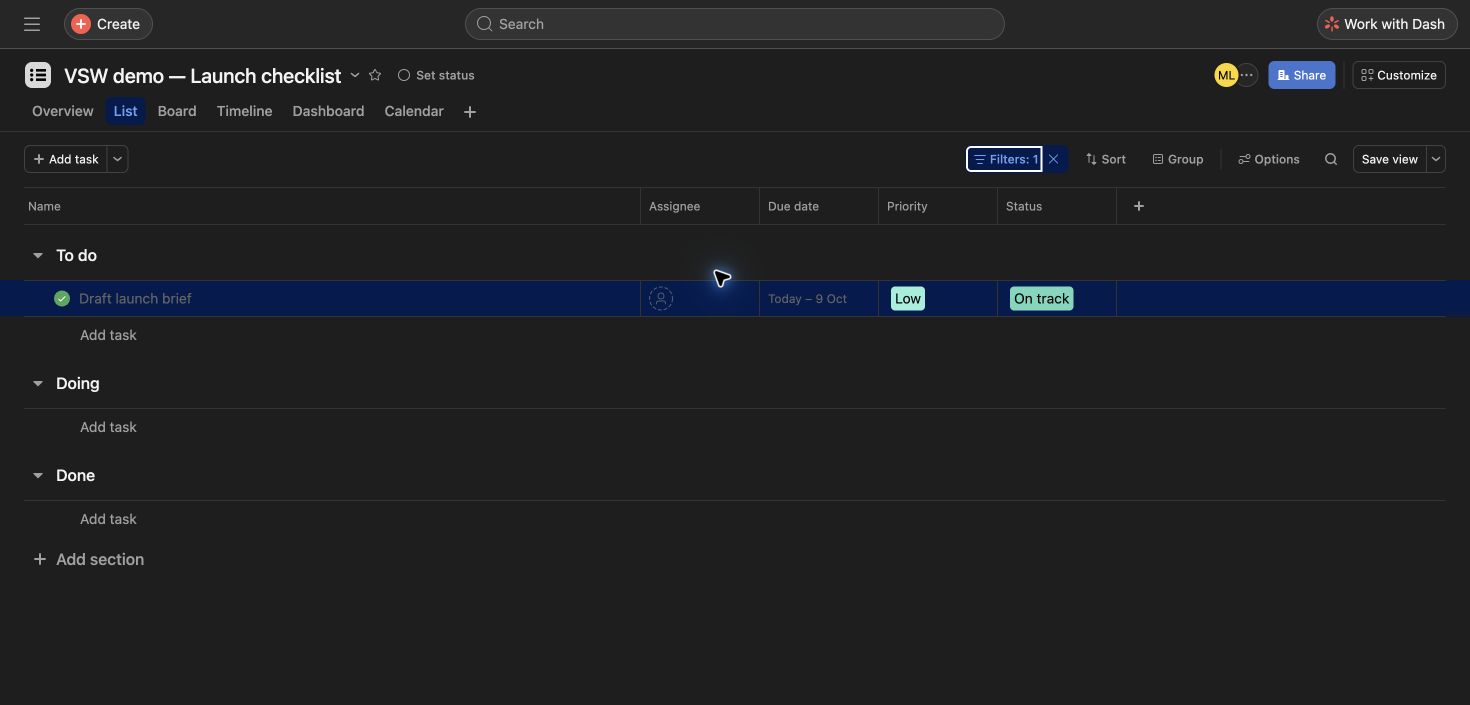
The completed-only list filter isolated Draft launch brief. Clearing the filter restored all six top-level tasks.

Pay attention to the trial and date format

Onboarding started a 14-day Advanced trial without requesting a card. Its Timeline and custom fields should not be read as evidence of free-plan access. In this session, the numeric date picker used day/month/year: entering a US-style date produced an unintended date. Entering 16/10/26 corrected it to October 16, which we checked again after reload.

Work with Dash: a useful project lookup

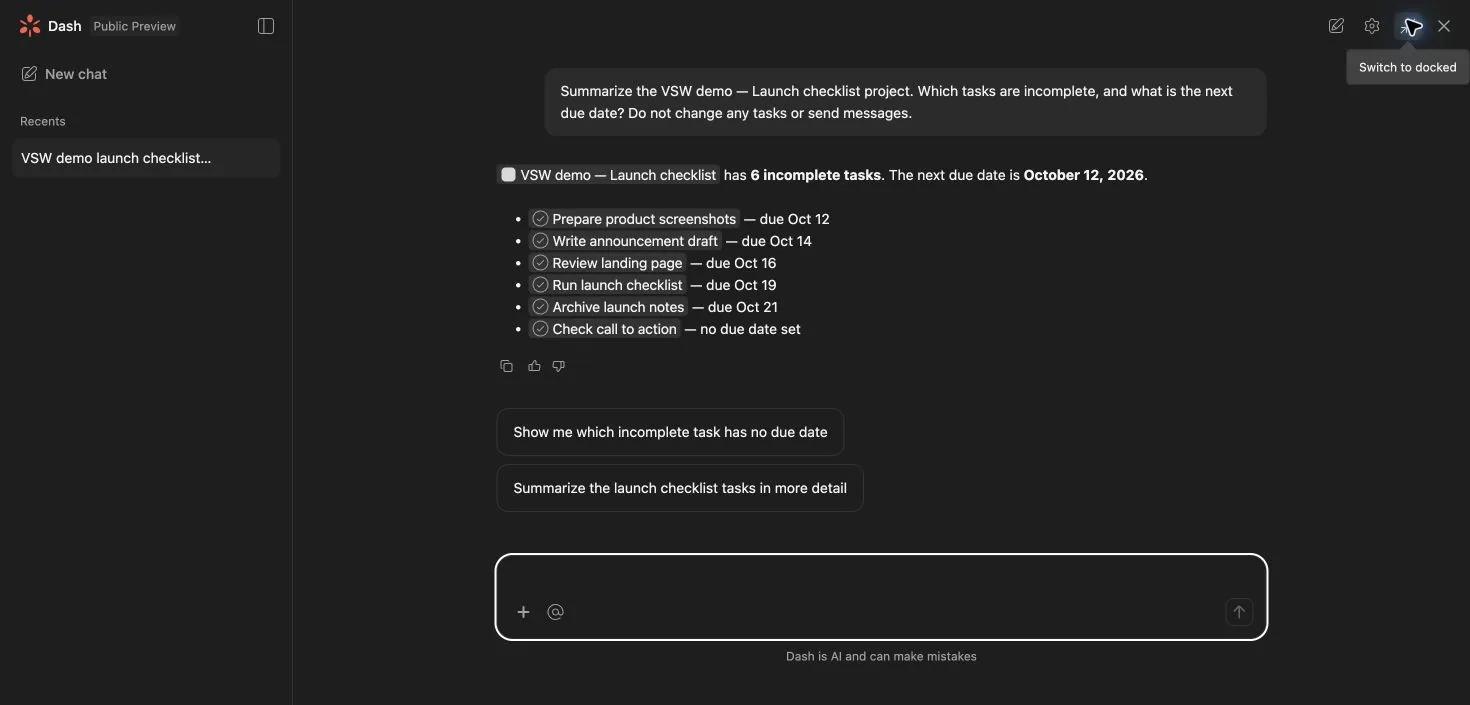
We asked Dash to summarize the demo project, identify incomplete tasks, and find the next deadline without changing work. It returned five unfinished top-level tasks and the unfinished Check call to action subtask, with links to each. Its count of six therefore included a subtask. October 12 matched the next unfinished task deadline. This was one successful retrieval request in a public preview, not a reliability benchmark or a test of autonomous actions.

Agents and Strategy have different jobs

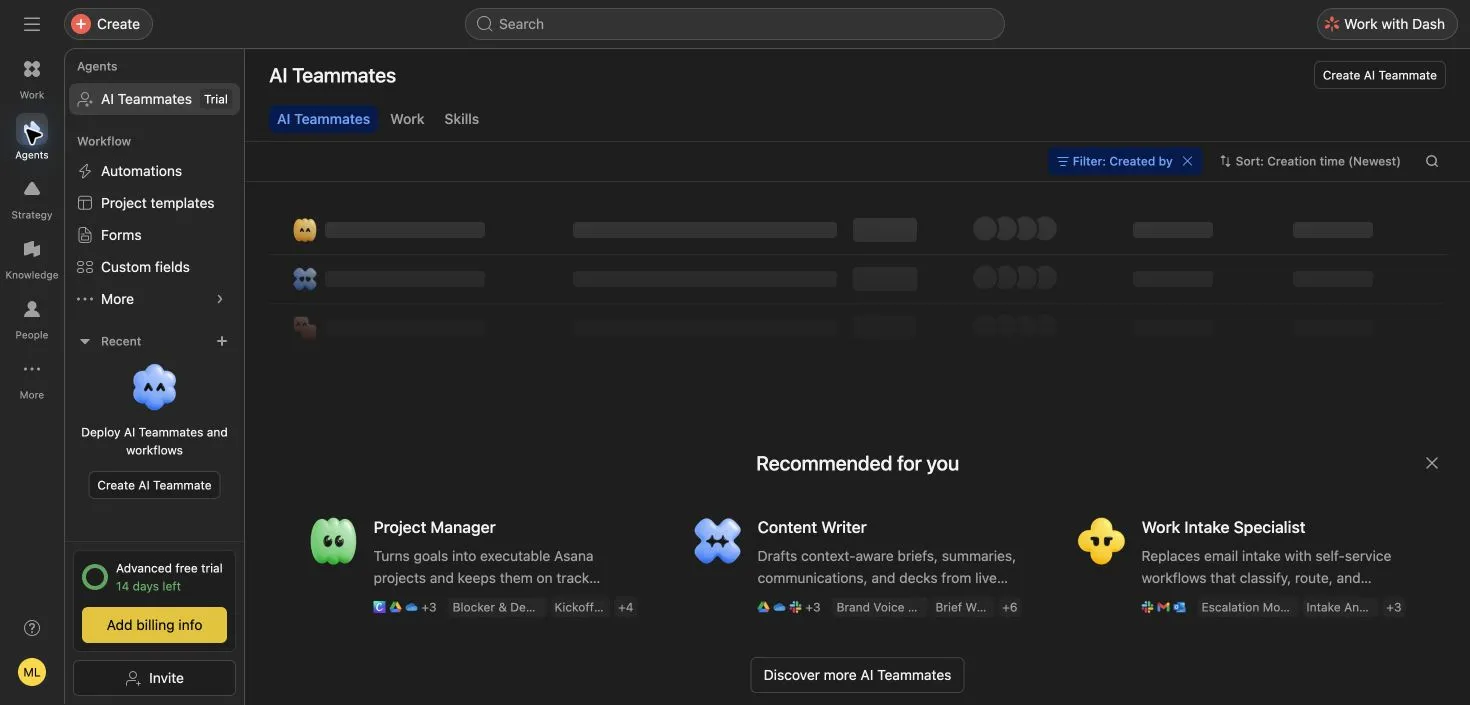
Agents exposed AI Teammates, Automations, Project templates, Forms, and Custom fields. Its secondary menu also contained Bundles, Task types, and Status templates. We inspected the recommended agents but did not deploy one. Strategy exposed Goals, Reporting, and Resourcing; the goals landing page offered example goals and a creation entry point. Their broader capabilities and plan limits are documented in the feature groups.

Knowledge, People, and More need their own coverage

Knowledge opened Meetings and Pages. Pages offered a creation entry point, while Meetings explicitly displayed Coming soon and a waitlist button. People showed profile and team navigation. More contained StackAI and navigation customization in this account. Asana’s additional Client Management, Service Management, and Command products are covered separately above; their public documentation does not establish access in this trial.

Scope of this review

This was a short, single-user exercise plus a workspace inspection. We did not test collaboration or permissions, dependency scheduling, automation runs, AI Teammate execution, connected apps, the mobile app, Enterprise functionality, or large-project performance. Pricing and capabilities outside the tested workflow come from the linked official sources.

Asana features

33 features · 10 categories

Work · tasks & completion

4
  • Tasks & subtasks

    Advanced trial tested

    Break a task into smaller actions with their own completion states.

    In our test: Added two subtasks to the announcement and completed one; the expanded board card showed both states.

    Asana board with five tasks in To do and one in Doing, showing one completed and one incomplete announcement subtask View full screen
    Board · Move work between sections and expand subtasks.
    Asana subtask behaviorChecked
  • Workflow sections

    Advanced trial tested

    Group tasks into stages without creating separate copies for each view.

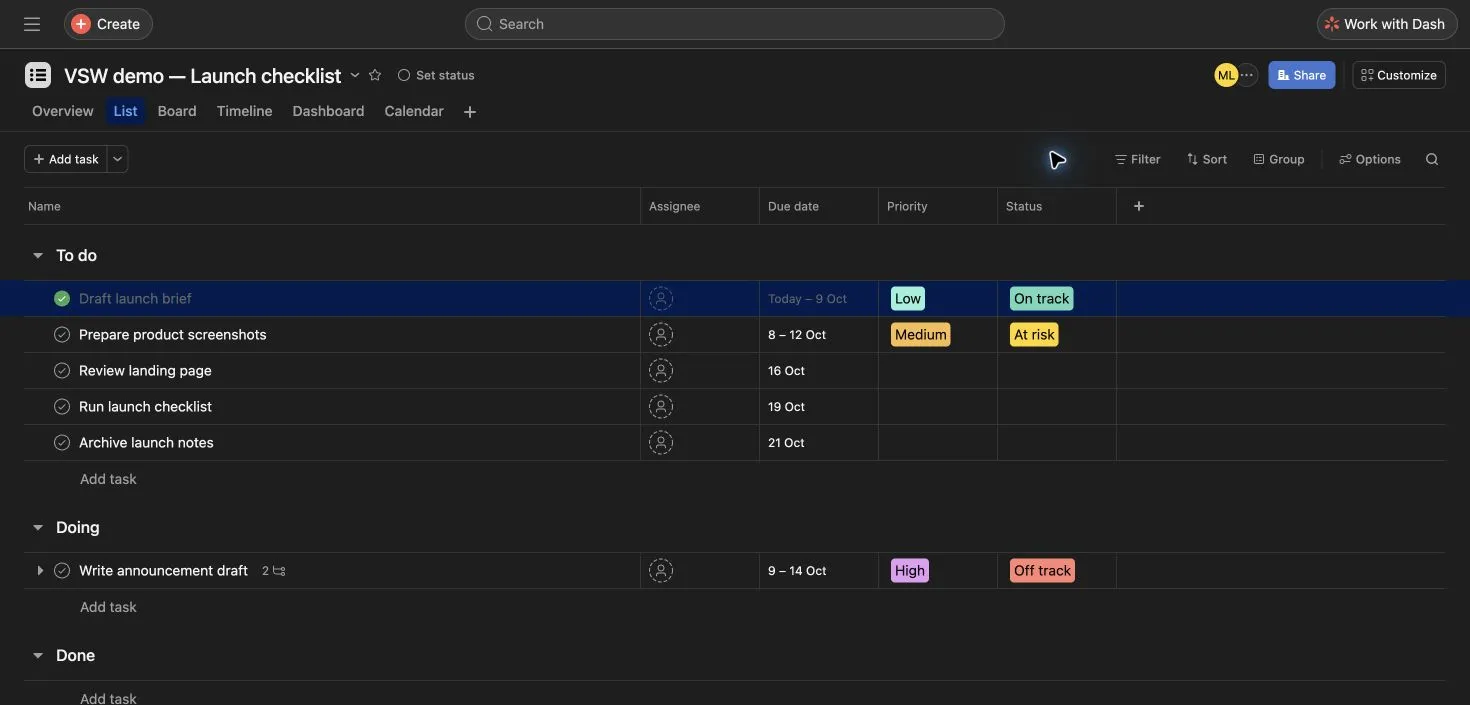
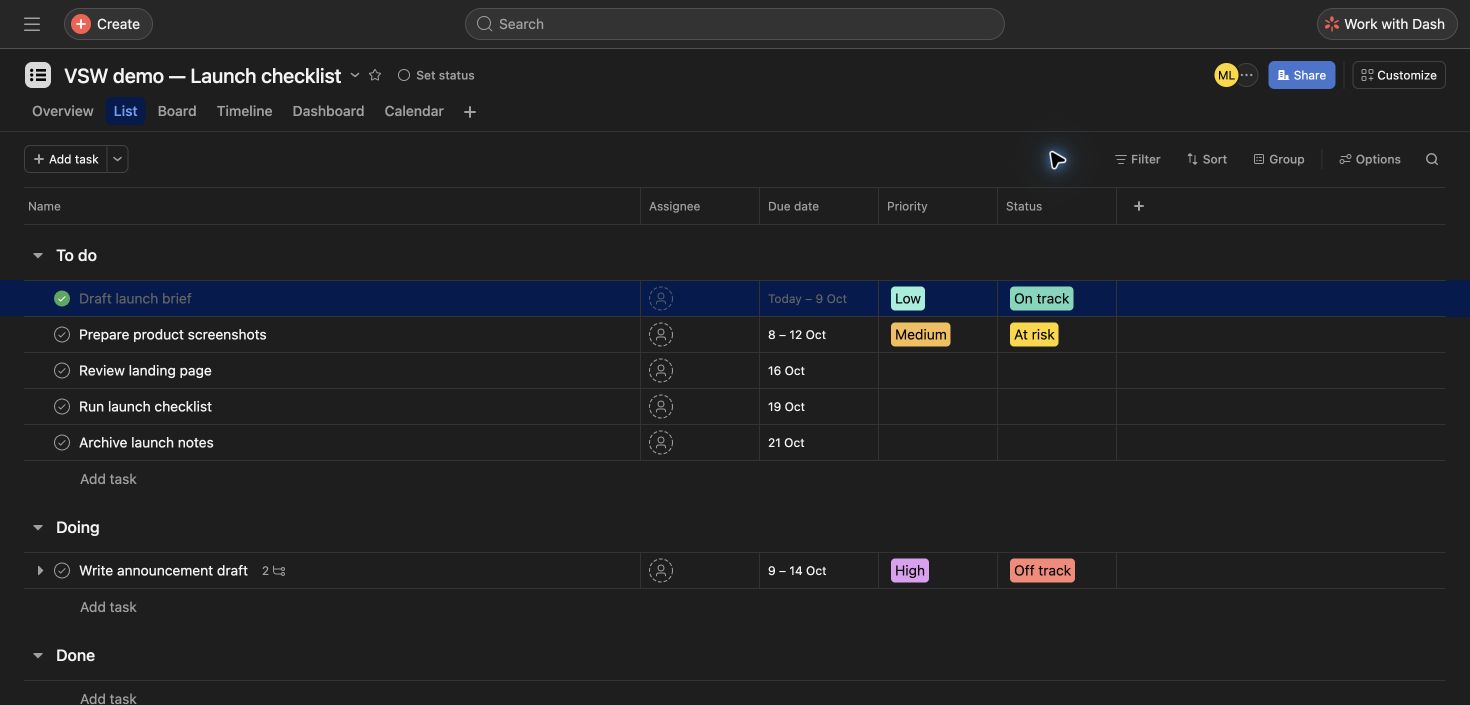
    In our test: Moved the announcement from To do to Doing. List and board both showed the changed section after a reload.

    Asana list showing six fictional launch tasks, due dates, a completed brief, and the announcement in Doing View full screen
    List · Six launch tasks with dates and workflow sections.
    Board views and sectionsChecked
  • Completion & filters

    Advanced trial tested

    Mark finished work complete and narrow the list to completed tasks.

    In our test: Completed Draft launch brief. The completed-only filter showed one task; clearing it restored all six.

    Asana list filtered to the single completed Draft launch brief task View full screen
    Filter · Only the completed launch brief is shown.
  • Independent subtask completion

    Advanced trial tested

    A parent can be complete while one of its subtasks remains unfinished.

    In our test: Completing the announcement left Check call to action incomplete. Reopening the parent preserved the two subtask states.

    Asana board showing the announcement marked complete while its Check call to action subtask remains incomplete View full screen
    Subtasks · Completing the parent leaves an unfinished subtask open.
    Asana subtask behaviorChecked

Work · project views

4
  • List view

    Advanced trial tested

    See task names, dates, sections, and available fields in a compact table.

    In our test: The list held six launch tasks, including an announcement in Doing and a completed brief.

    Asana list showing six fictional launch tasks, due dates, a completed brief, and the announcement in Doing View full screen
    List · Six launch tasks with dates and workflow sections.
  • Board view

    Advanced trial tested

    Track project stages as columns and inspect subtasks within a card.

    In our test: The board showed five tasks in To do and one in Doing; expanding the announcement revealed its two subtasks.

    Asana board with five tasks in To do and one in Doing, showing one completed and one incomplete announcement subtask View full screen
    Board · Move work between sections and expand subtasks.
    Board views and sectionsChecked
  • Calendar view

    Advanced trial tested

    See scheduled project tasks on a calendar. Dated subtasks need project association to appear as project-calendar items.

    In our test: After reloading, the announcement still ended October 14 and the landing-page task remained on October 16.

    Asana October 2026 calendar showing the announcement ending on October 14 and the landing-page review on October 16 View full screen
    Calendar · Edited dates remained after reloading.
    Calendar schedulingChecked
  • Timeline view

    Starter and higher; Advanced trial tested

    Visualize task date ranges and deadlines along a project schedule.

    In our test: Timeline displayed the six launch tasks, including the announcement range and later single-date deadlines.

    Asana Timeline displaying six launch tasks across October, including date ranges and individual deadlines View full screen
    Timeline · Launch dates on the Advanced trial.
    Timeline planningChecked

Work · daily focus

3

Work with Dash

3
  • Ask Dash about your work

    Public preview tested

    Ask questions about project work and follow links back to the underlying tasks.

    Plan detail: Tested on the Advanced trial.

    In our test: Dash listed five unfinished top-level tasks plus the open subtask, and correctly identified October 12 as the next due date.

    Asana Dash public preview listing five incomplete launch tasks and one incomplete subtask, with October 12 as the next deadline View full screen
    Dash · Retrieved unfinished tasks and the next due date from our demo.
    Getting started with DashChecked
  • Drafting & follow-up actions

    Documented; prompts inspected

    Dash can draft updates and help take actions in Asana. Its panel offered status-update and daily-priority prompts.

    Plan detail: We tested retrieval only, not generated updates, meeting scheduling, or connected apps.

    Getting started with DashChecked
  • Shared AI request allowance

    Paid plans

    Dash and AI Teammates share an AI request pool; complex work can consume requests. Administrative Dash tasks are included without extra request charges.

    Plan detail: Current Starter and Advanced pricing includes 5 requests per user per month, capped at 50 per account. AI Studio uses a separate credit allowance.

    AI request allocationChecked

Agents · AI teammates

3
  • AI Teammates

    Trial interface inspected

    Browse role-based agents for project management, writing, and work intake.

    Plan detail: No agent was deployed or evaluated.

    In our test: The Agents screen offered Project Manager, Content Writer, and Work Intake Specialist recommendations, plus Work and Skills tabs.

    Asana Agents area with AI Teammate recommendations and links to automations, project templates, forms, and custom fields View full screen
    Agents · Role recommendations and workflow tools; no agent deployed.
    AI Teammate skillsChecked
  • Teammate skills

    Starter and above

    Give an agent reusable instructions and reference attachments; library skills can be copied and customized.

    Plan detail: Documented capability; skill execution was not tested.

    AI Teammate skillsChecked
  • AI Studio

    Paid plans · credit limits

    Build AI-assisted workflows for intake, routing, approvals, and updates through a no-code interface.

    Plan detail: Documented separately from Dash and AI Teammates; no workflow was run.

    Asana AI toolsChecked

Agents · workflow building

4
  • Custom fields

    Starter and higher

    Add structured values such as priority and status; field visibility can differ by view.

    Custom fields and view settingsChecked
  • Automations & forms

    Starter and above

    Turn submitted requests into tasks, then use rules to move or assign work.

    Plan detail: Branching forms require Advanced or above; neither form submission nor a rule run was tested.

    Workflow customizationChecked
  • Project templates

    Interface inspected

    Reuse a project structure for recurring work. Agents includes a dedicated template index.

    Plan detail: Custom templates are listed on Starter and above; template creation was not tested.

    Workflow customizationChecked
  • Bundles, task types & status templates

    Menu inspected

    The Agents More menu exposes these tools for standardizing workflows and updates.

    Plan detail: Availability varies by tool and plan; deployment across projects was not tested.

    Asana navigation and product modesChecked

Strategy · goals & resources

4
  • Goals

    Advanced and above

    Connect outcomes to project work and track progress. Strategy opened a goals onboarding screen in our trial.

    Plan detail: Interface inspected; automatic progress updates were not tested.

    Advanced featuresChecked
  • Reporting dashboards

    Starter and above

    Build charts for tasks and projects, with portfolio and goal reporting on higher tiers.

    Plan detail: Portfolio and goal reports require Advanced or above. Dashboard calculations were not tested.

    Universal reportingChecked
  • Workload

    Advanced and above

    Review task effort and team bandwidth across projects in a portfolio.

    Plan detail: Documented portfolio workload; staffing decisions were not tested.

    Advanced featuresChecked
  • Capacity planning

    Enterprise and above

    Allocate people to projects over a longer planning horizon. This is distinct from task-level workload.

    Plan detail: Documented capability; the Advanced trial does not establish Enterprise access.

    Capacity planningChecked

Knowledge · pages & meetings

2
  • Pages

    Interface inspected

    Keep briefs and documents connected to projects, tasks, portfolios, or teams.

    Plan detail: The Pages landing screen offered Create page. Collaborative editing and page-to-task conversion were not tested.

    Pages in AsanaChecked
  • Meetings

    Coming soon in tested account

    The Knowledge area describes converting transcripts into summaries and tasks.

    Plan detail: Our Meetings screen displayed Coming soon and Join waitlist. We did not join or test transcription.

    Asana navigation and product modesChecked

People · profiles & teams

2
  • People profiles

    Interface inspected

    Profiles collect a person’s tasks, recent projects, collaborators, and goals.

    Plan detail: Our own profile also exposed out-of-office and profile-editing controls; no personal screenshot is published.

    Asana navigation and product modesChecked
  • Teams

    Navigation inspected

    Find team spaces from the People sidebar to understand where work belongs.

    Plan detail: The workspace team appeared in this account. Multi-user collaboration and permissions were not tested.

    Asana navigation and product modesChecked

More · additional products

4
  • StackAI by Asana

    Visible in More

    A separate platform for workflows that span multiple systems.

    Plan detail: This account’s More menu showed StackAI and Customize navigation. We did not connect external systems.

    Asana navigation and product modesChecked
  • Asana Client Management

    Separate product · documented

    A product for client delivery, including a client directory and higher-tier client portals.

    Plan detail: Not available in this account’s More menu; not tested.

    Client Management plansChecked
  • Asana Service Management

    Separate product · documented

    Manage service requests through queues and a knowledge base, with AI assistance for routine questions.

    Plan detail: Not available in this account’s More menu; not tested.

    Asana Service ManagementChecked
  • Command by Asana

    Separate product · sales-led

    Connect engineering specifications, release planning, tickets, and coding-agent work.

    Plan detail: Not available in this account’s More menu; not tested.

    Command by AsanaChecked

Plans & pricing

Personal is free; paid subscriptions start at two seats. Dash and AI Teammates have shared request allowances, while AI Studio uses credits. Additional products have separate access and pricing. Testing used a 14-day Advanced trial.

Prices in USD

Personal

For individual work or a pair.

$0

free plan

  • Up to 2 users
  • Unlimited tasks and projects
  • List, board, and calendar

Current Personal plan; legacy seat limits may differ.

Starter

For more structured project planning.

$10.99

per user / month · billed annually

  • Timeline and Gantt
  • Custom fields and forms
  • Rules and reporting

Minimum two paid seats.

Advanced

For coordinating multiple projects.

$24.99

per user / month · billed annually

  • Portfolios and goals
  • Resource management
  • Time tracking and approvals

Minimum two paid seats. Trial access was used in this review.

Enterprise / Enterprise+

For organization-wide administration.

Custom

contact Asana sales

  • Enterprise: SAML and SCIM
  • Enterprise+: additional security controls

Separate sales-led tiers; request a quote for your requirements.

Source: vendor pricing · Updated

View official pricing

Asana FAQs

Is Asana free?

Yes. The current Personal plan supports up to two users with unlimited tasks and projects, plus list, board, and calendar views. Some older accounts have different legacy limits.

Asana Personal plan details

Can I buy a paid Asana plan for one person?

Paid subscriptions start at two seats. Asana also uses seat increments as teams grow, so the per-user rate is not necessarily the total monthly bill.

Subscription sizes and paid seats

Which Asana plan did VSW test?

We tested a 14-day Advanced trial on October 7, 2026, using six fictional launch tasks and two subtasks. The trial was identified in onboarding and the workspace sidebar.

Does completing a task complete its subtasks?

No. In our test, completing the announcement left its unfinished Check call to action subtask open. The task also stayed in its existing Doing section.

Asana subtask behavior

Do changes carry across project views?

In our test, moving a task into Doing appeared in both list and board views. Edited deadlines remained in the calendar after a page reload. This was a small single-user exercise.

Is Timeline included in Asana Personal?

Timeline is available on Starter and higher paid plans. We opened it through Advanced trial access; that does not establish availability on Personal.

Timeline planning

What is Work with Dash in Asana?

Dash is Asana’s conversational AI assistant. In our trial’s public preview, it correctly retrieved five unfinished top-level tasks and one open subtask, and identified the next deadline. Drafting and action-taking capabilities are documented but were not tested.

Getting started with Dash

Are all sidebar features included in the trial?

No. We could inspect the main workspace areas, but Meetings displayed Coming soon. More showed StackAI; Client Management, Service Management, and Command were documented separately and were not available in our menu. Plan, product, and rollout access can differ.


Community reviews

Write a review

Be the first to share your experience.

Customer reviews are checked before publication.

Sources & editorial

How we review software

VSW editorial · Assistant-led testing. Hands-on testing and official vendor sources. Editorial research is separate from customer ratings.