
Airtable vs Asana: connected data or project delivery?
Airtable and Asana can both organize a content calendar or launch. The choice becomes clearer when you ask what needs to stay connected: business information such as campaigns, assets and clients, or the assignments and deadlines needed to deliver a project.

Airtable
Full profile & featuresBest fit
Teams building a shared operational system around related content, clients, assets or projects.
$20paid plans from
USD / billable collaborator / month, billed annually · Team

Best fit
Teams coordinating assigned work, deadlines and project progress, with a route into portfolios and goals.
$10.99paid plans from
USD / user / month, billed annually · Starter · 2-seat minimum
The decision
Our verdict
Choose Airtable when the work needs a reusable data model and several teams need different views of the same records. Choose Asana when accountable tasks, deadlines and project progress are the main job. Airtable rewards thoughtful database design; Asana gives the team a project-and-task starting point, with portfolios and goals available on Advanced.
Airtable: strengths & tradeoffs
Why choose it
- Linked records connect different kinds of information without copying each relationship into a task description.
- Grid, calendar and Kanban can present the same records for different jobs.
- Interfaces can give a team a focused way to work with its underlying data.
Weigh up
- Someone needs to design the tables, relationships and permissions before the workflow becomes useful.
- Record capacity, automation allowances and collaborator billing matter alongside the seat price.
Asana: strengths & tradeoffs
Why choose it
- Tasks and subtasks keep the deliverable, owner and next steps explicit.
- The same project can be inspected through list, board, calendar and paid planning views.
- Advanced connects projects with portfolios, goals and resource planning.
Weigh up
- Current Personal is limited to two users; Timeline, Gantt and custom fields need a paid plan.
- Completing a parent task does not automatically finish its subtasks; the team needs a clear completion convention.
Airtable vs Asana at a glance
Free plan[3][4][9][10]
- Airtable
- Free includes 1,000 records per base and up to five Editor or Creator collaborators; read-only access is unlimited.
- Asana
- Personal currently supports two users, unlimited tasks/projects and list, board and calendar views. Older subscriptions can have different limits.
Paid planning step[3][4][9][10]
- Airtable
- Team includes Timeline and Gantt and raises capacity to 50,000 records per base. Choose it for both view access and the amount of data the workflow needs.
- Asana
- Starter includes Timeline, Gantt, custom fields and forms. Advanced is the relevant step for portfolios, goals, approvals and native time tracking.
Features: how the work gets done
These differences matter when the team moves from a useful view to an everyday working process. The recommendations below follow the kind of work each product organizes.
Work structure[2][8][11]
- Airtable
- Records can represent more than assignments: a client, campaign, asset and task can each have their own table, connected through linked-record fields.
- Asana
- Projects organize assigned tasks, dates and subtasks. Custom fields on Starter add structured information without requiring the team to design a separate database model.
Our take: Airtable is the stronger starting point for relating different business entities. Asana is the more direct starting point for assigning the next piece of project work.
Scheduling and views[4][9]
- Airtable
- Grid, calendar and Kanban offer different perspectives on a base. Team adds Timeline and Gantt; date ranges and multiple calendar date fields also require a paid plan.
- Asana
- Personal includes list, board and calendar. Starter adds Timeline and Gantt for scheduling and dependency planning; paid access is separate from a temporary trial.
Our take: Both offer useful planning views, but compare Airtable Team with Asana Starter rather than assuming their free calendars include the paid scheduling tools.
Intake, documents and discussion[5][8][9]
- Airtable
- Forms collect records and Interface Designer creates focused pages over a base. Separate interface sharing and more presentation controls depend on the plan.
- Asana
- Task descriptions, comments and project context keep discussion near the assignment. Starter forms can turn incoming requests into project tasks.
Our take: Use Airtable intake when a submission should become part of an operational database. Use Asana intake when it should become an assigned task in a project.
Reporting and coordination[5][9]
- Airtable
- Interfaces and views can summarize operational data for a particular audience. The structure and fields you build determine what those summaries can answer.
- Asana
- Starter provides project reporting. Advanced adds portfolios, goals, approvals, native time tracking and resource management for coordinating work across projects.
Our take: Airtable answers questions about the records and interfaces you build. Asana Advanced is worth examining when goals, portfolios and team capacity are the reporting problem.
Automation and AI[6][4][12][9]
- Airtable
- Automations trigger actions from record changes or schedules. Runs are metered per workspace; AI also has plan-specific credits. Define the process before automating it.
- Asana
- Rules handle repeatable project steps. Dash and AI Teammates have request allowances, while AI Studio uses credits; those AI meters are separate from ordinary task and rule availability.
Our take: Airtable automation runs and Asana AI requests/credits are different meters. Model the actual workflow before treating either allowance as a cost advantage.
Pricing & the cost of your team
Public USD rates checked October 16, 2026. Annual rates require annual billing; the monthly alternatives are shown separately. Compare the tier that includes the required planning and coordination features.
Paid subscription rates[3][4][9][10]
- Airtable
- Team is $20 per billable collaborator/month annually or $24 monthly. Business is $45 annually or $54 monthly; Enterprise Scale is quoted.
- Asana
- Starter is $10.99 per user/month annually or $13.49 monthly. Advanced is $24.99 annually or $30.49 monthly; Enterprise tiers are quoted.
The planning package[3][4][9][10]
- Airtable
- Team includes Timeline and Gantt and raises capacity to 50,000 records per base. Choose it for both view access and the amount of data the workflow needs.
- Asana
- Starter includes Timeline, Gantt, custom fields and forms. Advanced is the relevant step for portfolios, goals, approvals and native time tracking.
Who becomes billable[3][4][9][10]
- Airtable
- Self-serve plans apply to a workspace. Team bills Commenters and higher permissions, including relevant interface collaborators; self-serve Business generally bills Editors and above.
- Asana
- Paid subscriptions start at two seats, with subscription sizes growing in supported seat increments. Scope the team or organization covered by the subscription.
What changes the total[3][4][9][10]
- Airtable
- Check attachment/record capacity, AI credits and automation limits. A private company email domain is required for Business and Enterprise Scale.
- Asana
- AI request packs and AI Studio credits can affect ongoing cost. Service Management, Client Management and other separate products need their own scope and quote.
A 10-person planning budget
Both selected tiers include advanced scheduling views. Assume ten billable collaborators in one workspace or subscription. The example compares access costs; Airtable records/interfaces and Asana project coordination are different packages.
Airtable Team
$2,400/ year
10 seats × $20 × 12 months
Asana Starter
$1,318.80/ year
10 seats × $10.99 × 12 months
Base subscription for ten billable people, billed annually. Excludes taxes, AI usage/add-ons, external services, marketplace purchases, promotions and negotiated discounts. Check the final account quote, permissions and guest roles before purchase.
Connect the tools you already use
A connection name is only the beginning. Check which event starts the workflow, what information moves, and whether the connection is one-way, two-way or dependent on a paid tier.
Files and connected information[7][3][13][9]
- Airtable
- Google Drive and other integrations can connect source information with a base. Decide which system owns each field before setting up sync.
- Asana
- Google Drive and other app connections keep files and external information close to tasks. Specific integrations and enterprise connections can have plan requirements.
Custom workflows and limits[7][3][13][9]
- Airtable
- Automations and the API support custom processes, with plan-specific run, API and sync allowances. A linked-record field itself is not an external integration.
- Asana
- An integration directory and developer platform support connected workflows. Check the required trigger/action and distinguish ordinary rules from AI usage.
Who each product fits
For a marketing team, Airtable can be the connected campaign-and-asset register while Asana coordinates who must deliver each task. Decide which job the team is actually buying for.
The interface and everyday use
Airtable
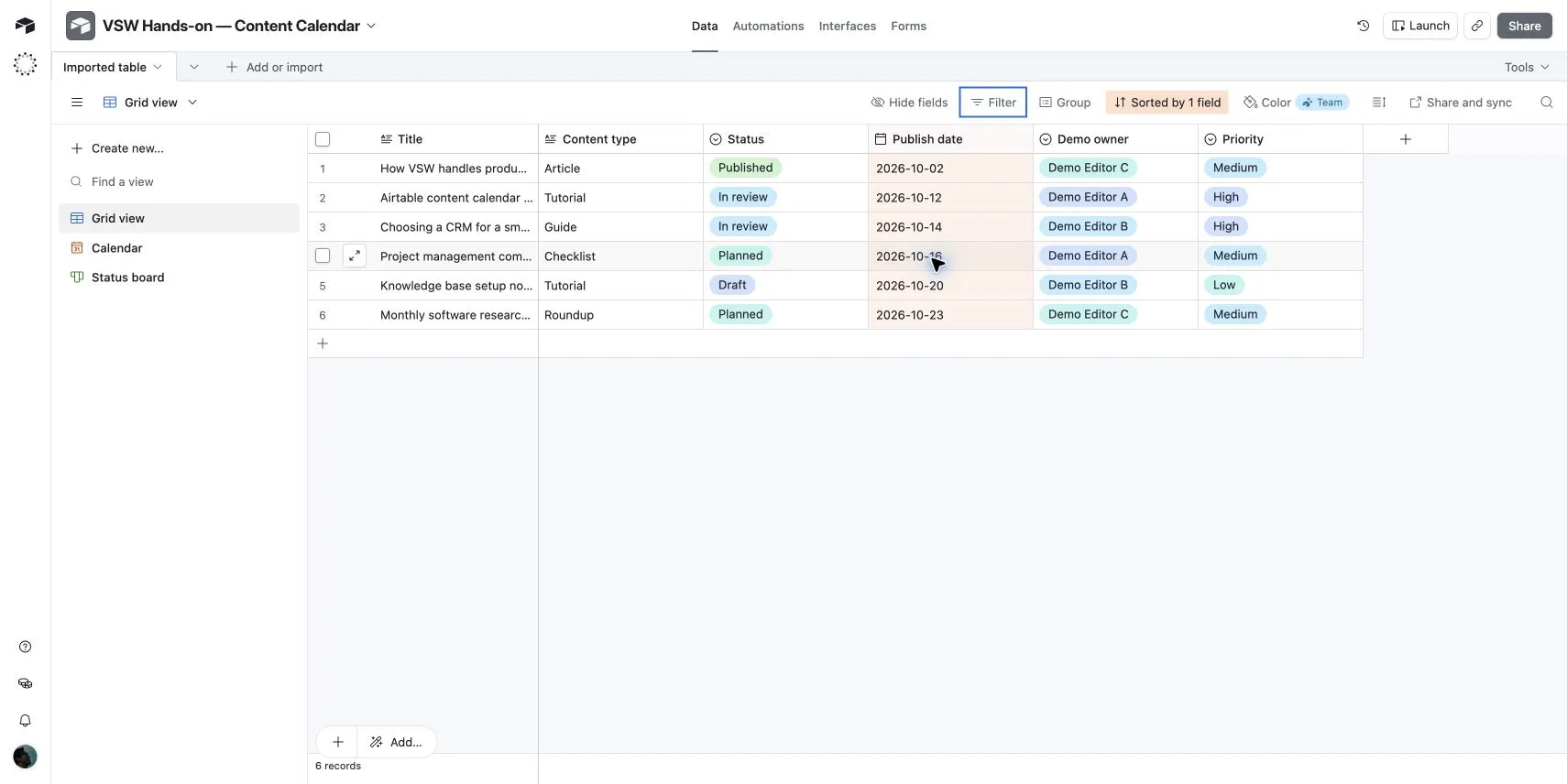
In our recorded Free-plan content calendar, one set of records appeared as a grid, calendar and status board. A status edit carried from the board to the grid. That supports a practical benefit: different teams can view shared information in different ways. Setting up the underlying fields and choosing which fields are visible remain part of the work.
Explore Airtable in detailAsana
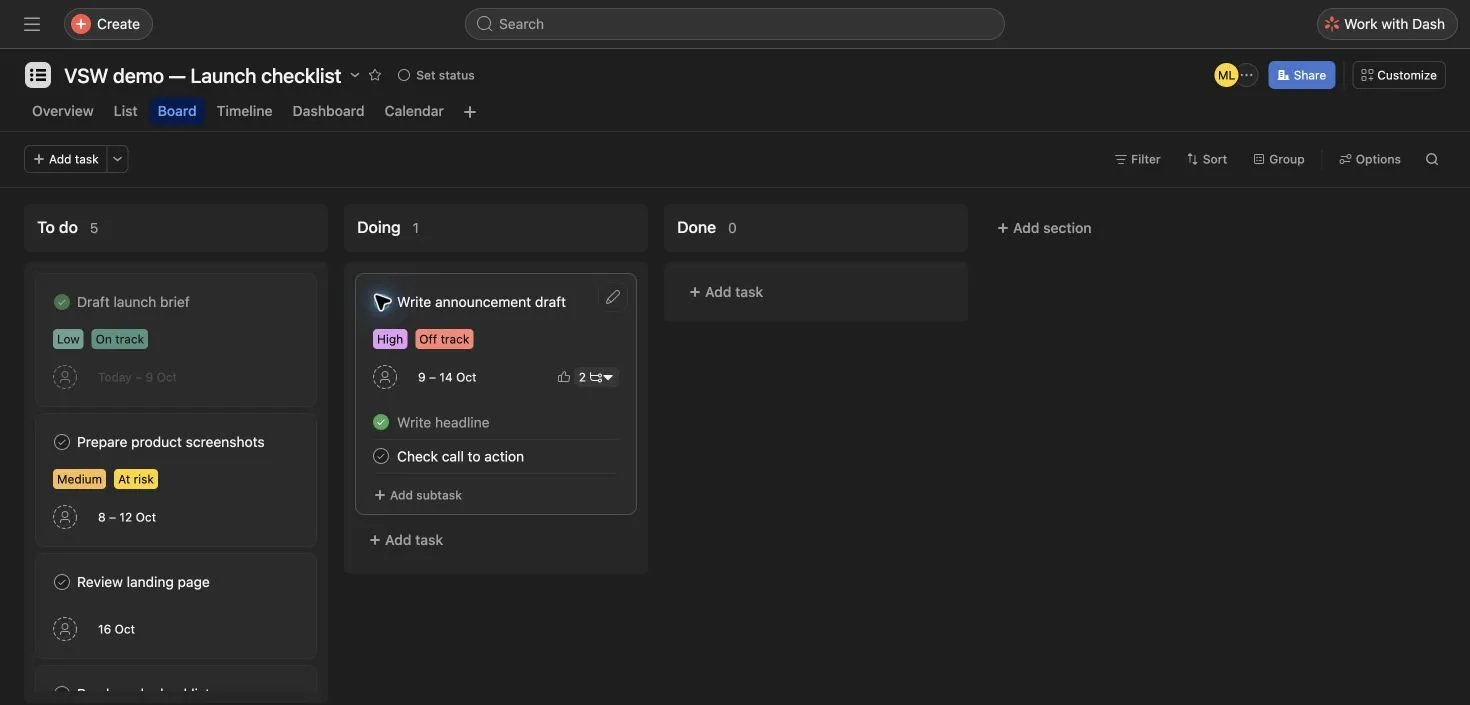
Our recorded launch project kept the same work available in list, board and calendar views, and edited task dates remained after reload. Expanding a card exposed its subtasks. Completing the parent left an unfinished subtask open, so completion needs a team convention rather than an assumption that every child item closes with it.
Explore Asana in detailSupport & governance
Match the help resources and administration controls to the people responsible for running the workspace. The lowest paid tier does not imply enterprise governance.
Help and onboarding[3][4][1][9][8]
- Airtable
- Official support documentation covers bases, views, interfaces and billing. Plan documentation is especially useful when deciding who needs edit or comment access.
- Asana
- Asana provides a Help Center, Academy and community resources. Documentation explains task behavior, paid features and subscription sizes.
Permissions and governance[3][4][1][9][8]
- Airtable
- Business introduces central administration and Enterprise Scale offers broader organizational governance. Match base/interface access and paid roles to the intended audience.
- Asana
- Enterprise includes SAML and SCIM; Enterprise+ adds further audit, residency and governance controls. Those capabilities belong in a tier decision, not an assumption about Starter.
Other approaches to consider
 ClickUp
Teams keeping detailed tasks, working documents and project conversations in one configurable workspace.
View profile  monday.com — Work Management
Teams organizing a repeatable process through shared boards, configurable columns and visible status.
View profile  Trello
Teams whose work is clearest as cards moving through a small set of visual stages.
View profileRelated comparisons
All comparisons

Airtable vs ClickUp
Compare Airtable and ClickUp on linked records, tasks, docs, planning, automation and team cost, with real interface evidence and plan details.

Airtable vs monday.com — Work Management
Compare Airtable and monday.com on data structure, boards, planning, integrations and seat costs, with workflow evidence and a practical buying verdict.

Airtable vs Trello
Compare Airtable and Trello on records, cards, planning views, automation and team cost, with clear fit guidance and authentic product images.

Asana vs ClickUp
Compare Asana and ClickUp on tasks, documents, planning, reporting, AI and subscription cost, with recorded workflow evidence and practical tradeoffs.
Asana vs monday.com — Work Management
Compare Asana and monday.com on tasks, boards, planning, reporting, automation and cost, with current plan requirements and real workflow evidence.
Asana vs Trello
Compare Asana and Trello on tasks, cards, scheduling, reporting, free limits and paid costs, with workflow evidence and clear reasons to choose each.
Airtable vs Asana FAQs
Can Airtable replace Asana for project management?
It can represent tasks, owners, dates and status as records, with calendar, board and paid planning views. Choose it when those tasks also need relationships to clients, assets or other business data. Asana is a more direct fit when project delivery and accountable assignments are the main requirement.
Which is cheaper for a ten-person planning team?
At annual base rates, ten Airtable Team collaborators cost $2,400 per year; ten Asana Starter seats cost $1,318.80. Both include advanced scheduling views, with different features. Billable permissions, AI usage, taxes and additional products can change the total.
Which free plan fits a small team?
Airtable Free allows up to five Editors or Creators within its record limits. Current Asana Personal allows two users with unlimited tasks and projects. Compare both the number of collaborators and the kind of work, rather than the free label alone.
When should an Asana buyer consider Advanced?
Advanced is the relevant step for portfolios, goals, approvals, native time tracking and resource management. Starter already includes Timeline, Gantt, custom fields and forms, so a team focused on one project may not need the higher tier.
Sources & our approach
Versusware's AI-assisted editorial analysis combines official capabilities, plan and billing sources checked October 16, 2026 with the existing product evidence. Airtable observations and images come from the recorded October 5, 2026 content-calendar workflow on the Free plan. Asana observations and images come from the October 7, 2026 launch workflow on an Advanced trial; its Timeline access was part of that trial. Recommendations are our analysis of workflow fit, structure and subscription requirements. The full profiles retain their methodology and detailed findings.
How we review software- [1] Airtable platformChecked 2026-10-16
- [2] Airtable linked-record relationshipsChecked 2026-10-16
- [3] Airtable pricingChecked 2026-10-16
- [4] Airtable plan limits and billable collaboratorsChecked 2026-10-16
- [5] Airtable Interface DesignerChecked 2026-10-16
- [6] Airtable automation usageChecked 2026-10-16
- [7] Airtable integrationsChecked 2026-10-16
- [8] Asana project and workflow featuresChecked 2026-10-16
- [9] Asana pricing and included capabilitiesChecked 2026-10-16
- [10] Asana subscriptions and paid seatsChecked 2026-10-16
- [11] Asana subtask behaviorChecked 2026-10-16
- [12] Asana AI requests and usageChecked 2026-10-16
- [13] Asana app directoryChecked 2026-10-16