Project home · The brief, decisions and task tracker together.
1 / 3
What is Notion?
Notion brings documents and structured work into the same space. A launch brief can sit above a task tracker, while each task opens into a page with its own instructions. Our Free-plan workflow made that connection tangible, and a limited-trial AI question returned a useful summary with source links. The appeal is flexibility; the tradeoff is deciding how your workspace should be organized.
Notion is a compelling starting point when project work depends on useful notes, briefs and shared knowledge. Our Free workflow put those pieces together, and the AI trial helped retrieve the next deadline. Start with a small structure people will actually maintain, then upgrade for a named collaboration, AI or permission need. If you mainly want a ready-made project process, compare a dedicated work-management tool before committing.
How we tested NotionTested Oct 7, 2026
Assistant-led Chrome testing with fictional launch work. We selected Free during onboarding; the workspace menu confirmed Free Plan · 1 member. Optional AI data sharing and marketing were not enabled, no colleagues were invited, and no upgrade was purchased.
Launch brief and decision log, inline Tasks Tracker template, three renamed tasks with edited status/date/description, a task-page brief, reload, table/board comparison, database search and one read-only Notion AI question using the limited trial. Three general screenshots. Multi-user collaboration, forms submission, publishing, automation execution, Custom Agents, meeting recording, connected apps, Calendar sync, paid plans, scale, offline/mobile and accessibility were not tested.
Screenshots captured on Oct 7, 2026 with fictional records and demo owners.
Notion review: a home for your knowledge and project work
Who will get the most from Notion?
Notion makes a strong first impression when your work needs more than a list of tasks. Think of a launch with a brief, a few decisions, supporting notes and deadlines: those pieces can share one project home, while the tasks themselves open into pages with room for detail.
That is the reason to consider it for a small team knowledge hub, a content operation or a project where the reasoning matters as much as the next action. The workspace can take the shape of your work. Our recommendation is to start with one useful project home and let the structure earn its place.
If you want a prescribed project process with very little setup, compare our Asana, ClickUp and monday.com reviews too. Notion’s freedom is appealing, but someone still needs to decide what belongs where.
What feels useful in a real project?
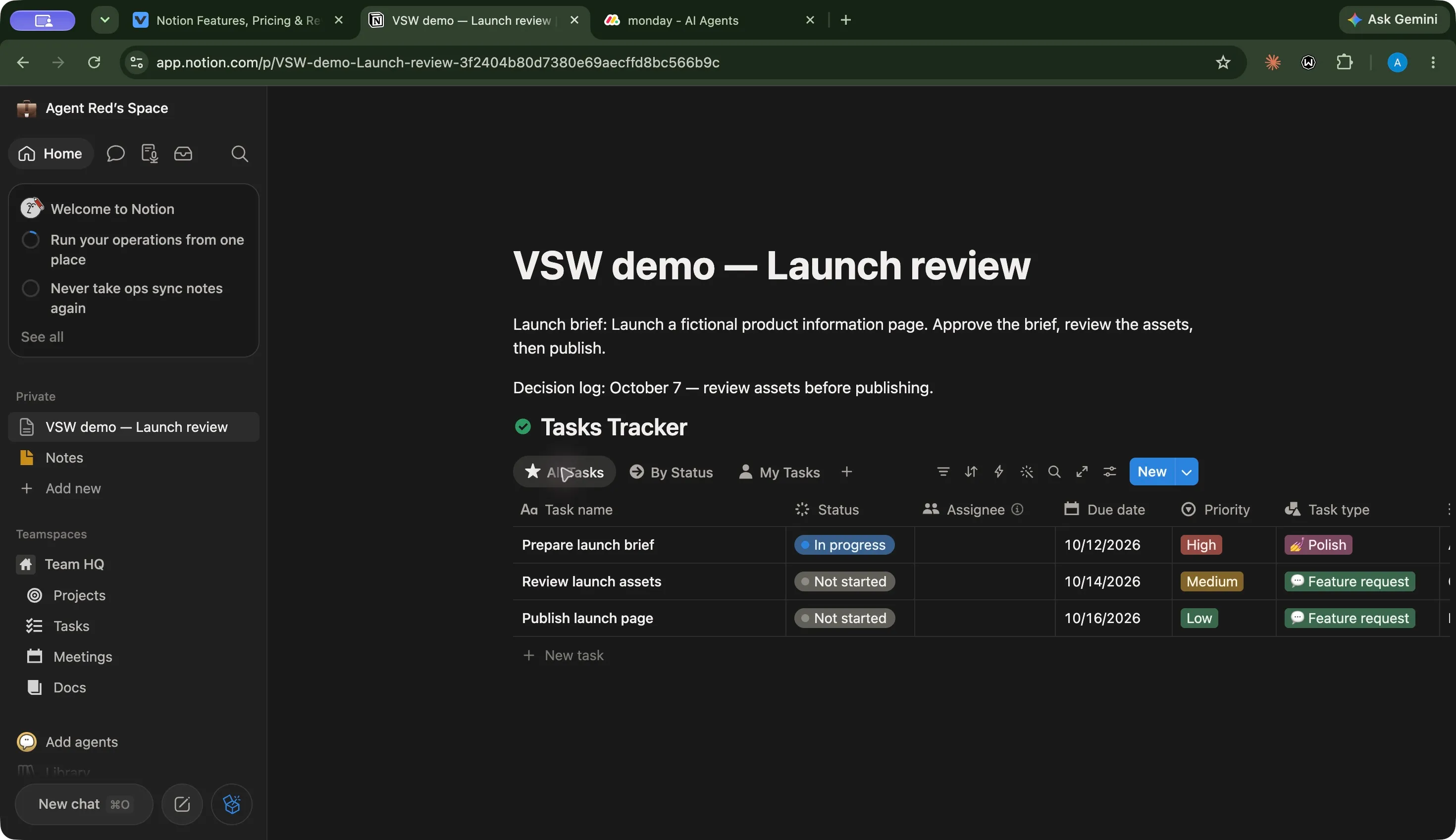
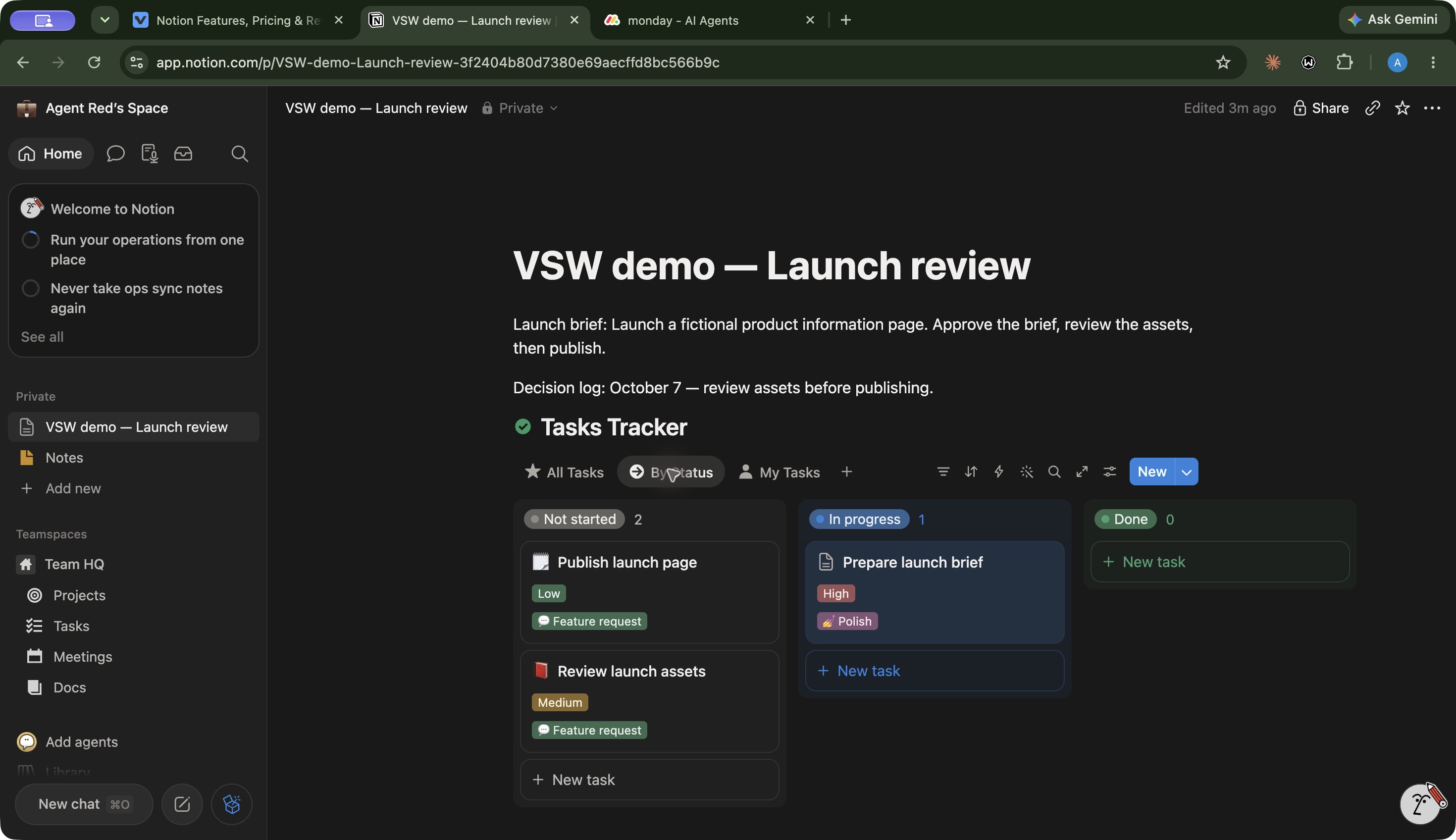
The best part of our launch workspace was seeing the brief and decision log directly above the task tracker. We could read what the project was trying to achieve, then move straight into the work. Opening the brief task added another layer: its page held audience and approval instructions alongside structured properties.
We used Notion’s Tasks Tracker template as a starting point and replaced its examples with three fictional launch tasks. The brief was In progress and due October 12; assets were Not started and due October 14; publishing was Not started and due October 16. The saved page and edited task values remained after reload.
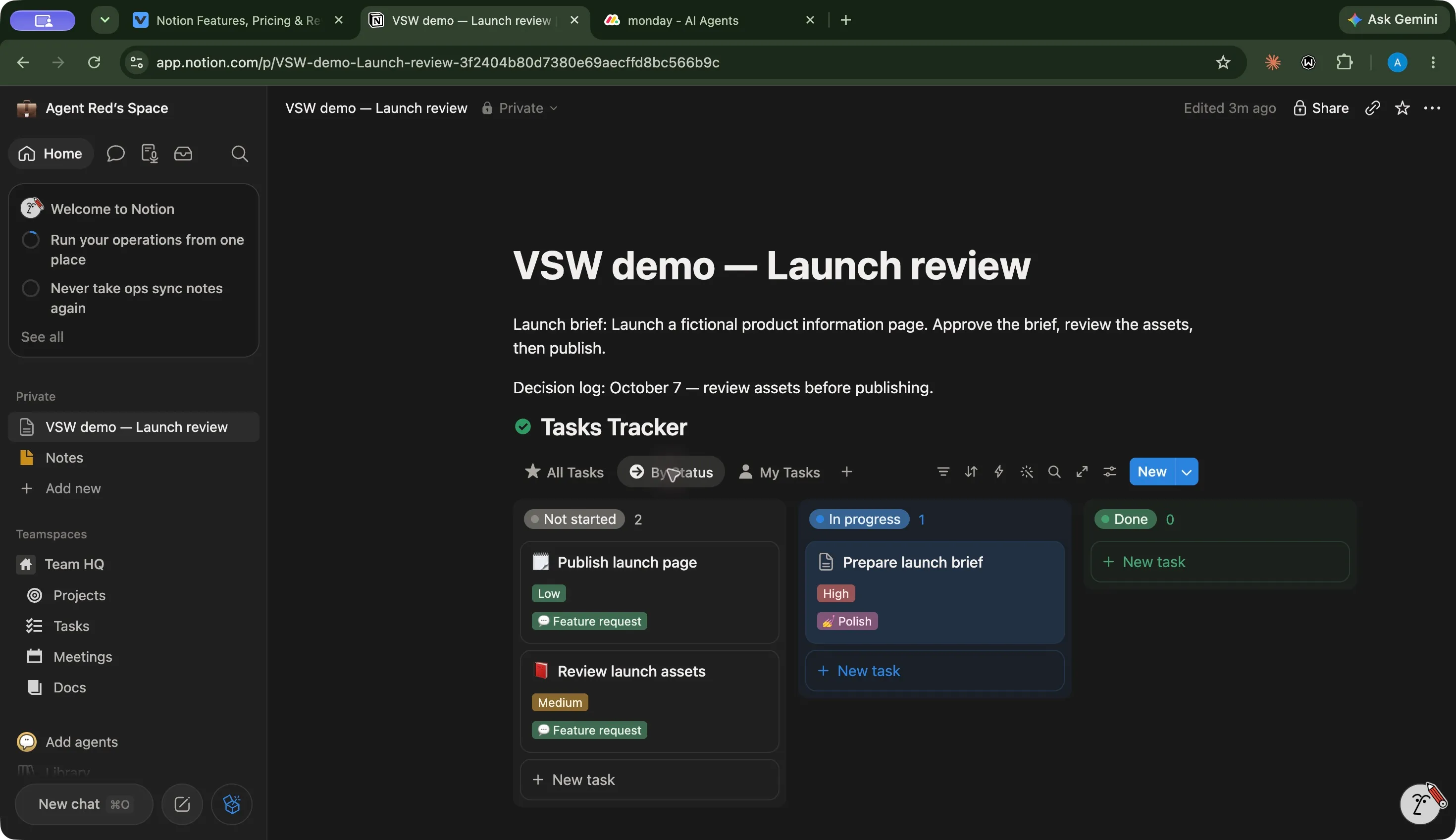
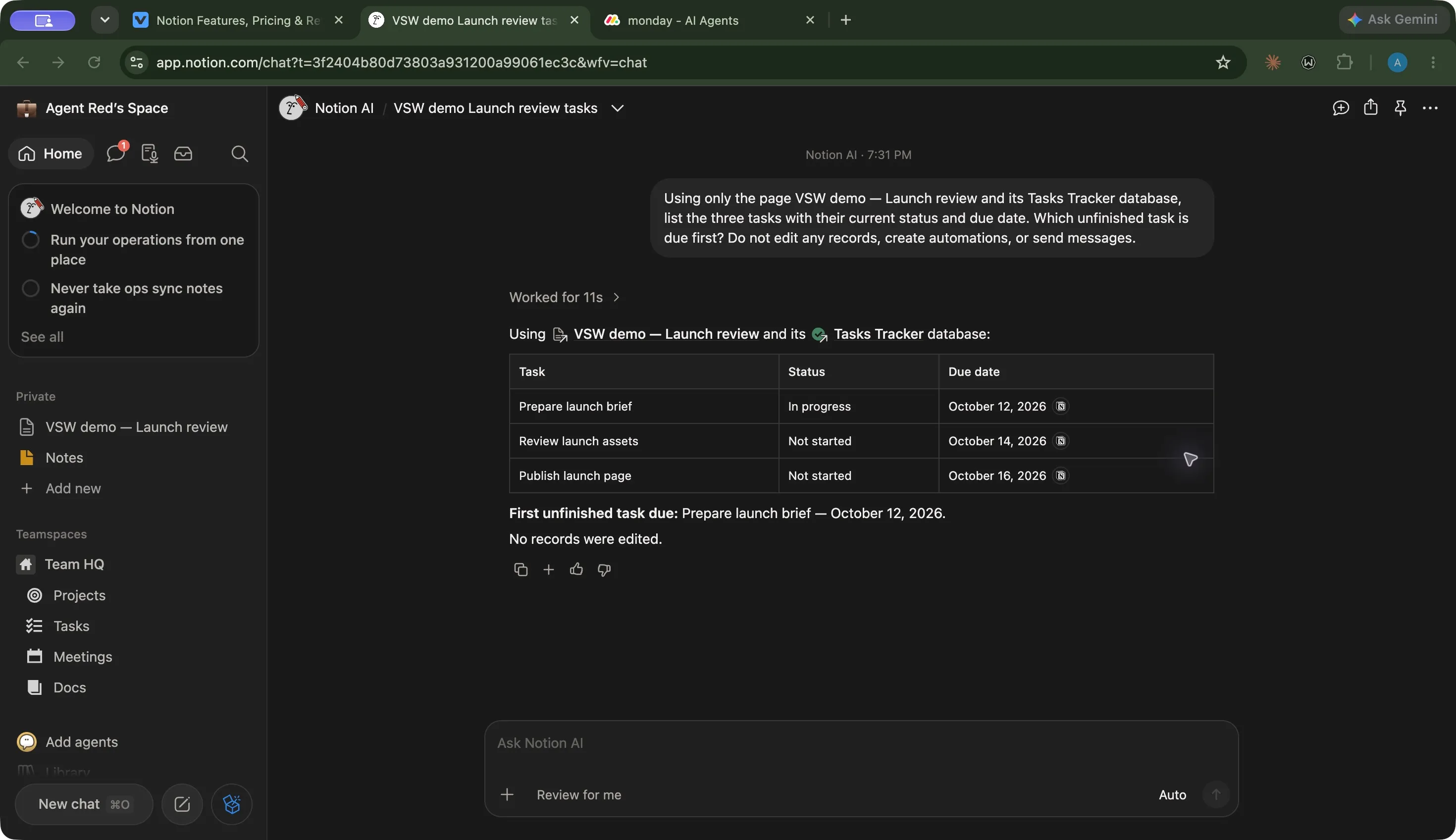
Those checks support a practical benefit: the tracker and its context can stay together without maintaining a separate project document. The three screenshots show the project home, status board and AI summary. We tested one member on Free, rather than a paid collaboration workspace.
How does the interface feel day to day?
The page canvas gave our small project a calm reading order: brief, decision, then tasks. It is a useful arrangement when a teammate needs to understand the job before jumping into it. Database records opening as pages also give richer instructions somewhere to live.
Views changed the emphasis without making us recreate the work. The table was the better place to compare our deadlines. The board made the status split immediately visible: two tasks waiting, one underway. Our default board cards showed priority and task type rather than due dates, so we returned to the table for the deadline comparison. Choose visible properties around the question your view should answer.
There is setup work behind that flexibility. The template supplied example tasks, dates, descriptions and extra fields. We replaced the task content, but left optional template fields in place. With the sidebar open, the wide table extended beyond the visible canvas; the board gave the small project a clearer status overview. A leaner selection of properties would be worth trying for everyday use.
Our takeaway is that Notion rewards a deliberate structure: useful context on the page, a few meaningful fields, and views with a clear purpose. This was a desktop workflow, so it does not establish mobile comfort, accessibility, learning time or performance with a large knowledge base.
How far does the wider workspace go?
Pages and databases are the foundation, with a wider set of tools around them. Knowledge bases help give reference material a home. Forms collect responses into databases; Sites publish selected pages; charts and dashboard layouts offer other ways to read structured work. Timeline and calendar views extend project planning beyond a table.
The AI side also deserves its own look. Notion Agent works with you on demand, AI Meeting Notes brings meeting context into the workspace, and Enterprise Search reaches supported connected sources. Custom Agents are designed for recurring work through triggers and schedules. These are different buying decisions, not one interchangeable AI feature.
We cover them in the compact feature groups below. Our hands-on evidence concerns the Free launch workflow and one AI question. We have not published a site, recorded a meeting, connected private tools or run autonomous agents. Calendar is a separate companion app, and Workers beta is a developer capability with its own usage pricing.
Can Notion AI help you find the next action?
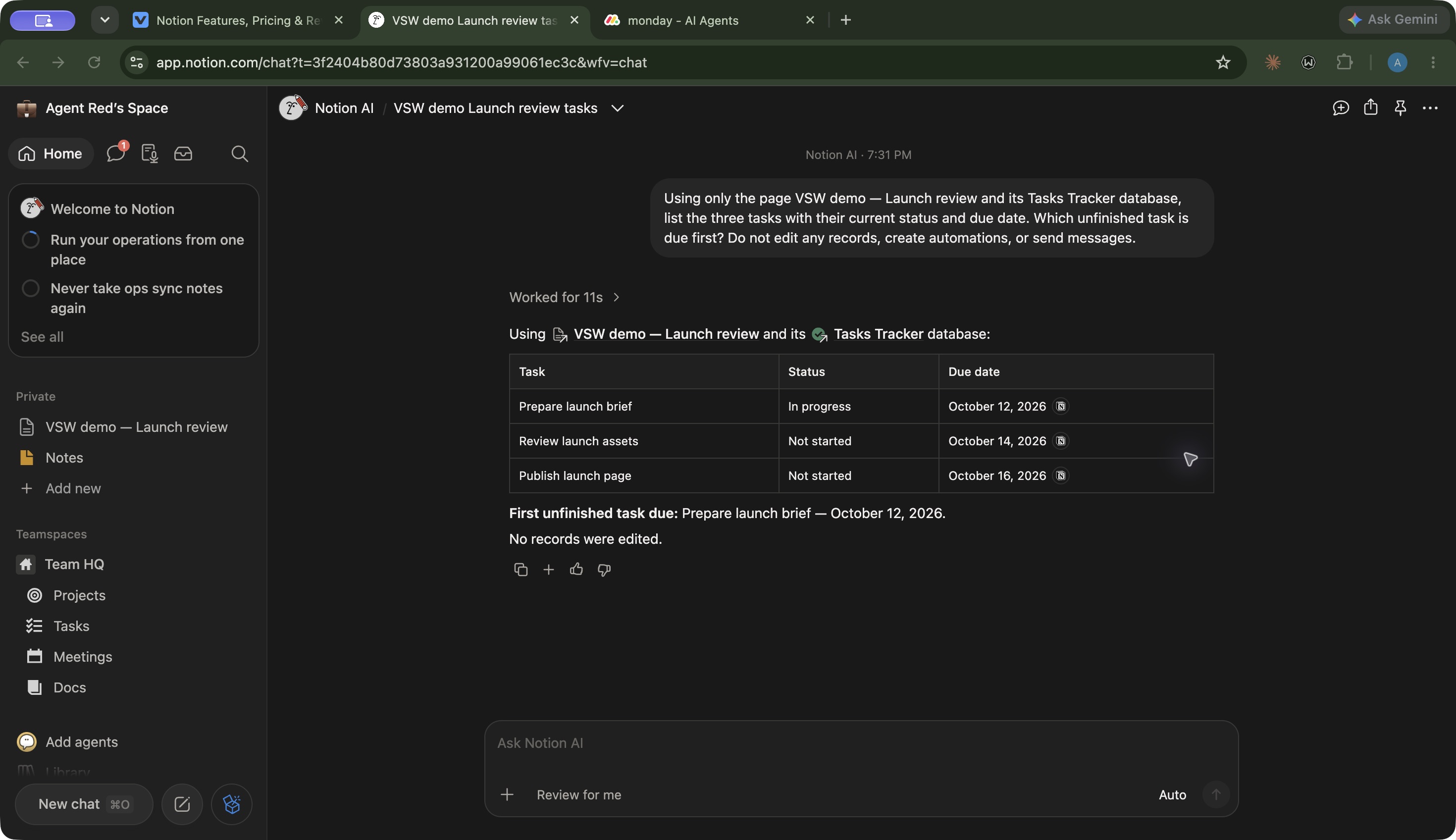
In our small test, it did. We asked about only the launch page and its tracker: list the tasks, their current statuses and dates, then identify which unfinished task was due first. The request explicitly prohibited edits, automations and messages.
The answer matched all three records, provided source links, and chose Prepare launch brief — October 12, 2026. That makes the feature easy to picture in daily work: ask a focused question, get a quick answer, then open the supporting page when you need detail.
Keep the result in perspective. This was one clean, three-task example using the limited AI trial on Free. It does not establish reliability across a large or inconsistent workspace. Notion’s plan guidance also says Plus does not renew a used AI trial allowance, so upgrading for more collaborative space should not be confused with buying ongoing AI access.
When is it worth paying?
Free is a good way to explore the page-and-database approach on your own. Its collaborative block limit, 5 MB file limit and seven-day history become more relevant when other people and larger files enter the workflow. Plus adds more collaborative room and longer history; Business brings ongoing AI and more selective team access. See the current plan comparison.
With USD and annual billing selected on October 7, Plus was $10 per member per month and Business $20. For an illustrative three-member workspace:
Annual seat cost
Calculation
USD
Plus
3 × $10 × 12
$360
Business
3 × $20 × 12
$720
These are seat-only examples, not quotes. Taxes, custom domains, credits and other extras are excluded, and plan availability can vary by workspace. Members and guests also play different roles: a guest’s access is page-specific, so use the role that fits the collaboration you need.
For Custom Agents, budget eligible Business or Enterprise seats and usage credits. Current pricing advertises a trial followed by $10 per 1,000 monthly credits. Do not assume the Business seat price covers unlimited autonomous work.
What should you think through before adopting it?
Start with the information people need at the moment they do the work. In our example, the brief and approval decision belonged above the tracker; the audience instructions belonged inside the relevant task. That small choice made the page useful without building an elaborate system.
Agree on a few fields and reusable views before adding more. A template can save the blank-page effort, but inherited fields and example content are worth reviewing. Decide who maintains shared knowledge and how a reader recognizes the current version of a document.
Then name the capability that would justify an upgrade: collaborative capacity, longer recovery history, ongoing AI or more granular access. Full database automation creation is mainly paid, with documented Free exceptions. Permissions, integrations and autonomous workflows need their own evaluation; our one-person project cannot answer those questions for a team.
Our buying recommendation
Try Notion when your project work and knowledge keep drifting apart. Its most convincing benefit in our review was giving the brief, decisions and tasks a shared home, with enough room inside each record to explain the work. The AI trial added a useful shortcut to the next deadline.
Begin with a small workspace people can understand and maintain. If that becomes a place they return to, price the collaboration and AI features you actually need. Notion has room to grow with the workflow; the value comes from building a useful working space, rather than filling it with every available feature.
Notion features
24 features · 8 categories
Browse all 24 features
01
Pages and team knowledge
3
Docs beside your work
Free plan tested
Bring a brief, decisions and a task tracker together on one page, so the context is close to the next action.
In our test: Our launch brief and decision log sat above an inline Tasks Tracker. The edited page and deadlines remained after reload.
Start from a template, then adapt its fields and views to the way your team works.
In our test: The template supplied table and board views, plus sample records. We replaced the names, dates, statuses and descriptions before evaluating our launch workflow.
No matching features. Try another term or clear the search.
Plans & pricing
USD prices checked October 7, 2026 with Pay yearly selected: Free $0, Plus $10 and Business $20 per member/month; Enterprise is quoted. Plans may not be available for every workspace. Free and Plus have limited AI trials; Plus does not renew used trial allowance. Custom Agents require Business or Enterprise and separate Notion credits, advertised at $10 per 1,000 monthly credits after the trial. Custom domains and other usage can add costs.
Prices in USD
Free
A useful starting point for individual work.
$0
Unlimited individual pages and blocks
Basic forms and sites
One chart
Collaborative blocks limited for 2+ members; 5 MB per file, seven-day history and limited AI trial. Tested with one member.
Plus
More room for a collaborative workspace.
$10
member / month · annual billing
Unlimited collaborative blocks
Custom forms and sites
Unlimited charts
30-day history. AI remains a limited trial; plans may not be offered to every workspace.
Business
AI and more selective team access.
$20
member / month · annual billing
Notion Agent and AI Meeting Notes
Enterprise Search
Private teamspaces and granular database permissions
90-day history. Custom Agents use separate credits. Paid capabilities not tested.
Enterprise
Administration for larger organizations.
Contact sales
SCIM provisioning
Audit log and advanced controls
Unlimited page history
Quoted pricing and workspace eligibility; not tested.
Yes. Our one-member Free workspace supported a brief, task database, table and board views, edited dates and statuses, and database search. Team collaboration, file sizes, history and AI have separate limits.
Free and Plus provide limited trials of Notion AI. Notion says upgrading to Plus does not renew an already-used trial allowance. Business and Enterprise include ongoing AI access; Custom Agents still have separate credit terms.
Custom Agents require Business or Enterprise. They are advertised as free to try, then $10 per 1,000 monthly Notion credits. That usage is separate from the workspace seat price; check your intended workload before buying.
Is Notion better for knowledge or task management?
Its strongest appeal in our workflow was connecting both: a brief and decisions above a tracker, with more context inside each task page. It is worth evaluating when work relies on documentation; the right structure still needs to be designed and maintained.


 View full screen
 View full screen
 View full screen