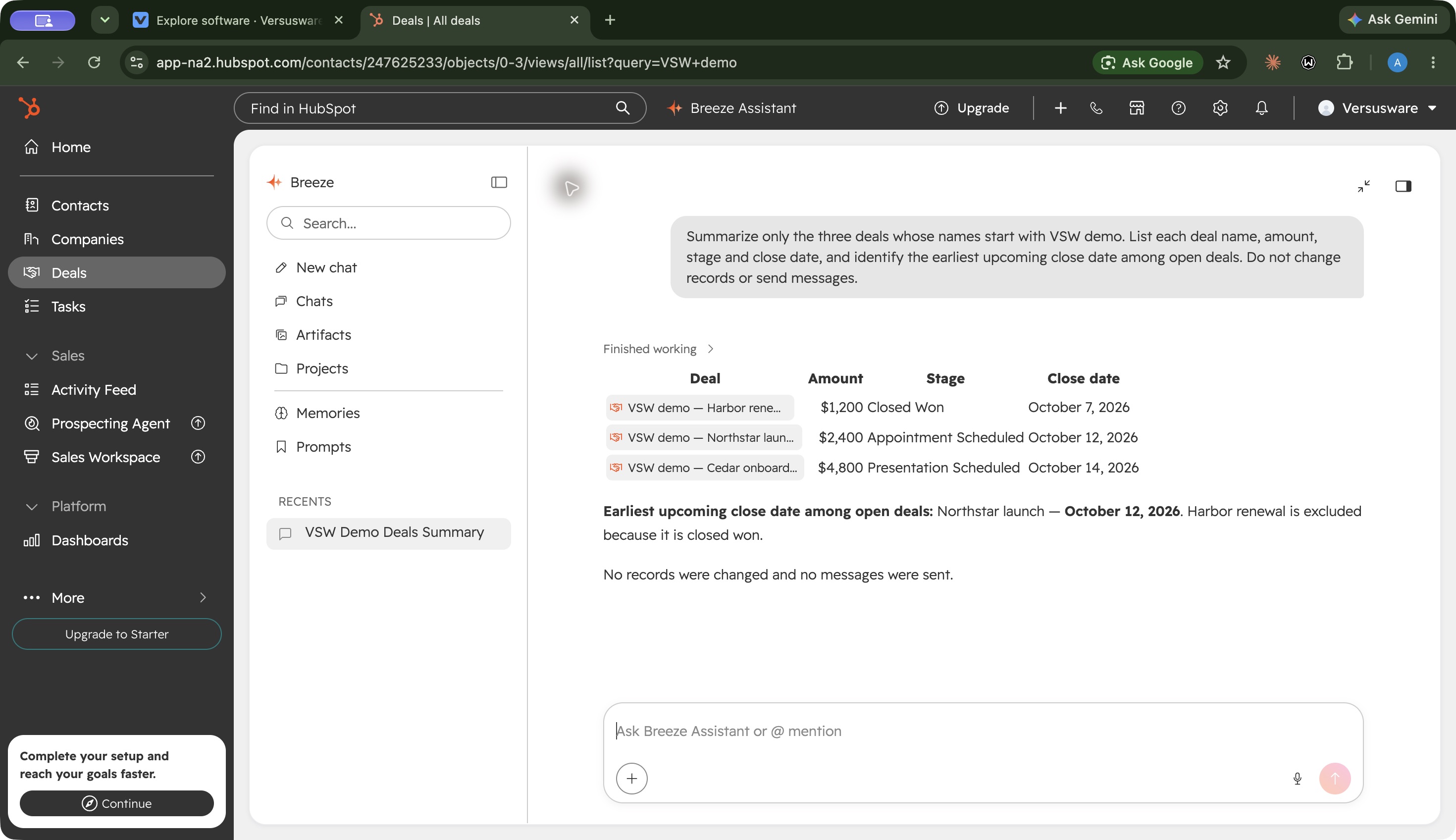
Pipeline · Two open demo opportunities in different sales stages.
1 / 3
What is HubSpot Sales Hub?
HubSpot Sales Hub builds sales tools around shared customer and deal records. It suits teams that want pipeline work, follow-ups and reporting in the same environment. Our Free Sales Tools test handled three fictional opportunities, preserved a deal note and stage change, and returned an accurate Breeze summary. Advanced automation and sales management require a closer look at paid editions.
Start with Free if one or two people need a basic sales pipeline. Our test kept deal records and activity consistent, and Breeze answered a small pipeline question accurately. Professional becomes a separate buying decision: sequences and forecasting may justify it, but annual seat costs and required onboarding need a clear business case. We have tested the Free foundation; paid-tier value remains a research-based assessment.
How we tested HubSpot Sales HubTested Oct 7, 2026
Assistant-led Chrome testing on an account explicitly labeled Free with Free Sales Tools. We used fictional opportunities and did not purchase an upgrade.
Three demo deals, amounts and close dates, board/table retrieval, a saved note, a Closed Won stage change and reload, one Breeze summary, and inspection of the automation panel. Three general screenshots. Email sending, mailbox sync, team collaboration, autonomous agents, integrations and paid plans were not tested.
Screenshots captured on Oct 7, 2026 with fictional records and demo owners.
HubSpot Sales Hub review: is the Free CRM enough?
Who is HubSpot Sales Hub for?
HubSpot Sales Hub is worth considering when your work revolves around customer conversations and opportunities: who owns a deal, what happened last, and when it might close. Our recommendation is to begin with Free if one or two people need that foundation, then identify the specific sales process that would justify a paid edition.
The attraction is the shared CRM context. A deal’s amount, stage, close date and activity live together, and our Breeze question could draw on those records. That makes it a useful candidate for a team that wants sales work organized around customers.
There are reasons to look elsewhere. Free’s two-user limit matters immediately for a larger team. A team shopping mainly for project delivery or a flexible internal database has a different starting point; see our Asana review and Airtable review. This review covers Sales Hub, rather than the cost or performance of HubSpot’s full marketing, service and commerce suite.
What worked in our Free CRM test?
We tested a small sales pipeline on October 7, 2026, using three fictional opportunities in an account explicitly labeled Free Sales Tools. Northstar was worth $2,400, Cedar $4,800, and Harbor $1,200. Each had a different stage and planned close date. A name search retrieved all three, and their table values matched the saved records.
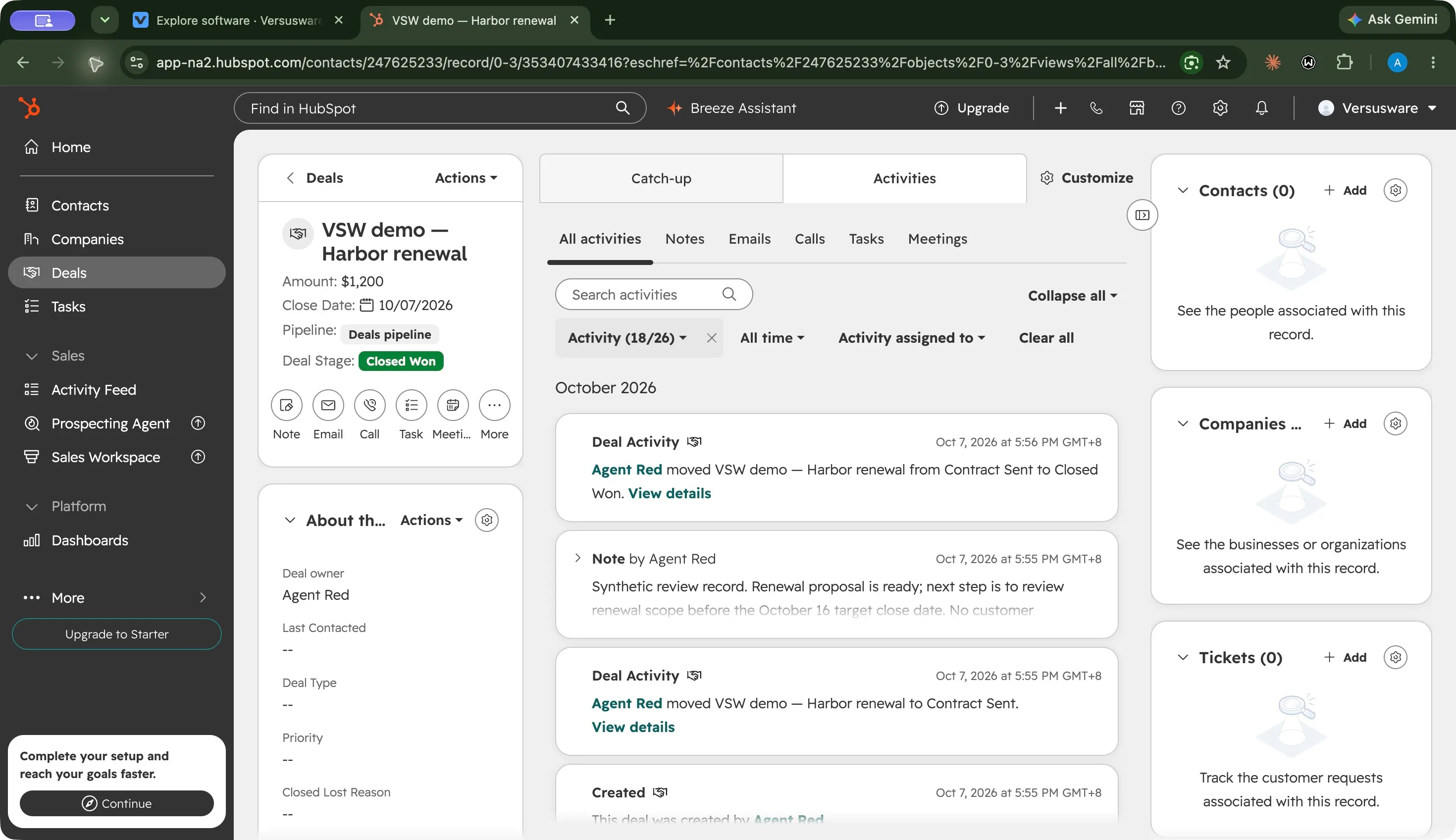
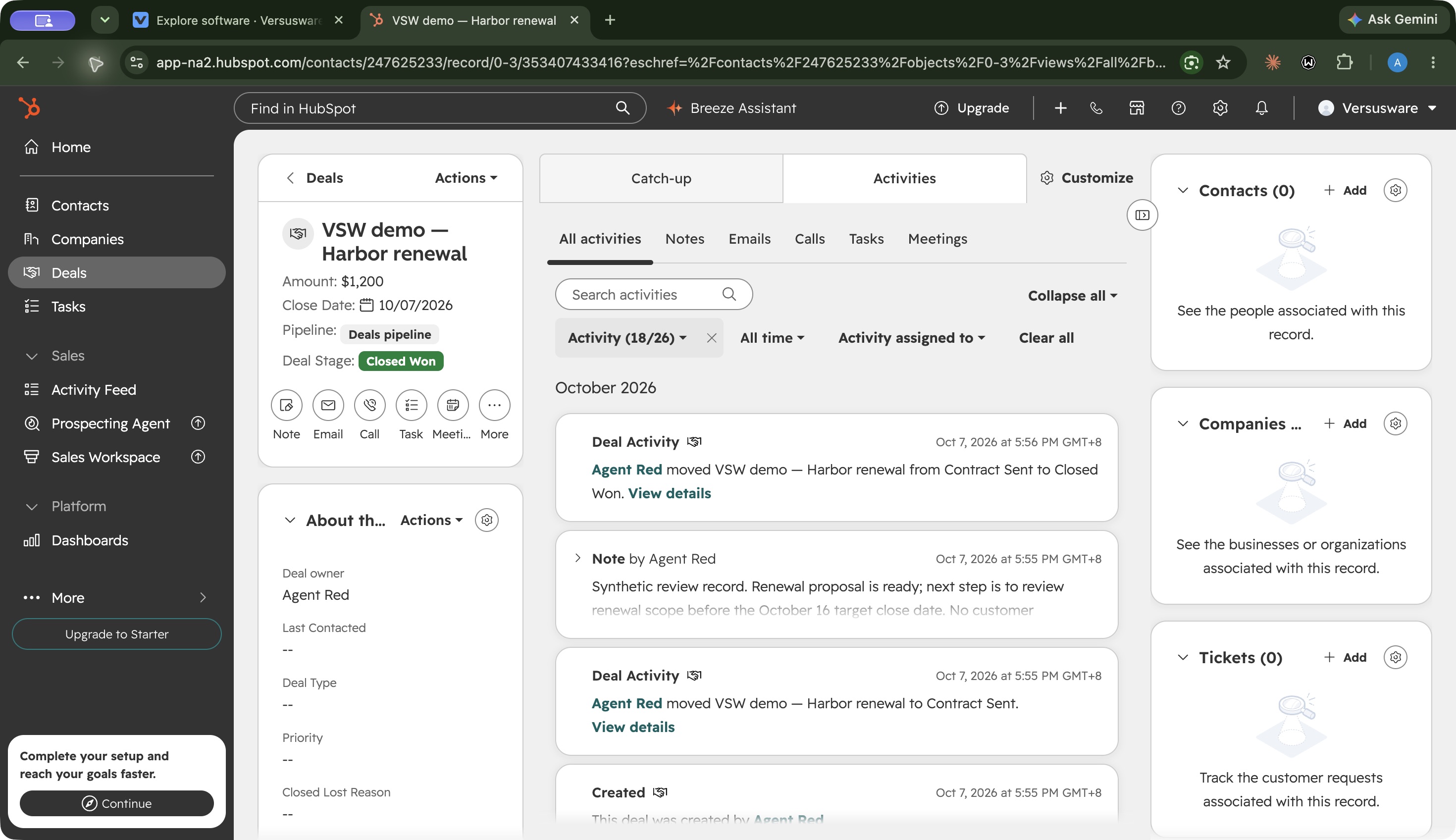
The useful result came from updating Harbor. We saved a renewal note, moved the deal from Contract Sent to Closed Won, and reloaded the record. Its amount, note and new stage persisted, while the activity history showed the transition. For the everyday job of keeping a small pipeline current, the saved activity and consistent records were useful.
We also found a default worth checking before adopting the tool: marking Harbor won changed its close date from October 16 to October 7, the day of the change. HubSpot documents this close-date behavior. If your team distinguishes an expected close date from the date a deal actually closes, agree on how those fields should be used before relying on a report.
How does the interface feel in everyday use?
For our basic pipeline workflow, HubSpot’s strongest usability point was keeping deal context together. The record combined its amount, stage and close date with the saved note and activity history. After reloading, we could check what changed without reconstructing the update from a separate document.
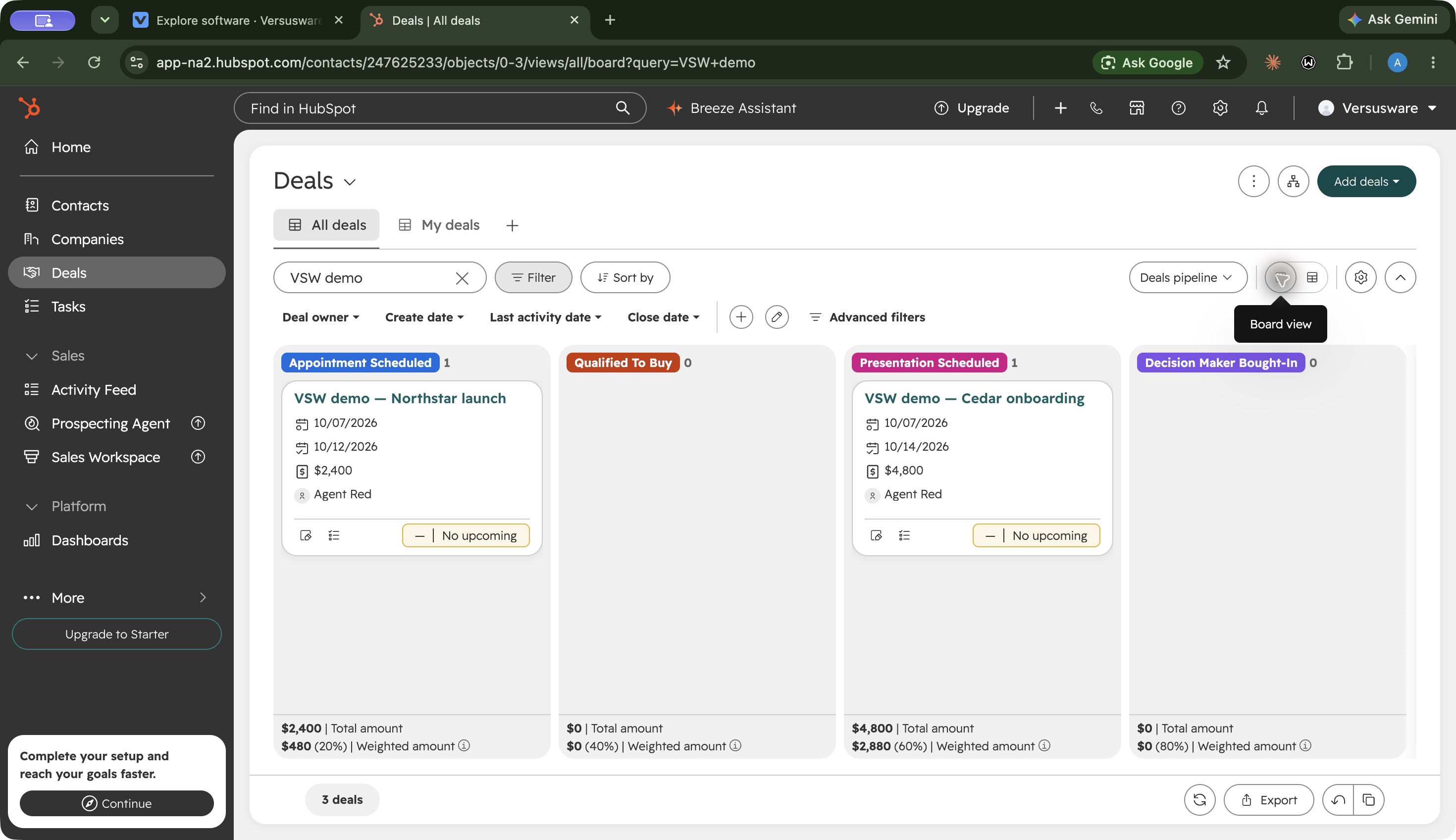
The board and table served different purposes. The board made the two open opportunities’ stages visible, while the table let us compare all three demo deals and confirm their amounts and dates. The won deal sat outside the visible board columns in our captured view. For this workflow, switching to the table and using the name search gave us a more complete check than relying on the visible board alone.
The automation panel also communicated a boundary: suggested actions were disabled and explicitly labeled available at Starter. That helped explain why we could see an option but could not use it on Free. Teams should still check the edition required for the full process they want to build.
Our usability judgment is therefore specific: the deal record worked well for reviewing context, and the view choice mattered when checking the whole pipeline. This was a desktop test of three records. We have not established a new user’s learning time, mobile usability, accessibility or responsiveness with a large dataset.
Where does Free end and paid begin?
Free handled our records, notes, view checks and Breeze question. It did not give us the suggested automation actions in the deal panel: those were disabled and labeled available at Starter. That was an observed boundary in the tested account.
The broader Sales Hub pricing comparison puts sequences, forecasting and the full workflow builder in Professional or Enterprise. Starter is an intermediate step for simpler automation. These editions solve different needs; paying for Starter should not be assumed to unlock Professional’s sales processes.
Before upgrading, write down the job you need to automate or manage. Is it a simple deal-stage follow-up, a repeatable outreach sequence, or a manager’s forecast? Check that job against the edition and seat requirements. A feature appearing in HubSpot’s navigation does not establish that it is included in your subscription.
What could Professional cost in the first year?
The headline price leaves out part of the decision. On October 7, HubSpot advertised Professional from $90 per Sales seat per month with annual billing, plus $1,500 required onboarding.
For an illustrative purchase of three Professional Sales seats:
Cost item
Calculation
USD
Annual seats
3 × $90 × 12
$3,240
Required onboarding
One-time starting fee
$1,500
First-year total
Seats plus onboarding
$4,740
This is arithmetic using published starting rates, not a vendor quote. It excludes taxes, add-ons, other Hubs and additional usage charges. Confirm your actual seat requirements and terms. Monthly payment can still involve an annual commitment; the payment schedule and commitment are separate questions.
Our view is that the upgrade needs a measurable reason: less manual follow-up, a required sales process, or reporting your team will actually use. Our Free test establishes the CRM foundation, but cannot demonstrate that Professional will earn back its cost for your business.
Is Breeze useful for everyday sales work?
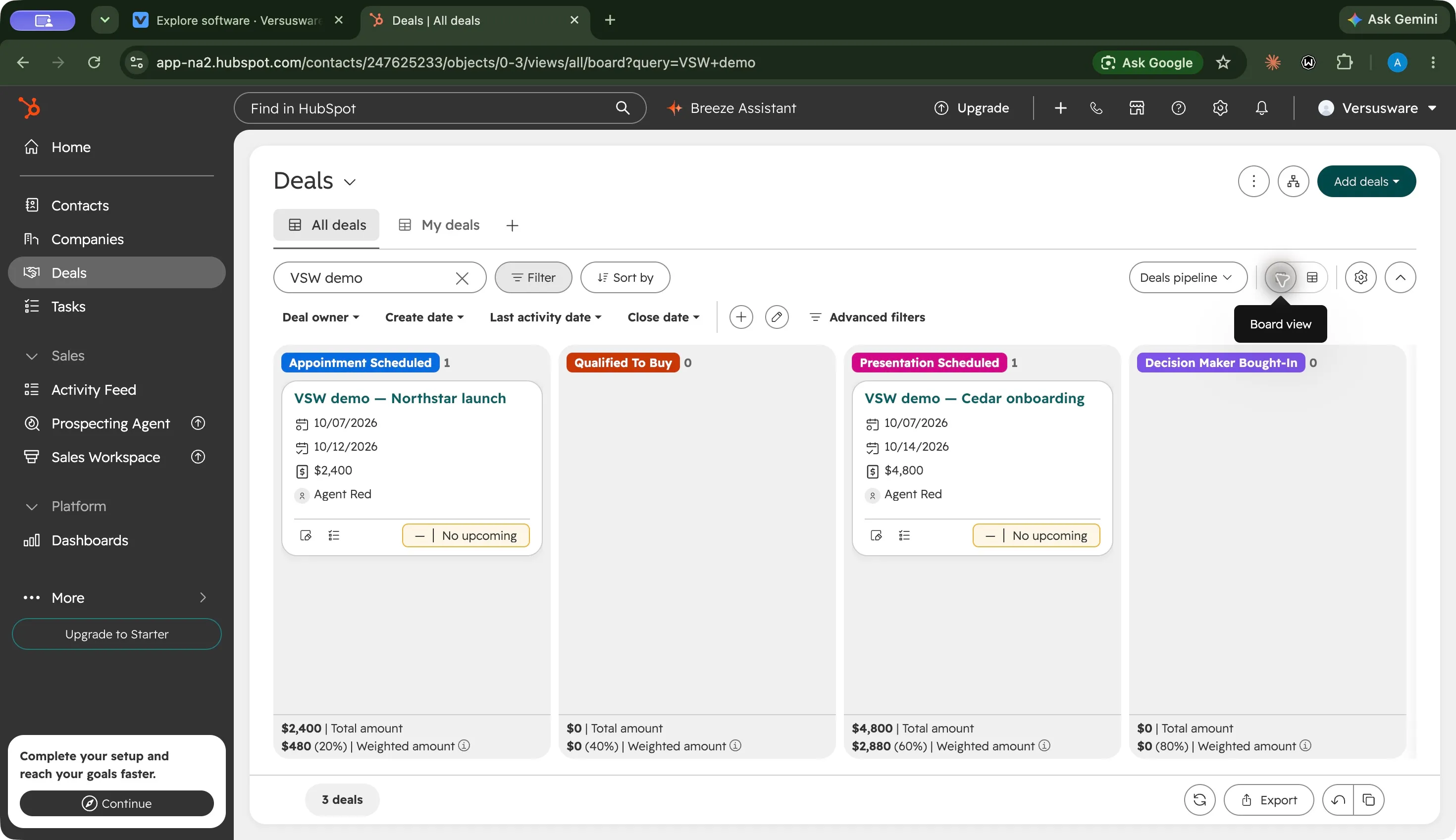
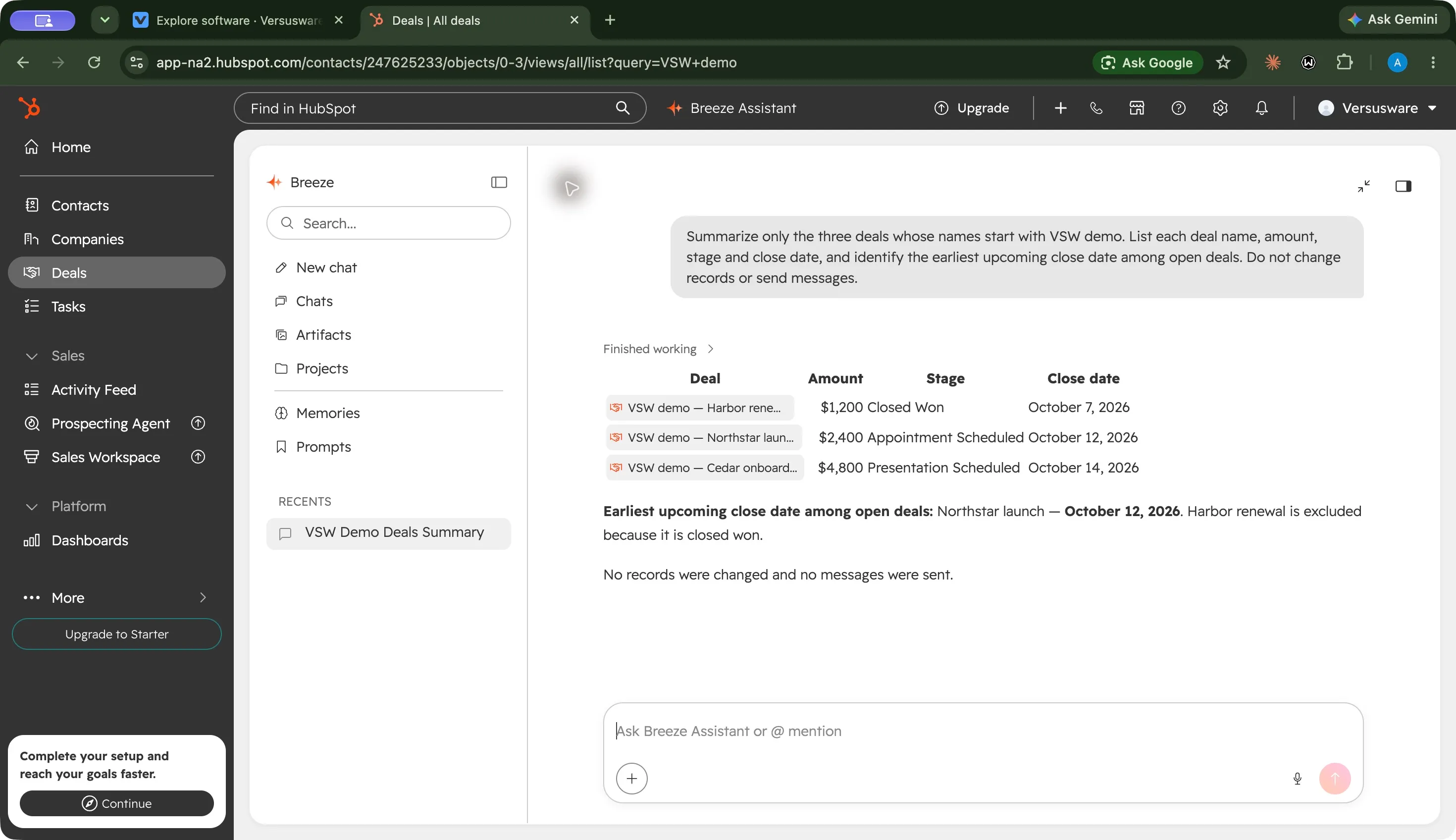
In our single test, yes. We asked Breeze to summarize only the three demo deals, list their amounts, stages and close dates, and identify the next upcoming close date among open deals. We explicitly told it to leave records unchanged and send no messages.
The answer matched all three records and linked back to them. It correctly selected Northstar’s October 12 date and excluded the won Harbor deal from the upcoming open-deal calculation. Choose the Breeze image in the three-screenshot gallery to inspect that result.
That supports a practical use: asking a question about a small, clearly defined pipeline, then checking the underlying records. It does not establish autonomous prospecting quality, outreach performance or accuracy across a large, messy CRM. Breeze Assistant and the separately described prospecting agents should be evaluated as distinct capabilities.
What are the main tradeoffs?
The CRM foundation worked in our small test. Records remained consistent after edits and reload, and the linked AI answer was useful. That is the clearest reason to try Free with a representative pipeline of your own.
The path to advanced sales tools changes the budget. Edition boundaries, sales seats, onboarding and commitments matter more than the lowest advertised monthly price. Check renewal terms on Starter’s promotional offer and price the edition that actually includes your required tools.
Defaults can affect the meaning of your data. Our won-deal close-date change was visible and documented, but a team must understand that behavior before interpreting pipeline history.
The evidence has a defined scope. We tested one Free account and three fictional deals. Email delivery, mailbox integrations, paid workflows, multi-user permissions, migrations and autonomous agents were outside this workflow. The feature groups below describe those broader capabilities from official sources.
Our buying recommendation
Use Free to decide whether HubSpot’s customer and deal structure fits your daily sales work. Our test supports that starting point for a basic pipeline with one or two users. Bring realistic stages, amounts and date rules to your own evaluation, and check that everyone understands what a record means.
Move to a paid evaluation when you can name the missing process, confirm its edition, and budget the full commitment. That is the decision this review can support today: a tested Free foundation, with a clearly priced and separately assessed route to more advanced sales operations.
HubSpot Sales Hub features
16 features · 6 categories
Browse all 16 features
01
CRM and deal pipelines
3
Deal stages and pipeline views
Free plan tested
Track opportunity amounts, ownership and close dates in a board or table. Search and filters narrow the records in view.
In our test: We created three demo deals and retrieved all three with a name search. The board showed the two open opportunities in their saved stages.
Keep notes and sales activity beside the deal rather than in a separate document.
In our test: A saved renewal note and the transition from Contract Sent to Closed Won survived reload. Closing the deal also changed its close date to today in the default pipeline.
Ask questions using CRM records as context and follow the answer’s record links.
In our test: Breeze returned the correct amounts, stages and dates for all three demo deals, and identified October 12 as the earliest upcoming close date among open deals.
Research prospects and prepare personalized outreach through HubSpot’s prospecting agent. Availability and usage allowances need checking separately from Assistant access.
Sales Hub sits within a broader platform with marketing, service, content, data and revenue products. A shared account does not mean every Hub’s paid features are included.
No matching features. Try another term or clear the search.
Plans & pricing
USD pricing checked October 7, 2026. Free tools support up to two users. Starter was advertised from $7/seat/month under a promotional offer; confirm the billing term and renewal price. Professional starts at $90 per Sales seat/month billed annually, plus $1,500 required onboarding. Enterprise starts at $150 per Sales seat/month billed annually, plus $3,500 onboarding. Paying monthly can still involve an annual commitment. Other Hubs and usage credits can add costs.
Prices in USD
Free
Core CRM and sales tools.
$0
Up to two users
Deal tracking
Basic meeting scheduling
The account used for this review was explicitly labeled Free.
Starter
Entry paid sales tools.
$7
seat / month · promotional
Expanded sales-tool limits
Simple automation
Starting promotional offer shown on October 7, 2026; confirm billing commitment, eligibility and renewal price.
HubSpot offers Free Sales Tools alongside paid Sales Hub editions. Our account was labeled Free and supported the tested deal records, notes, views and Breeze question. This does not include every paid sales feature.
The deal automation panel in our Free account showed suggested actions as available at Starter. The full workflow builder is a separate Professional/Enterprise capability, with eligibility depending on the Hub and action.
Yes. In our test it summarized all three synthetic deals accurately and excluded the won deal when identifying the next upcoming close date. That is one small test, not a guarantee for larger or messier CRM data.
Why did a deal’s close date change when it was won?
Our default pipeline automatically changed the close date to today when we moved the deal to Closed Won. HubSpot documents automatic close-date behavior; check your deal and pipeline settings if you need a different process.


 View full screen
 View full screen
 View full screen