Begin with Wrike’s welcome workspace: a tour of the tools around your projects. The illustrated dashboard is part of the welcome tour.
1 / 5
What is Wrike?
Wrike becomes interesting when a project needs more than a list of tasks. Requests, linked schedules, review stages and team capacity can sit around the same delivery process. In our Pinnacle-trial launch workflow, extending an assets deadline moved the next linked task, and a submitted brief became work in the project. That connected approach is the reason to shortlist it; the right plan and some thoughtful setup make the difference.
Shortlist Wrike when your team needs a clear path from incoming requests to scheduled, reviewed delivery. Its connected handoffs and structured intake were the strongest moments in our launch workflow. Team suits smaller groups needing better planning; Business is the more relevant starting point for forms and resource coordination. Consider Pinnacle or Apex when advanced planning or a wider operational bundle justifies the quote.
How we tested WrikeTested Oct 9, 2026
Assistant-led testing in Chrome on a verified 14-day Pinnacle trial, using a fictional launch project. We edited task status, dates and description, checked persistence and alternate views, searched the project, submitted a sample work request and asked Copilot one read-only project question.
A small launch workflow with three original tasks, two onboarding subtasks and one form-created request. Findings describe this workflow and current official plan information.
Screenshots captured on Oct 9, 2026 with fictional records and demo owners.
Wrike review: from incoming requests to connected project delivery
Who should put Wrike on the shortlist?
Wrike is a strong candidate when work arrives as requests and leaves as coordinated delivery. Think launches, creative production or operational projects where a brief needs an owner, the next step depends on the previous one, and someone needs to approve the outcome.
The appeal is the connected process. A task list tells you what to do; Wrike can also show how those tasks fit together, gather the context that starts them and bring capacity into the planning conversation. That extra structure is most useful when handoffs have become a regular source of chasing and confusion.
What stood out in our launch workflow?
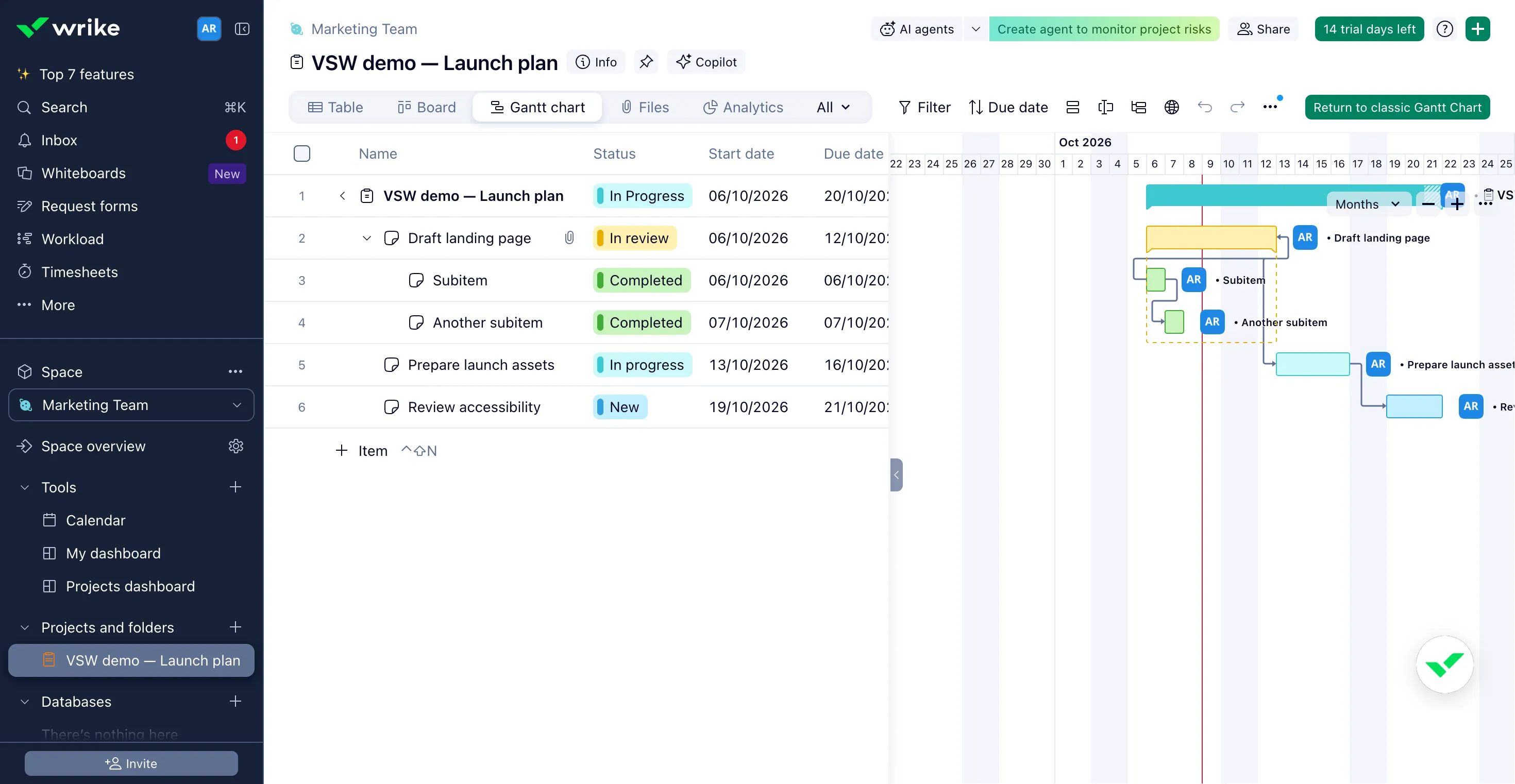
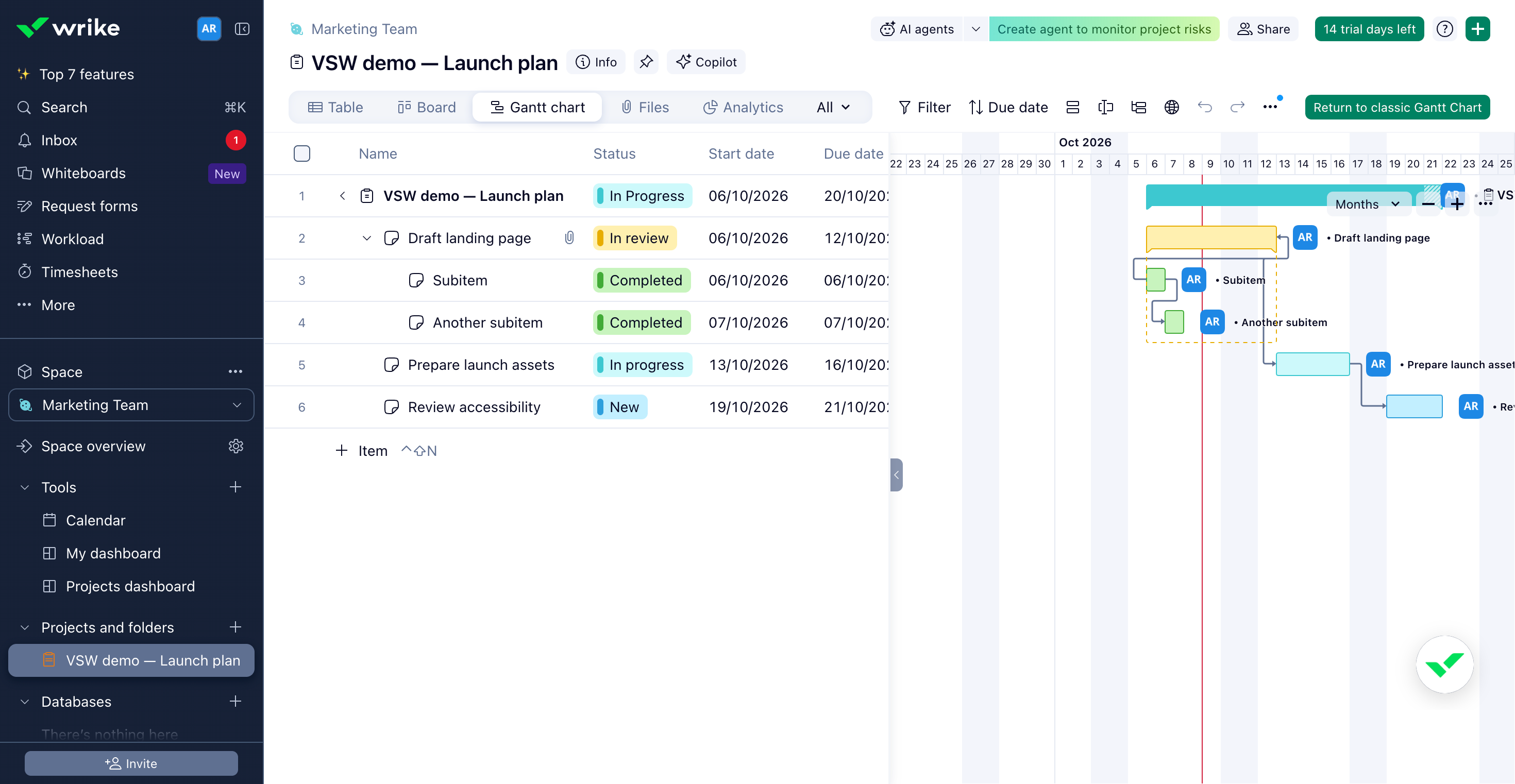
The best moment came when we extended the assets deadline by a day. Its linked accessibility review moved into the next working-day window, October 19–21. The handoff stayed connected instead of leaving a separate task with an outdated schedule. The Gantt view made that revised sequence easy to see.
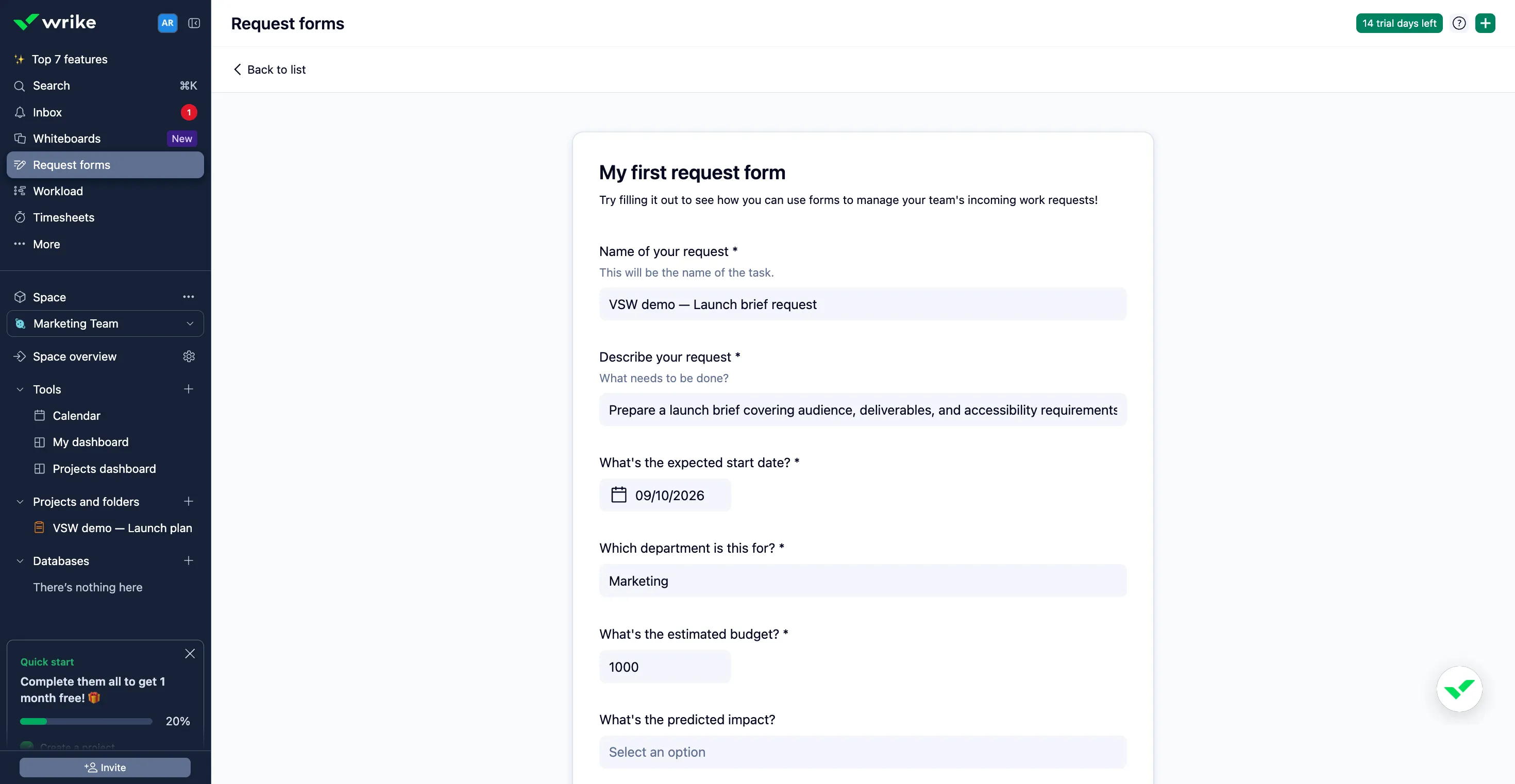
The request form offered another practical win. We submitted a fictional launch brief with a start date, department and budget. Wrike created a New task inside our launch project and carried the brief and department into its description. For a team collecting requests across messages, that is an inviting way to begin work with useful context already attached.
How does the interface feel in everyday use?
The workspace has a clear project center: a table for detail, a board for status and a Gantt chart for sequence. Task details bring the description, files and dependencies alongside the plan. Switching the conversation from “what is this?” to “what comes next?” feels natural when those perspectives belong to the same project.
Colored status pills make the table readable, and project search helped us return directly to the accessibility task. In the board, the original launch tasks fell into New, In progress and In review. It is a useful way to start a check-in before opening individual tasks.
The tradeoff is density. The sidebar has spaces and tools, projects have several views, and opening task details or Copilot narrows the table. Wide projects benefit from choosing the fields that matter and giving the timeline a suitable scale. Spend the setup time on a sensible hierarchy and workflow so the team can settle into a clear everyday routine.
What makes the scheduling useful?
Wrike’s Gantt chart puts dates and dependencies into a visual plan. In our launch, the extended assets task pushed its successor into a later working-day window. The saved change appeared in the table and schedule after reload.
That makes Wrike appealing for projects with real handoffs. A delayed asset can affect review, and review can affect delivery; seeing that chain helps the team discuss the consequences. The project’s own October 20 due date remained unchanged in our example, so the revised child schedule still needed a decision about the overall commitment.
Calendar view adds a date-led perspective on Team and above. Shared Calendars, available on Business and above, extend that coordination across work streams. They are separate capabilities in the current plan matrix.
Why are request forms worth a closer look?
Forms let the requester focus on the brief while the delivery team keeps its structured project. Our sample asked for a name, description, start date, department, budget and optional impact or files. Required-field checks prevented submission until the needed information was supplied.
The form toolkit goes further with conditional questions, answer-based routing and creation from reusable project structures. That is useful when different request types need different questions or destinations. Business is the first current tier that includes request forms.
Blueprints, custom item types and rule-based automation extend the same idea: give recurring work a dependable starting point and make routine transitions easier to manage. Decide what a good request looks like before building the form around it.
Where do Copilot and agents fit?
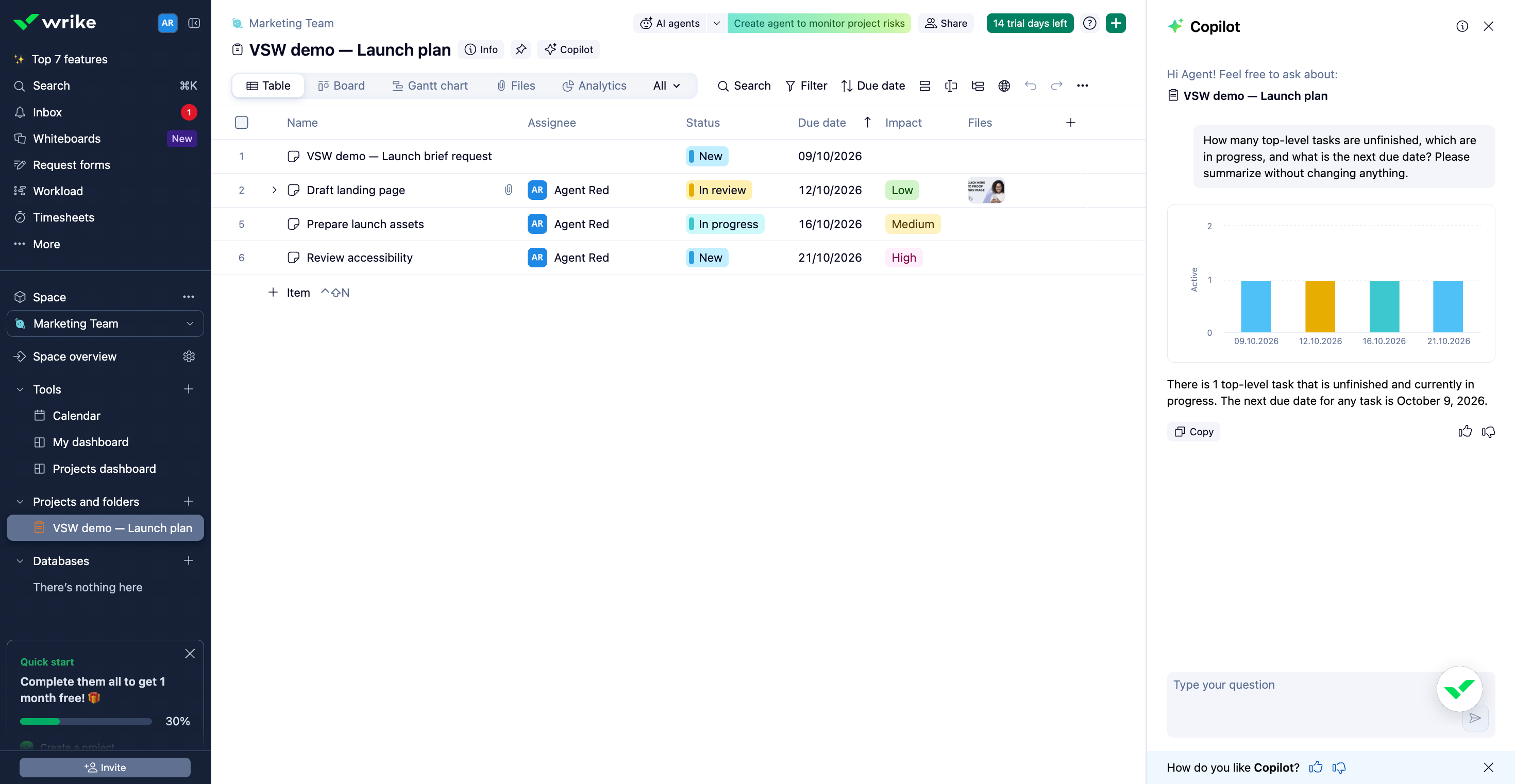
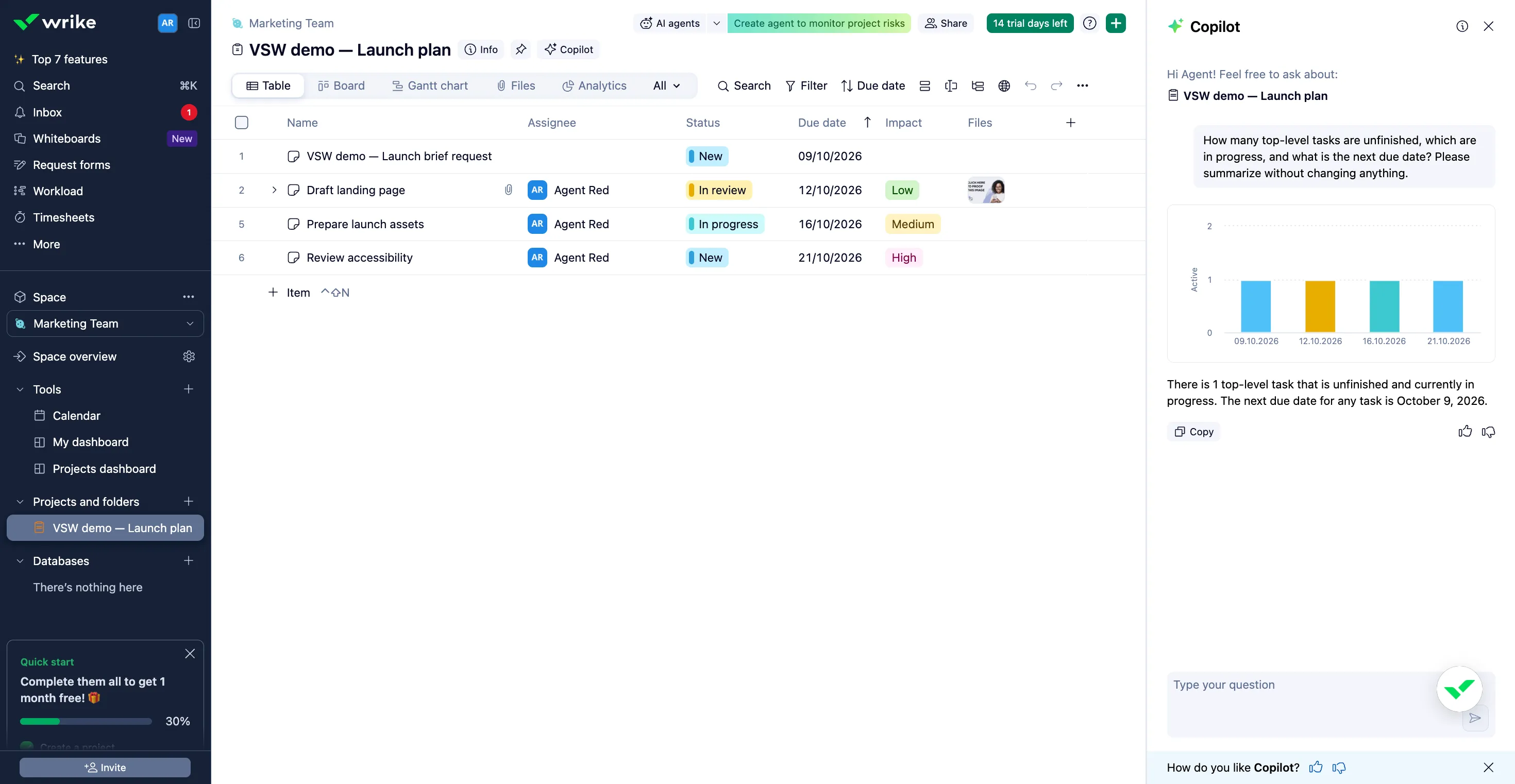
Copilot sits beside the project, ready for a natural-language question. We asked for unfinished top-level tasks, work in progress and the next due date. It produced a chart showing four active tasks by date and status, and correctly identified October 9 as the next deadline after our form-created request.
The written reply was less complete. It counted the one task that was both unfinished and in progress, but did not give the total unfinished count or name that task. The chart helped, yet the answer still needed the source table to finish the briefing. Use it as a convenient starting point and check that it has answered each part of the question.
AI agents take a different role: configured workflow actions such as validating intake, routing work and checking project risks. Their value depends on a clear process and suitable controls. Business and above include AI Elite allowances; higher tiers expand the action volume, and additional packs are available. Check the specific tool and allowance when comparing plans.
What else belongs in the buying decision?
Wrike reaches beyond project views. Workload and effort planning help teams discuss capacity; time tracking and timesheets keep recorded effort close to delivery. Approvals and proofing make it relevant to creative work that needs a clear sign-off process. Business brings these capabilities into the current package.
Dashboards and reports provide a wider view for stakeholders. Pinnacle adds deeper resource planning, budgets and Wrike Analyze, alongside advanced administration. Apex bundles Wrike Integrate, Two-Way Sync and unlimited Whiteboards with a higher AI action volume. These are reasons to consider a broader rollout once the everyday project process is working well.
Which Wrike plan makes sense?
Free is a starting point for essential tracking. Team adds Gantt planning and custom fields for smaller groups of 2–15 users. Business, for 5–200 users, is the tier to examine when forms, reusable delivery structures, workload and time tracking are central to the job.
The checked USD annual rates are $10 per user/month for Team and $25 for Business. Pinnacle and Apex need a quote. Wrike sells seats in bundles, and Business and above use annual billing, so the headline per-user rate is only the beginning of the budget discussion. Confirm the number of paid seats, AI action volume and any integration or other add-on your process needs.
Our account opened a 14-day Pinnacle trial. That made a broad set of tools visible; it does not mean every tool shown in the gallery is part of Free or Team. Use the plan details above to match the workflow to the subscription.
Is Wrike worth considering?
Yes, when the team needs a clearer path from request to scheduled delivery. The connected date handoff and form-created task gave our small launch workflow a practical shape, and the different views made it easier to discuss the same work from several angles.
Wrike asks for more setup than a simple task list. For teams coordinating briefs, review stages, dependencies and capacity, that setup can give the work a useful shared structure. Start with the process you want to improve, then choose the tier that supports it.
Wrike features
29 features · 7 categories
Browse all 29 features
01
Projects and everyday work
5
Keep the whole brief beside the work
Free and paid plans
Organize tasks, owners, dates and fields in a working table, then open the detail without leaving the project.
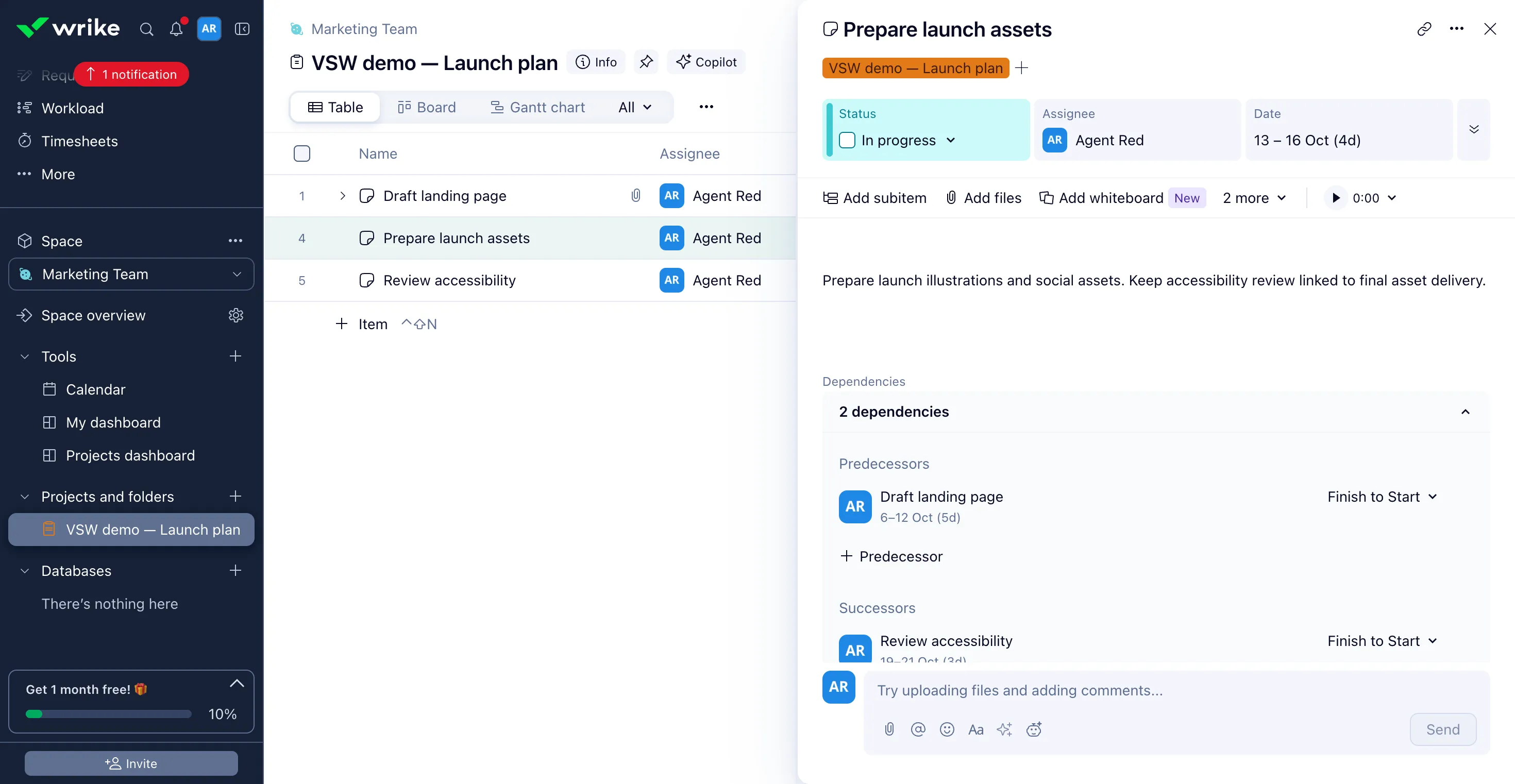
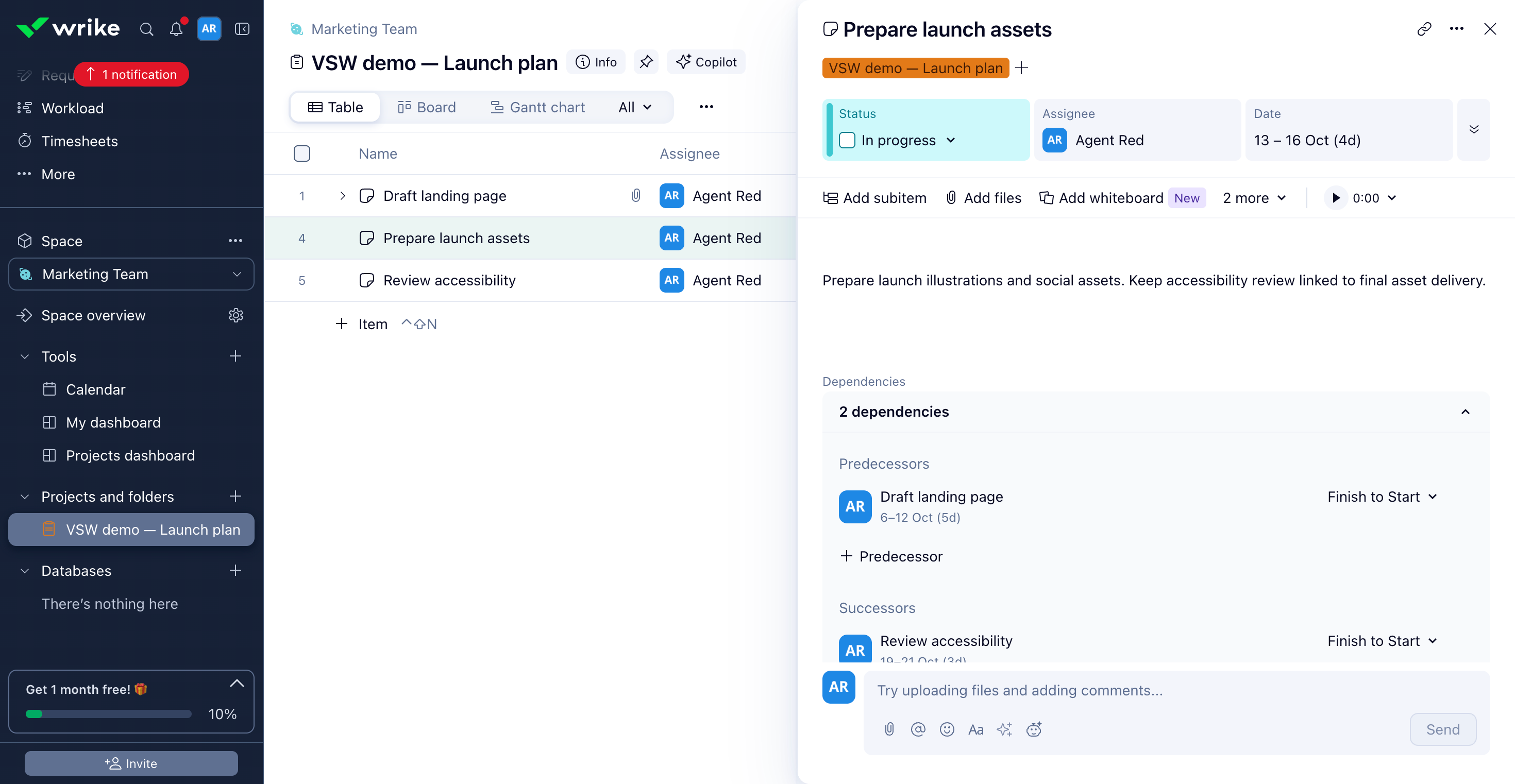
In our test: We changed Prepare launch assets to In progress and extended its due date to October 16. The saved task description, status and dates remained when reopened.
Gantt bars and dependency lines make the sequence of work easier to discuss.
In our test: Extending the assets deadline from October 15 to 16 moved its linked accessibility review to October 19–21. The Gantt view showed the revised sequence.
Collect a brief, dates and other required information through a form that creates work in Wrike.
In our test: Our completed sample request created a New task in the launch project, carrying the brief and Marketing department into its description and scheduling it for October 9.
Copilot answers natural-language questions and can visualize the project context.
In our test: Copilot charted the four active top-level tasks by status and due date, and identified October 9 as the next deadline. Its text counted the one unfinished task in progress, but omitted the full unfinished total and task name requested.
View full screenCopilot brings a visual briefing beside the project; check that its answer covers the whole question.Copilot·Checked
Build assistance into an ongoing workflow
AI Elite on Business and above
AI agents can validate requests, route work, check risks and produce project summaries.
Plan detail: Included AI action volumes differ by tier; additional action packs are available.
No matching features. Try another term or clear the search.
Plans & pricing
USD checked October 9, 2026. Team is $10 and Business $25 per user/month billed annually. Free is separate from the 14-day trial. Seat bundles, higher-tier quotes and optional add-ons affect the total.
Prices in USD
Free
Start with essential work tracking.
$0
Unlimited users
Table and board views
200 active tasks per account
Free plan limits apply.
Team
Add structure to a small team’s plan.
$10
user / month
2–15 users
Gantt charts and custom fields
One shared dashboard
Billed annually. Confirm seat bundles.
Business
Connect intake with team delivery.
$25
user / month
5–200 users
Request forms and blueprints
Time tracking and workload tools
Billed annually; AI Elite starter allowance included.
Wrike has a Free plan with unlimited users, table and board views, and a limit of 200 active tasks per account. Its 14-day paid-feature trial is separate from that plan.
Request forms are included on Business and above. They collect structured information and can create work in Wrike, with conditional questions and routing for more tailored intake.
The checked USD annual rates are $10 per user/month for Team and $25 for Business. Pinnacle and Apex require a quote. Team size, seat bundles, taxes and add-ons affect the final amount.
What is the difference between Wrike Copilot and AI agents?
Copilot helps you ask questions and understand project information. Agents perform configured workflow actions such as request validation, routing and risk checks. AI entitlement, action allowances and administrator settings determine access.


 View full screen
 View full screen
 View full screen
 View full screen