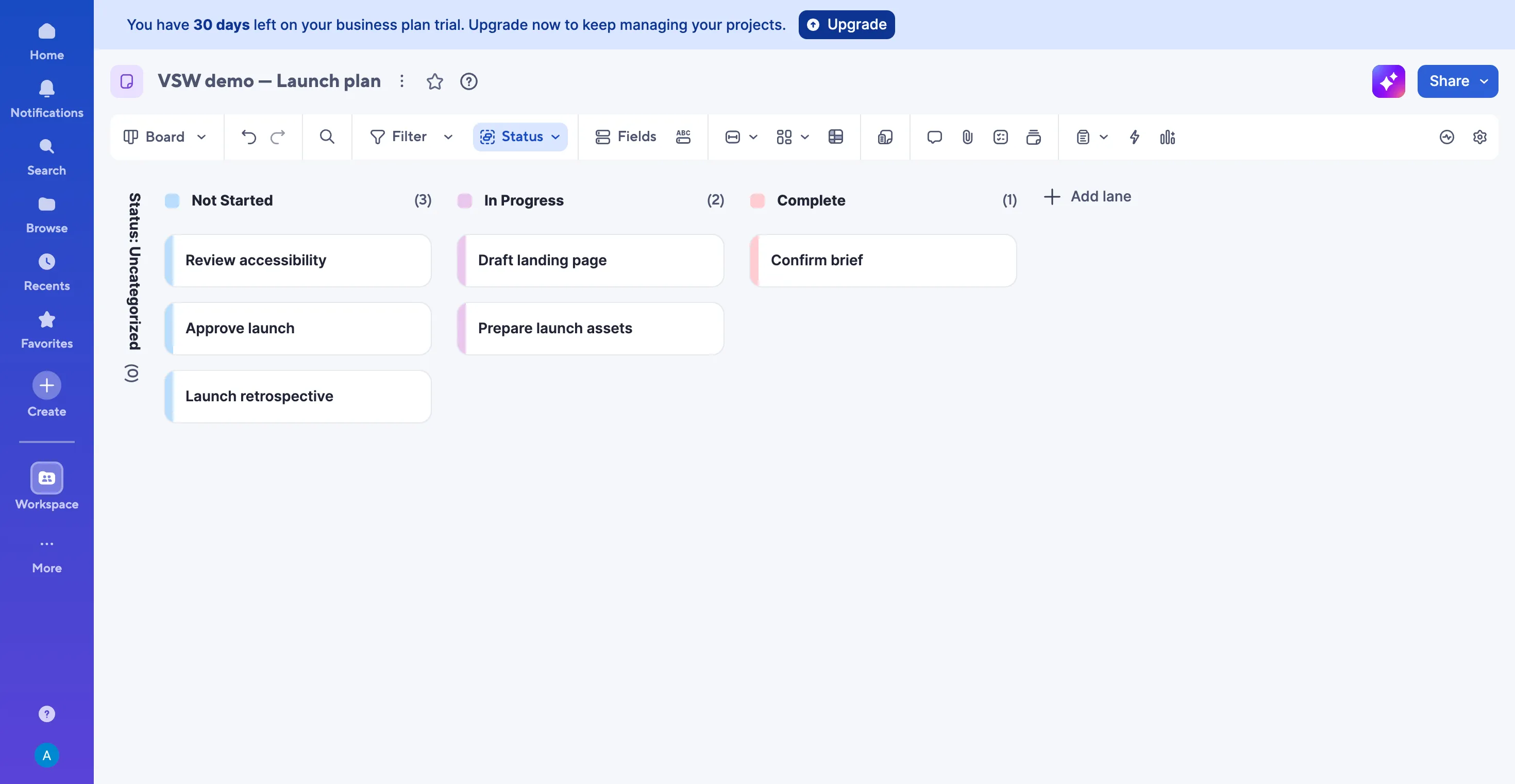
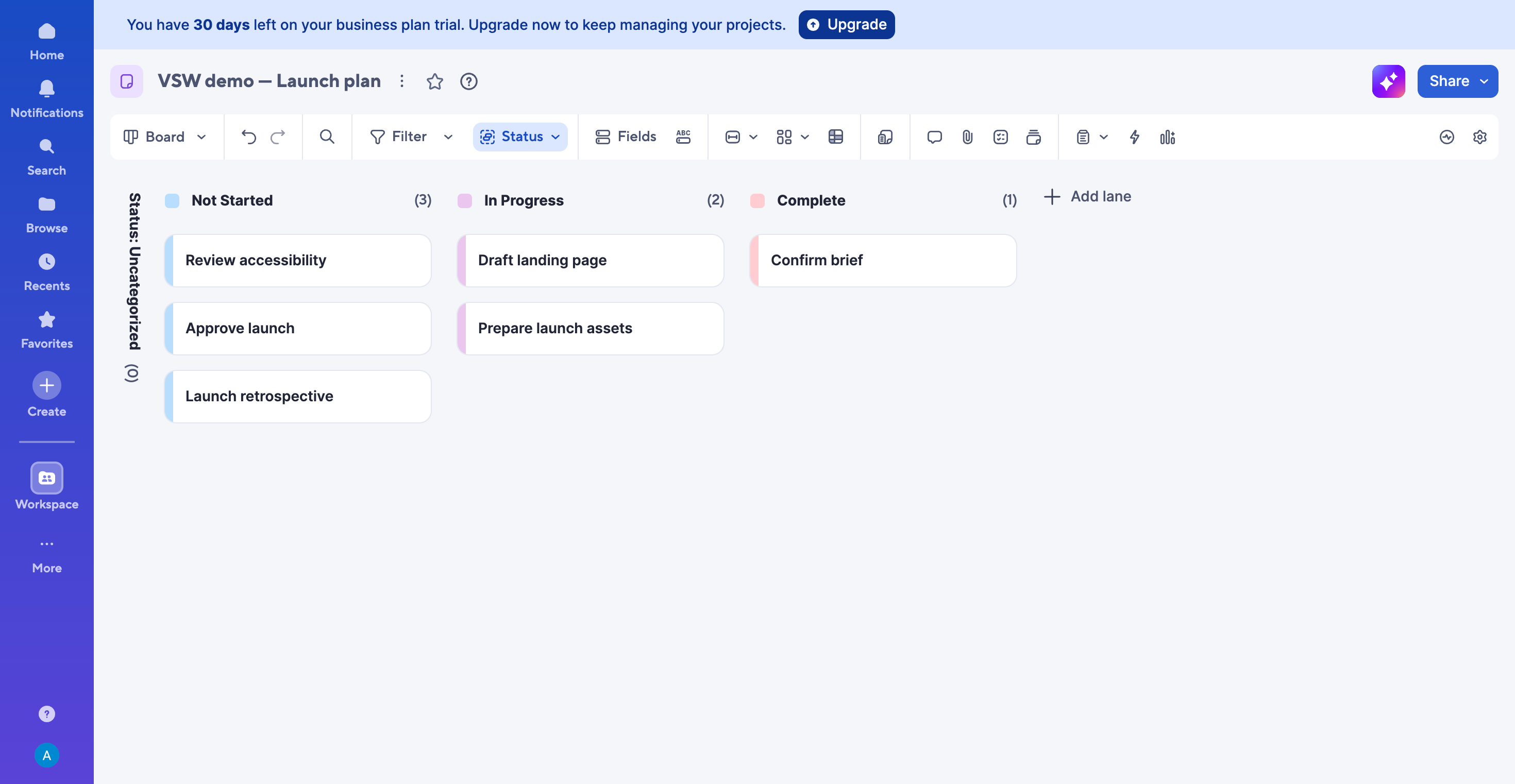
The board makes the launch plan easy to discuss by status. Business trial tested.
1 / 4
What is Smartsheet?
Smartsheet is appealing when your team likes spreadsheets but needs a better way to coordinate the work around them. Tables, boards and timelines give the same project different useful perspectives, while forms, automation and dashboards extend the working process. Our Business-trial launch plan showed that everyday appeal—and a helpful AI summary. The buying decision comes down to the coordination you need, the people who need paid access and the extras your process depends on.
Shortlist Smartsheet if your team wants to keep the familiarity of rows and columns while making project coordination more visible. Its appeal grows when intake, scheduling and stakeholder reporting belong to the same process. For a simple personal task list, weigh that flexibility against the setup and subscription you would take on.
How we tested SmartsheetTested Oct 8, 2026
Assistant-led testing in Chrome on a verified 30-day Business trial, using six fictional launch tasks. We configured columns, edited a status and due date, reloaded, searched, compared table, board and timeline views, asked one read-only Smart Assist question and inspected the form-sharing trial restriction.
One small launch workflow. We did not test team collaboration, dependencies, live form responses, automation delivery, reports, dashboards, premium apps, integrations, mobile use or enterprise scale.
Screenshots captured on Oct 8, 2026 with fictional records and demo owners.
Smartsheet review: familiar rows, a clearer team plan
Who should put Smartsheet on the shortlist?
Smartsheet makes sense when the spreadsheet is still useful but the coordination around it has become hard work. Your team may know the tasks and dates, yet still spend meetings piecing together progress, chasing updates and translating rows into a plan everyone can follow.
The attraction is keeping that familiar starting point and giving it more useful ways to work. Our fictional launch moved from a table into a status board and a weekly timeline. Each view answered a different question: what are the details, what is moving, and where does the work overlap?
What stood out in our launch workflow?
The board gave our six tasks an immediately readable shape. Confirm brief was complete, Draft landing page and Prepare launch assets were in progress, and three tasks were still waiting. That is a useful starting point for a launch check-in: the team can see where attention belongs before opening the detail.
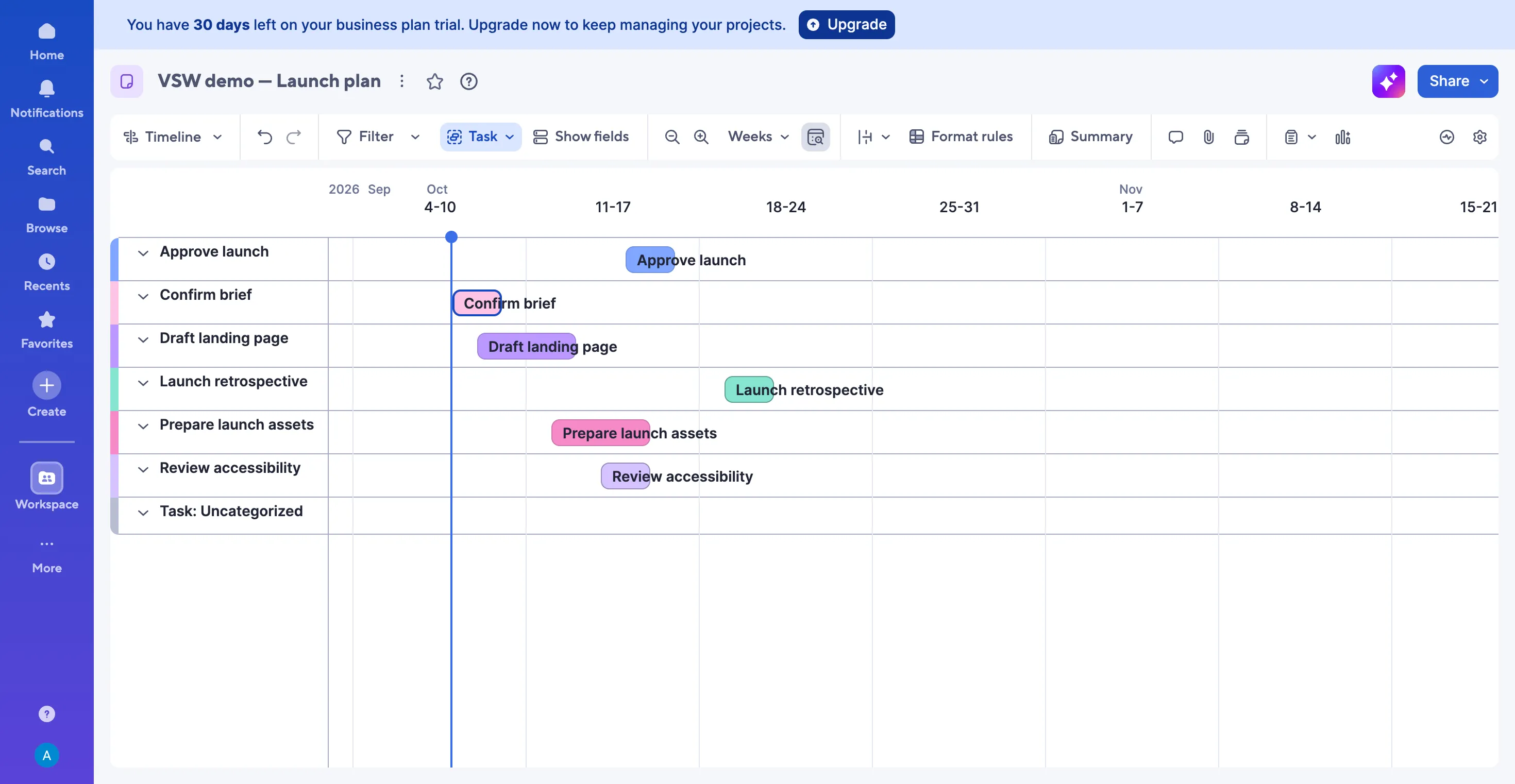
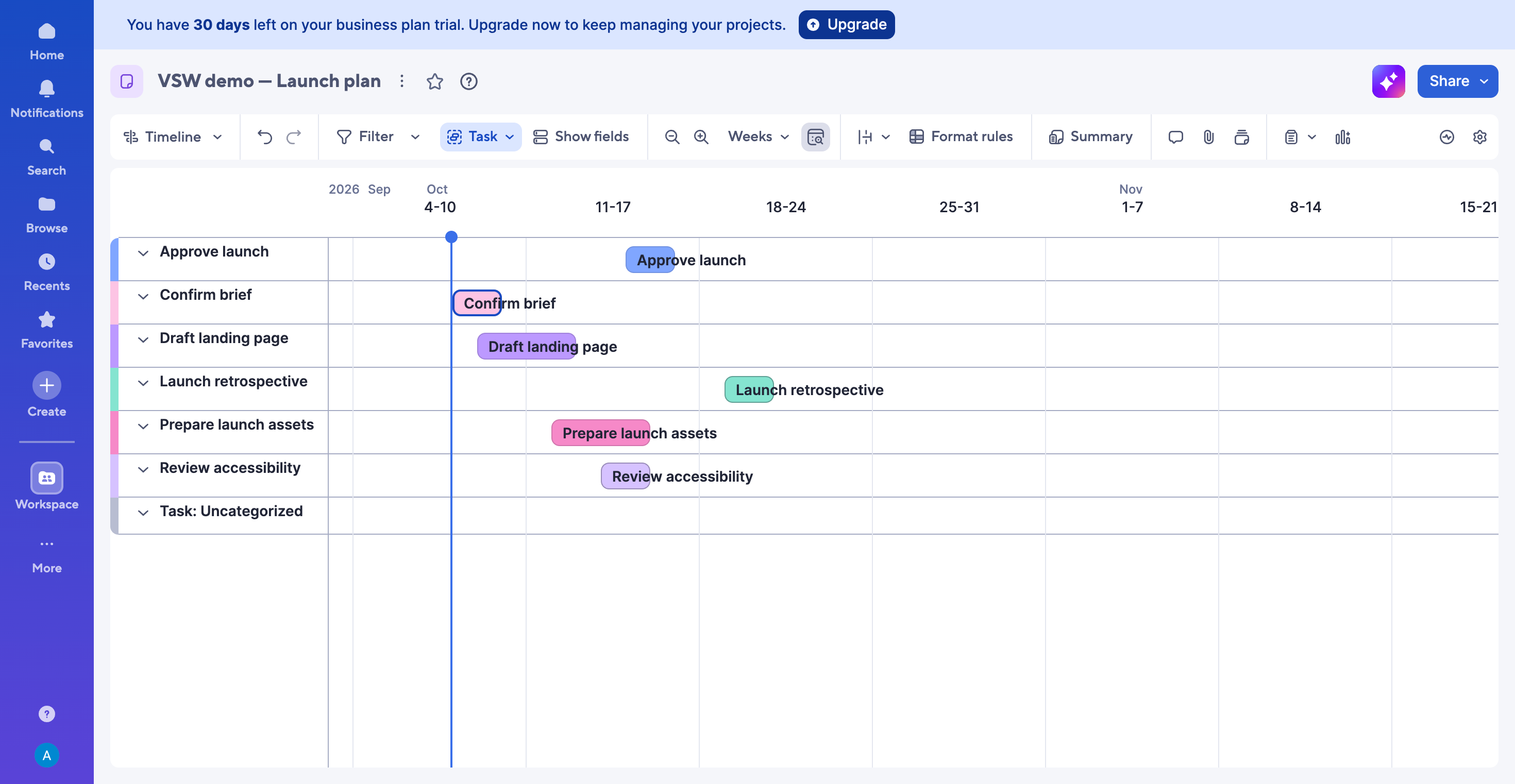
The timeline added the scheduling picture. Preparing assets overlapped with accessibility review, while the retrospective sat after launch approval. Switching the scale from months to weeks made this short project easier to read. These were dated bars; we did not configure dependencies or test automatic rescheduling.
Changing a status and extending the assets deadline to October 15 was straightforward in the table. The changes remained after reload and appeared in the alternate views. Searching for accessibility isolated the intended task. The practical benefit is staying close to one working plan as the conversation shifts from detail to progress to timing.
How does the interface feel in everyday use?
The table is a comfortable starting point if you think in rows and columns. Colored status pills help work stand out, and the toolbar puts filtering, sorting, formulas, conversations and attachments near the sheet. Pasting our task data across rows made the first working list quick to populate.
There is still some preparation. We named the columns, chose a dropdown for Status, added its choices and set both scheduling columns to Date. That structure makes the later views useful, but someone needs to decide how the team will record work before everyone starts adding it.
The board felt lighter than the table, with readable task names and status counts. Card fields can be adjusted to suit the discussion. The timeline needed a suitable scale and a return to today’s date to bring the short launch schedule into focus. Smartsheet gives you flexibility; spending a little time shaping those views helps that flexibility feel useful every day.
Is Smart Assist useful for a project check-in?
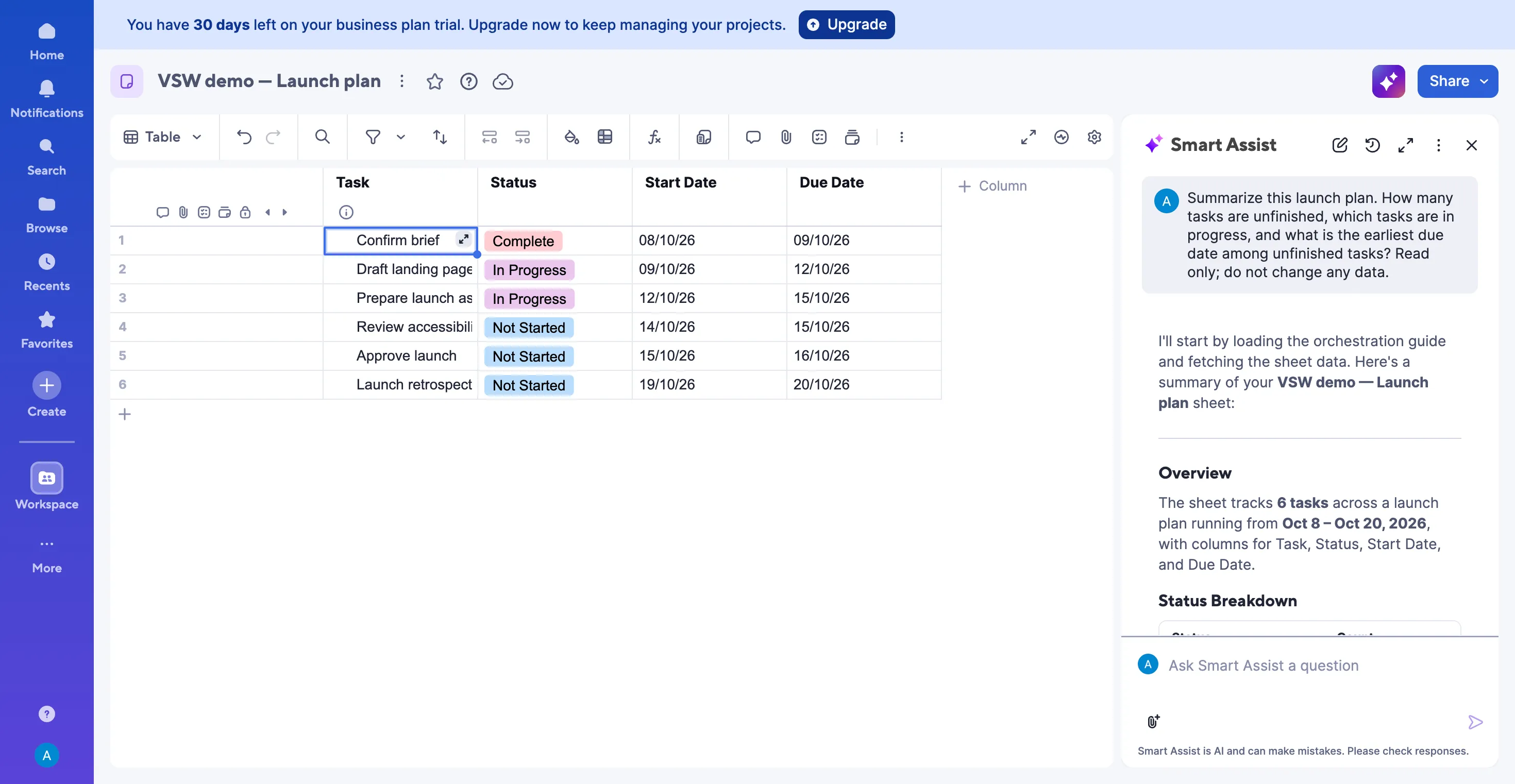
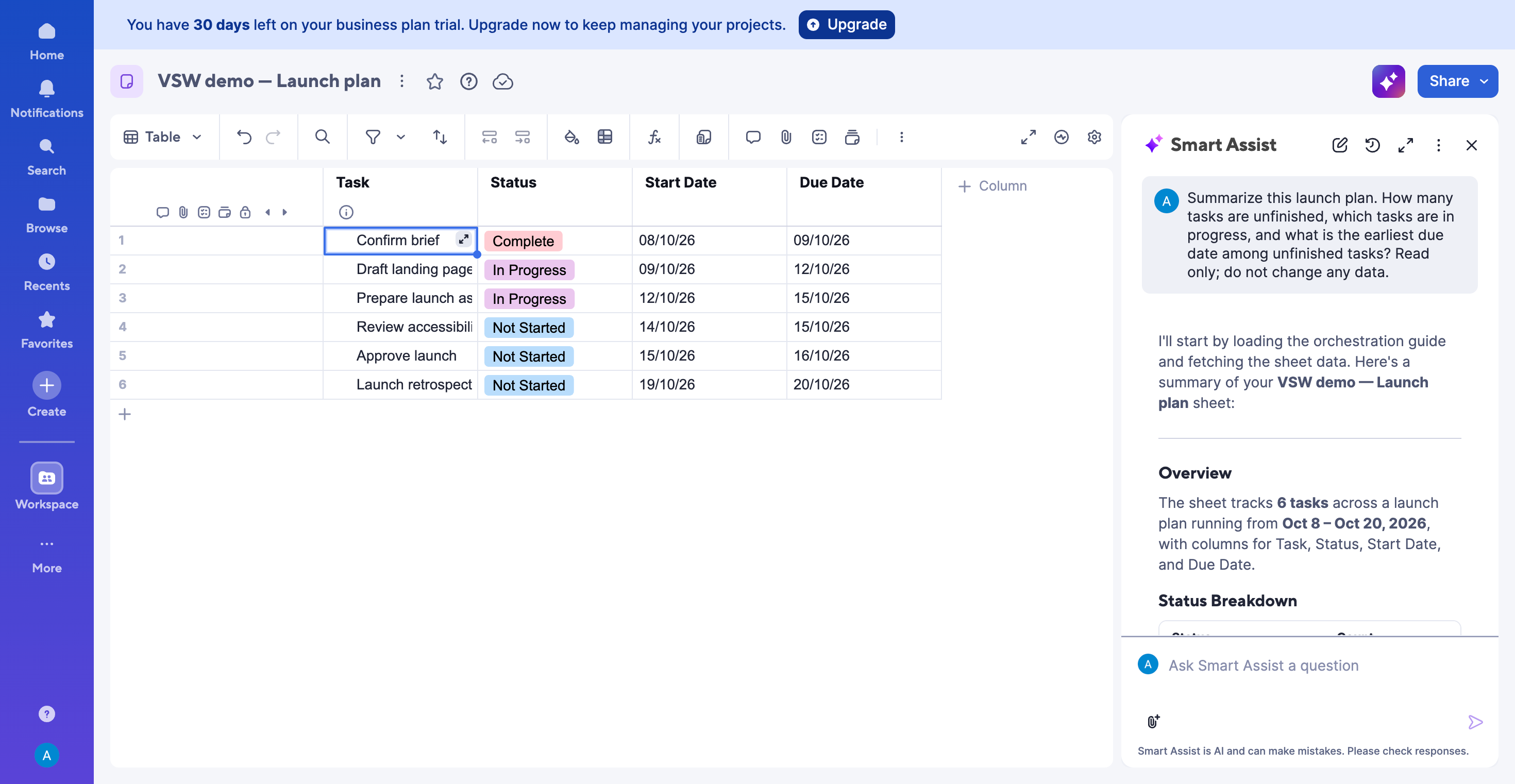
It was useful in our small example. We asked how many tasks were unfinished, which were in progress and what deadline came next. Smart Assist counted five unfinished tasks, named the two in progress and identified October 12 for Draft landing page. Its answer also reflected the assets deadline we had just changed.
That is an appealing use of AI: get a quick briefing while keeping the underlying work nearby. It is one successful read-only question on six fictional tasks, so it does not establish reliability for a large program or permission-sensitive team data.
Smartsheet’s AI toolkit also includes Smart Columns, dashboard creation and intelligent form fill. Availability varies by tool and administrator settings. The AI management guide places formula generation, text summaries and Analyze Data on Enterprise. Check the specific tool you want instead of assuming every AI option belongs to the base plan.
How useful are forms for collecting requests?
Forms are one of Smartsheet’s more inviting features. Your team can keep its structured working sheet while giving someone making a request a simpler screen to complete. That is appealing for project requests, launch inputs or routine submissions that otherwise arrive scattered across messages.
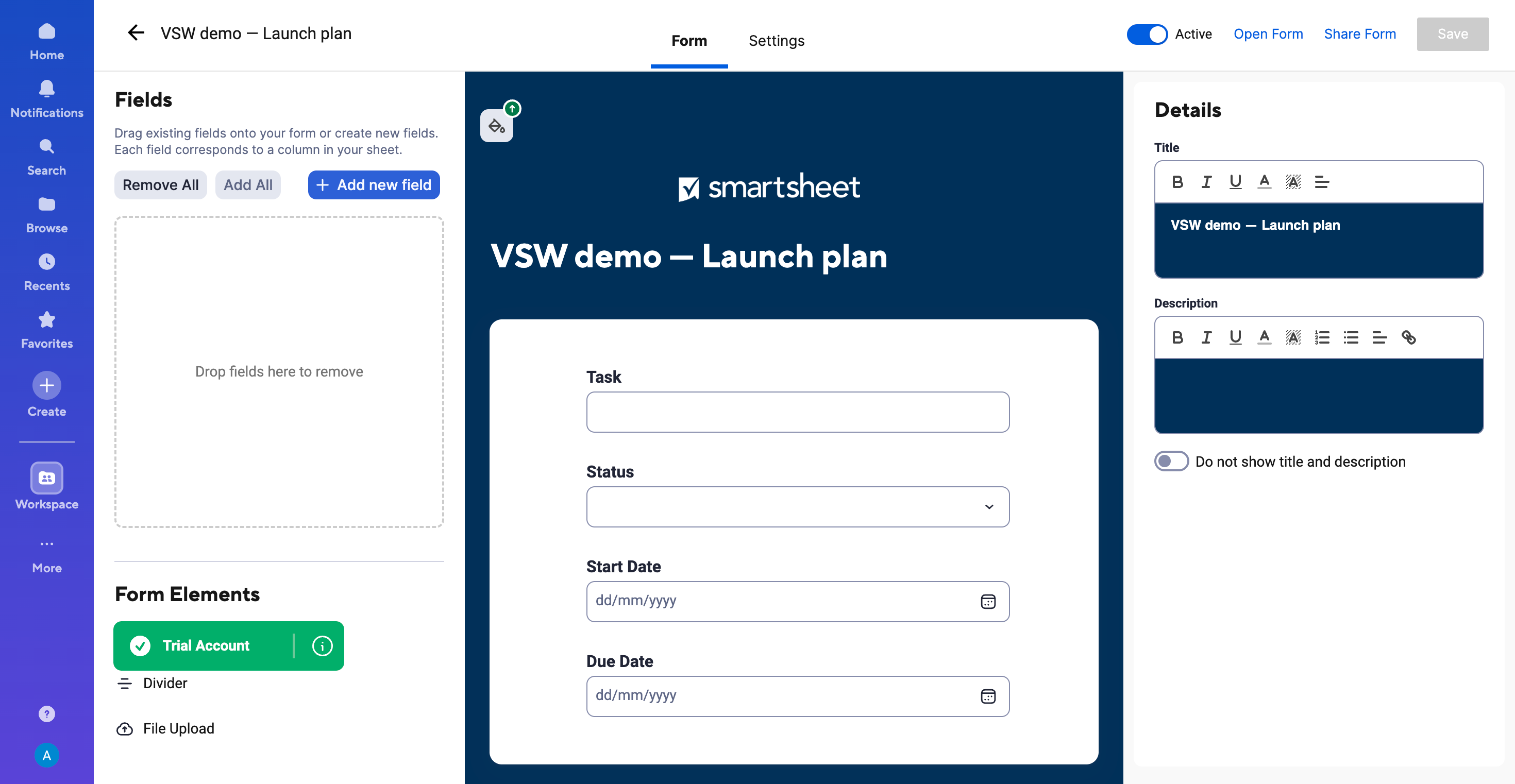
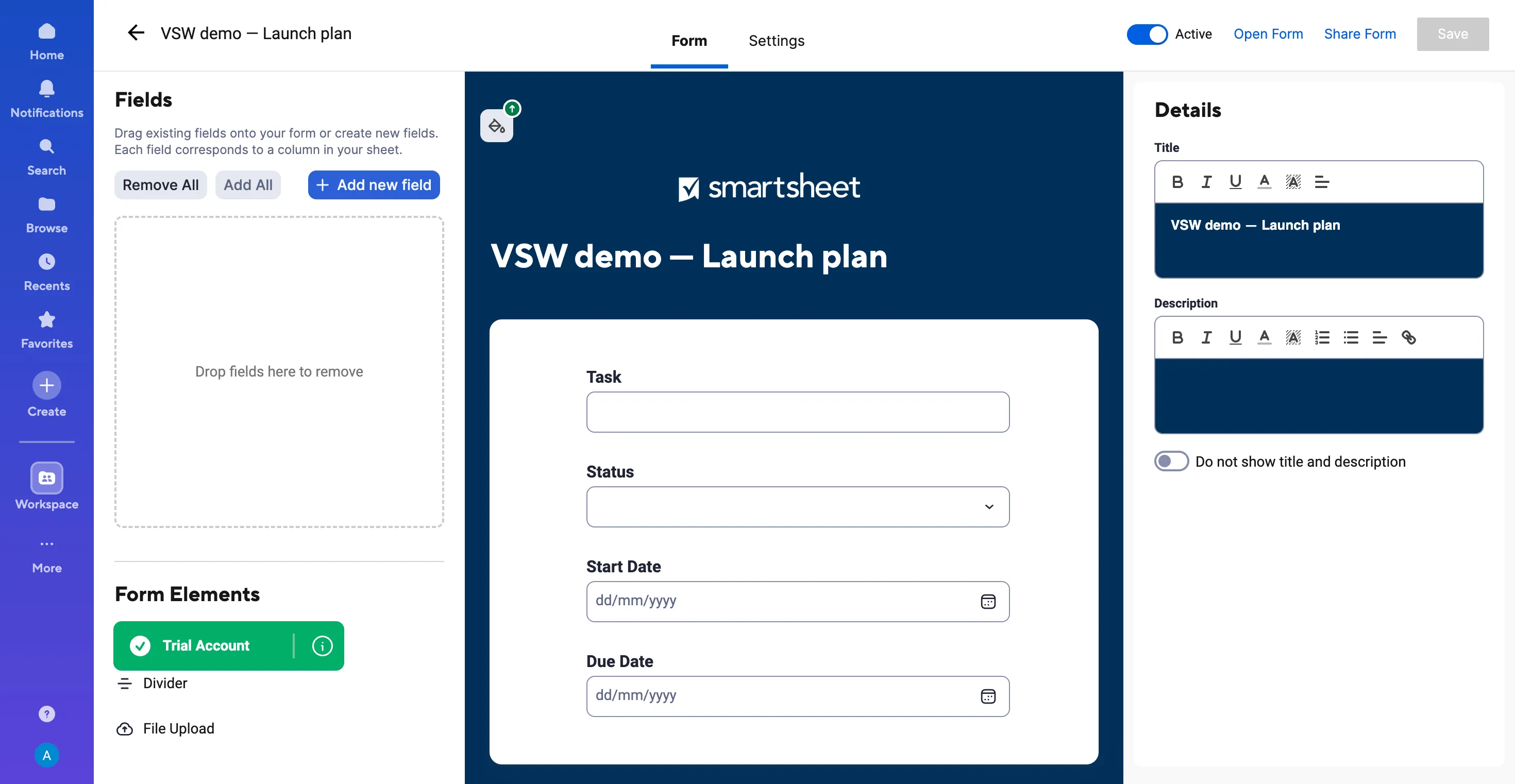
Our builder turned Task, Status, Start Date and Due Date into a central form preview. Field controls sat on the left, with title and description editing on the right. The layout made the connection clear: the questions on the form belong to the columns in the sheet. You can shape the intake around the information your team needs, rather than asking every respondent to navigate the working table.
The trial let us explore that builder, but sharing the form required a paid license. We did not collect responses or test conditional logic. The forms FAQ confirms the trial restriction. Even with that limit, the builder is worth a look when consistent intake is a large part of your team’s coordination work.
How far can the wider workflow go?
Automated workflows can handle routine reminders, update requests and approvals. Reports and dashboards give stakeholders a wider view of the work. Together, these capabilities make Smartsheet worth exploring for an operating process that repeats, rather than a task list you only consult occasionally. We researched those extensions without testing their delivery or accuracy.
For a larger operation, Control Center supports repeatable project setups and portfolio coordination. Resource Management and premium data tools extend the platform further. Those capabilities have separate licensing or bundle requirements; they are not findings from our ordinary sheet test.
What should you check before choosing a plan?
Start with the workflow and the people involved. A team that needs timeline and broader coordination should compare Business with Pro, then identify the premium capabilities it actually needs. Our tested account was a Business trial, so its available interface should not be treated as a promise about every plan.
The subscription model deserves particular attention. Members, Contributors and eligible external Guests have different rights. Qualifying participation can lead to provisional membership, and the administrator’s upgrade or downgrade settings influence what happens next. Agree who needs to create, edit and manage work before estimating the paid team size.
What will Smartsheet cost your team?
At the checked USD annual rates, five Pro Members cost 5 × $9 × 12 = $540 a year; five Business Members cost 5 × $19 × 12 = $1,140. Business’s three-Member minimum starts at $684 a year. Monthly billing uses higher rates, shown in the plan cards below. These examples exclude tax and extras.
Use the pricing comparison to build a requirements list, then confirm your Member count and any premium tools. The sensible budget is for the workflow you intend to run, including the time to structure sheets and maintain it.
Our buying recommendation
Shortlist Smartsheet when your team wants a familiar working surface with a clearer shared picture of progress and timing. Our launch plan showed why the combination is appealing: the table held the detail, the board made progress readable, and the timeline exposed overlaps worth discussing.
Give the trial a real job. Build a representative project, shape its views, ask a focused AI question and check the licensing around everyone who will participate. If that makes coordination easier—and the wider intake and reporting tools have a clear role—Smartsheet has a strong case. For a simple personal task list, consider how much of that operating system you need.
Smartsheet features
24 features · 7 categories
Browse all 24 features
01
Sheets and visual work
4
Start with a familiar working table
Business trial tested
Organize tasks in rows with typed columns, colored statuses and dates close to the work.
In our test: We entered six launch tasks, changed Prepare launch assets to In Progress and moved its due date to October 15. Both edits remained after reload.
Give people an approachable form to complete, with fields tied to the columns your team already uses.
Plan detail: A paid license was required to share the form and collect responses in our account.
In our test: The builder brought Task, Status, Start Date and Due Date into a form preview, with field and title controls alongside. Sharing required a paid license on our trial.
No matching features. Try another term or clear the search.
Plans & pricing
USD checked October 8, 2026. Pro and Business offer annual or monthly billing. The 30-day trial is separate from a paid subscription. Member minimums, collaboration rules and premium add-ons affect cost.
Smartsheet offers a 30-day trial without a credit card. That is separate from a paid plan for creating and managing work. Free Contributor or Guest participation has its own limits.
We used a Business trial and six fictional launch tasks to try table, board and timeline views, saved edits, sheet search, one Smart Assist summary and the form-sharing restriction.
Can you share Smartsheet forms during the trial?
Our trial allowed form creation but required a paid license to share the form and collect responses. The official forms FAQ documents this trial restriction.
Does every collaborator need a paid Smartsheet seat?
No. Contributors and eligible external Guests have limited free participation. Members create and manage work, while qualifying activity can introduce provisional membership. Check the admin reconciliation settings before rolling it out.


 View full screen
 View full screen
 View full screen
 View full screen