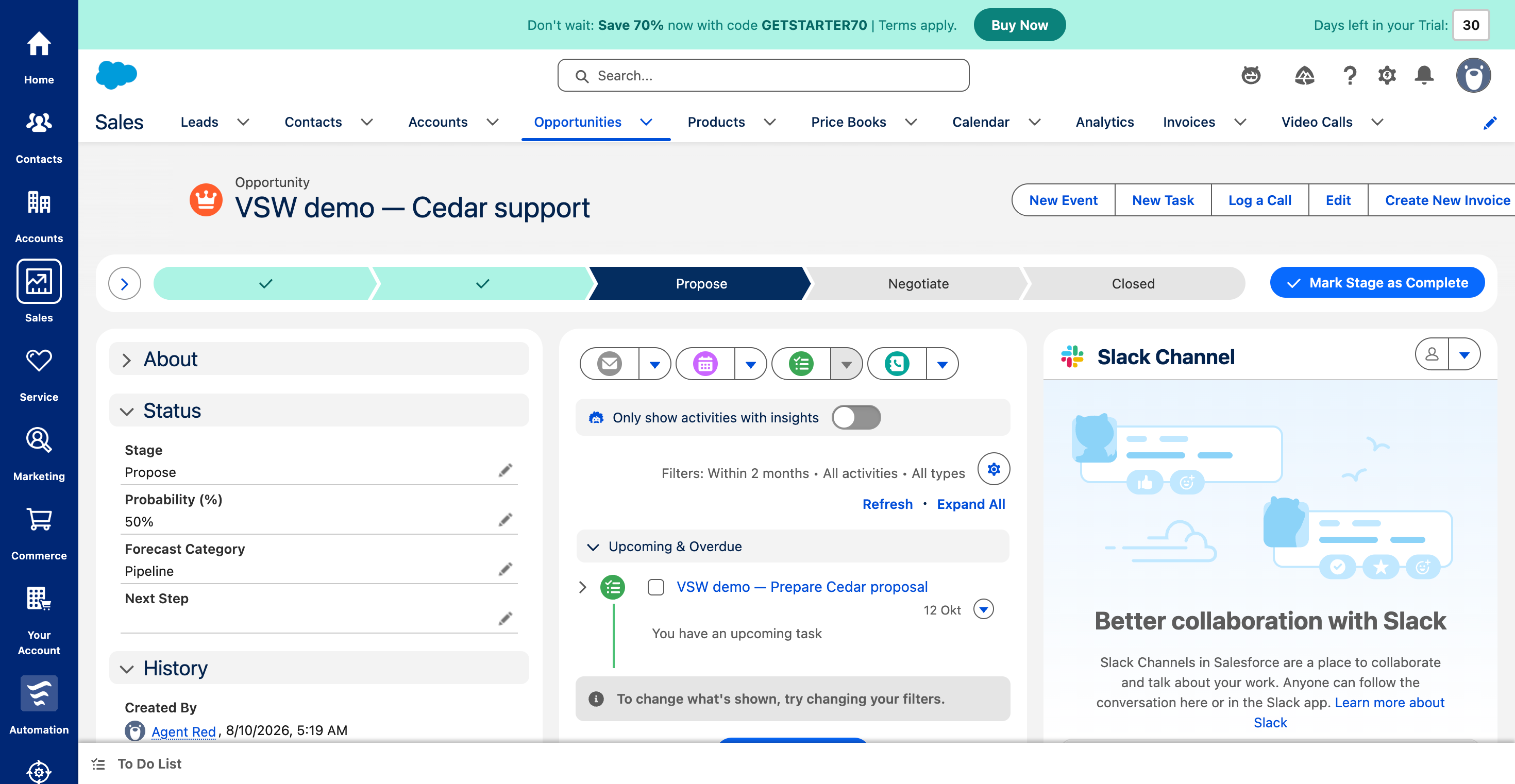
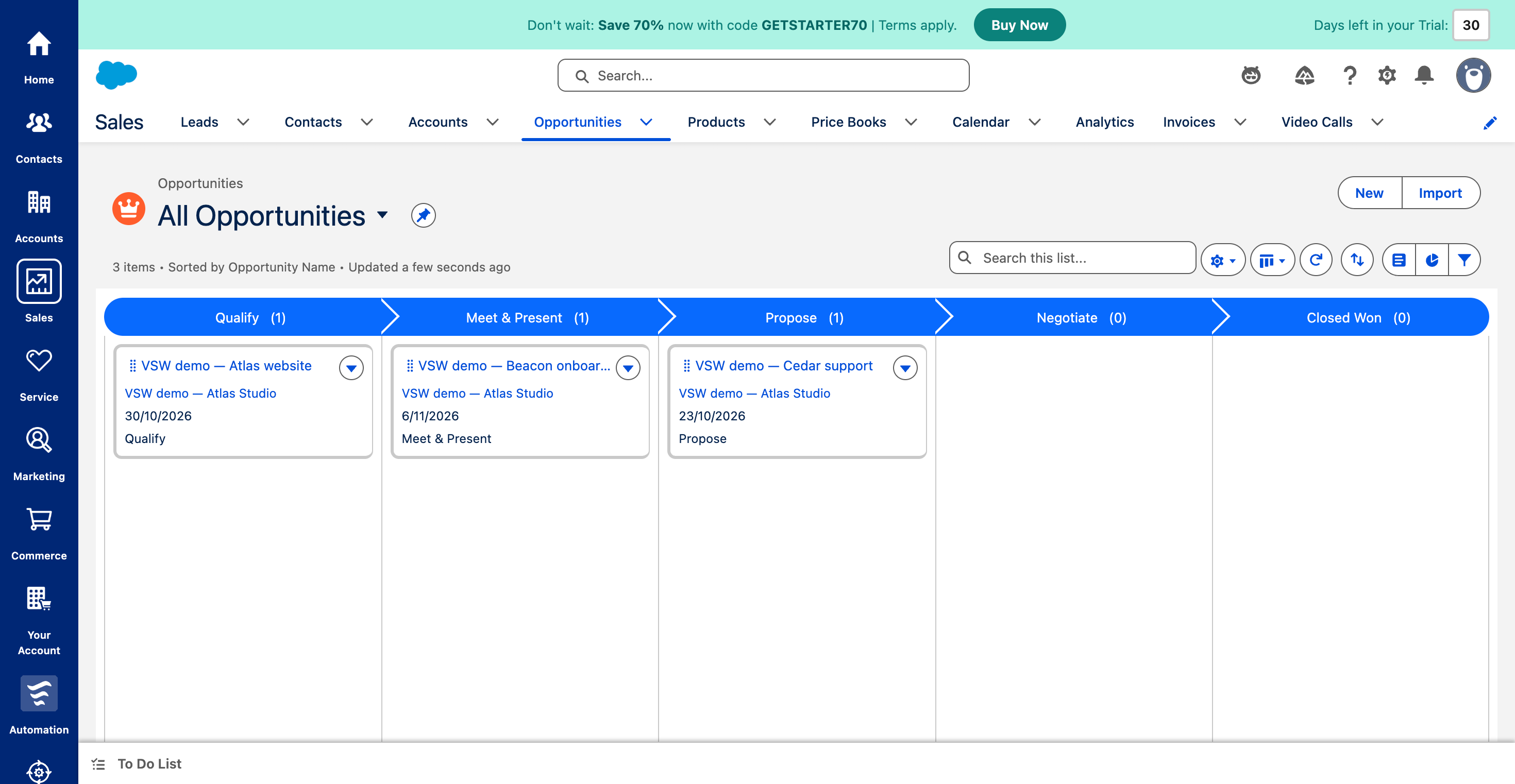
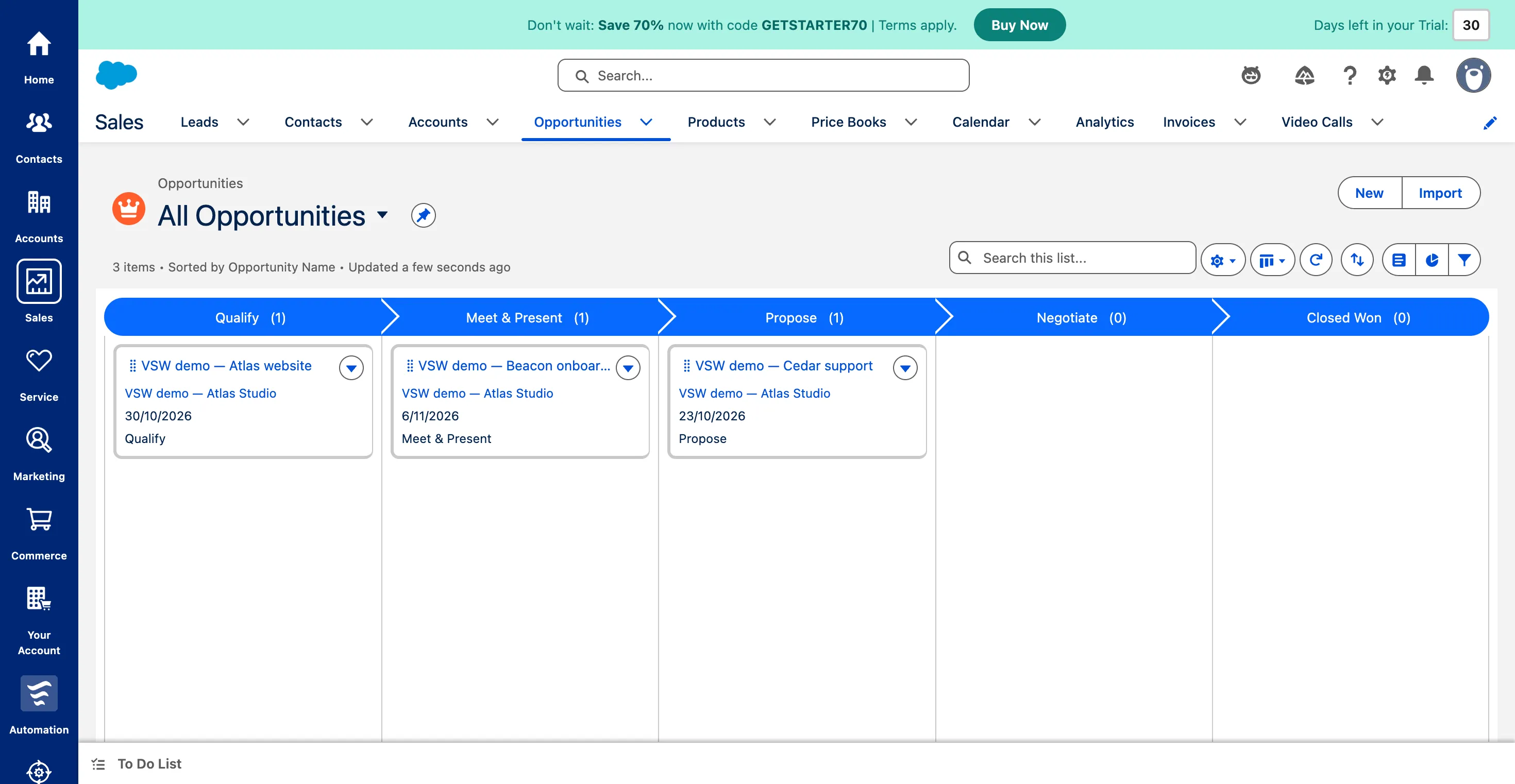
Three fictional opportunities, clearly grouped by sales stage with closing dates on each card. Tested on a Starter trial.
1 / 3
What is Salesforce Sales?
Salesforce Sales gives teams room to build a connected sales operation, from customer relationships and opportunities to reporting, automation and AI agents. Our Starter-trial workflow showed its everyday appeal: a visible sales path, a pipeline worth discussing and follow-up beside the deal. The buying decision is about choosing the right level of that platform—and allowing time to shape it around how your team sells.
Shortlist Salesforce when a shared customer record and a more structured sales process matter to your business. Starter is a useful place to try the everyday workflow; broader needs deserve an edition-by-edition plan. Teams wanting only a light opportunity tracker should weigh the platform’s flexibility against its setup and ongoing administration.
How we tested Salesforce SalesTested Oct 8, 2026
Assistant-led testing in desktop Chrome on October 8, 2026. Company Information explicitly showed Starter Edition; the account was an unsubscribed 30-day Salesforce Starter trial. We created one fictional account, three opportunities and one internal follow-up task. Checked stage persistence after reload, table/Kanban agreement, list search, task persistence and required-field validation.
Hands-on findings cover this small sales workflow. Other feature groups use dated official documentation. No mailbox/calendar connection, lead conversion, report build, custom automation, mobile test, multi-user collaboration, quotation or payment was performed. Generative AI was not enabled; this review does not evaluate Agentforce output quality.
Screenshots captured on Oct 8, 2026 with fictional records and demo owners.
Salesforce Sales review: customer context with room to grow
Who should put Salesforce Sales on the shortlist?
Salesforce is appealing when a sale needs more than a name, a value and a stage. A customer may have several opportunities, a history of conversations and work involving other teams. Bringing that context together gives the CRM a useful job: help the next person understand the relationship and move it forward.
Our Starter-trial test focused on that everyday sales routine. The opportunity record held the commercial detail, the sales path showed progress, and the activity timeline kept the next action nearby. That is a practical reason to consider Salesforce before exploring its much larger toolkit.
What stood out in our sales workflow?
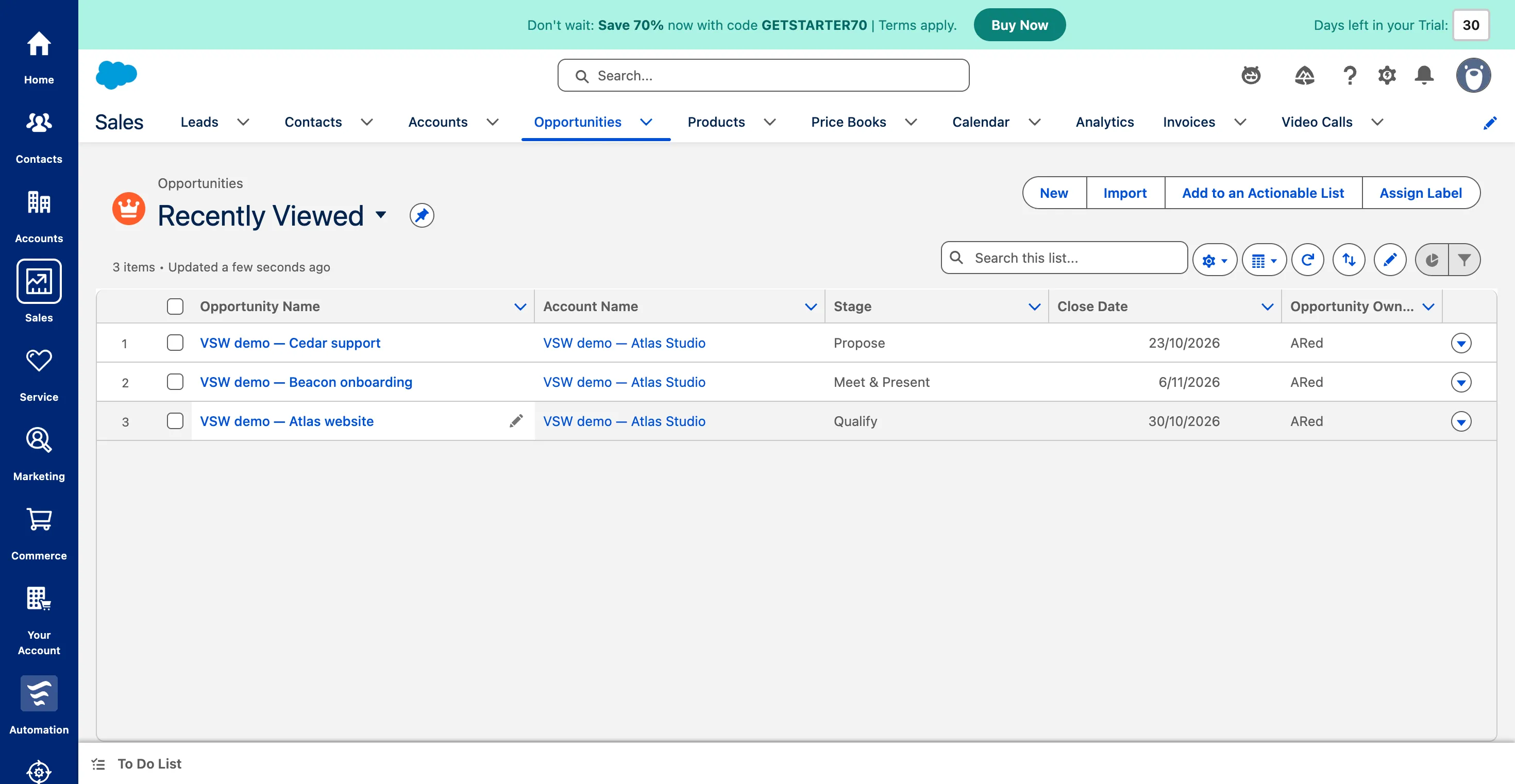
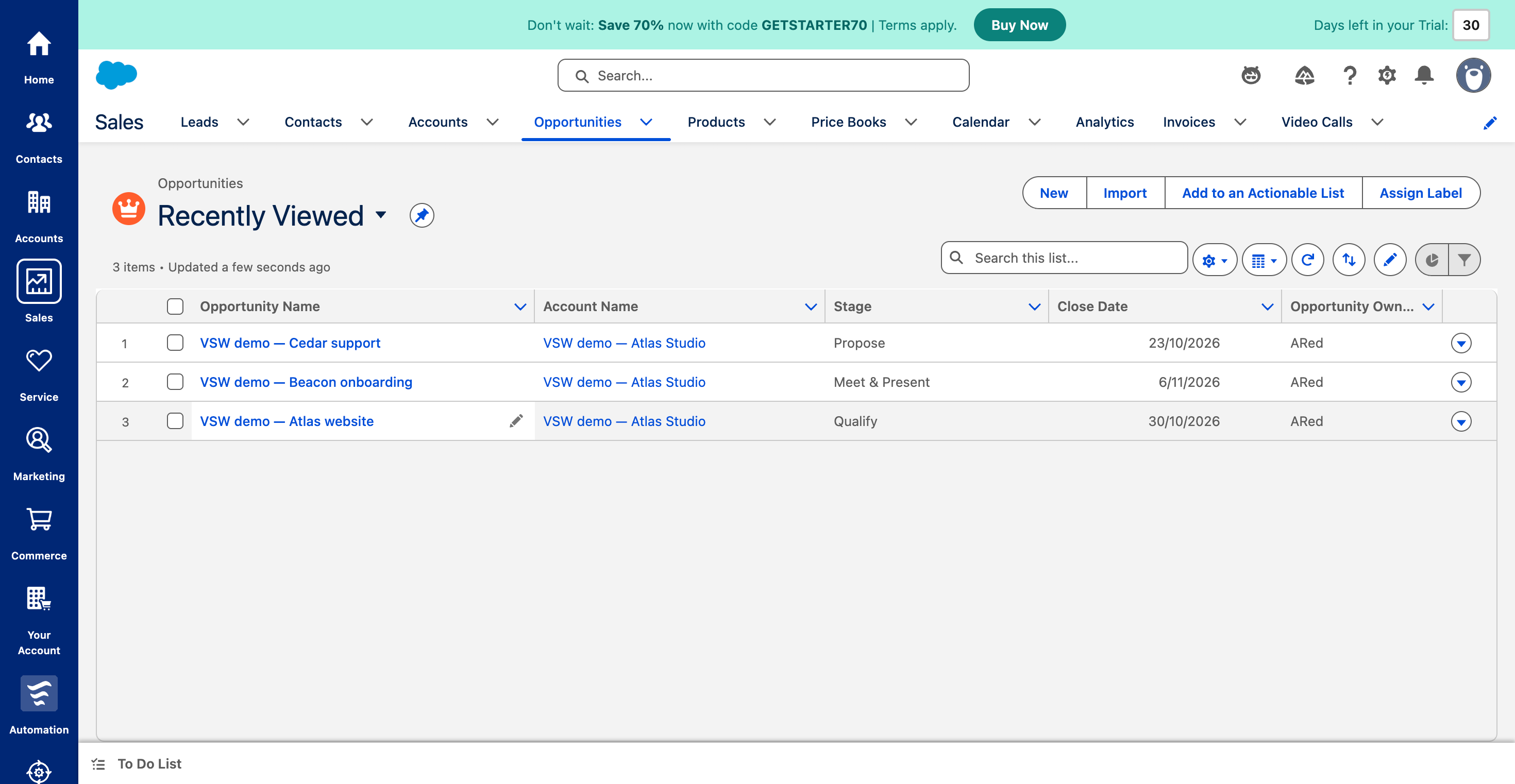
The pipeline told a clear story. Atlas was in Qualify, Beacon in Meet & Present and Cedar in Propose. Kanban made those different conversations easy to place, with closing dates on the cards. The table offered a quick comparison of customer, expected close date and stage; you can also include deal amounts when you want to compare value.
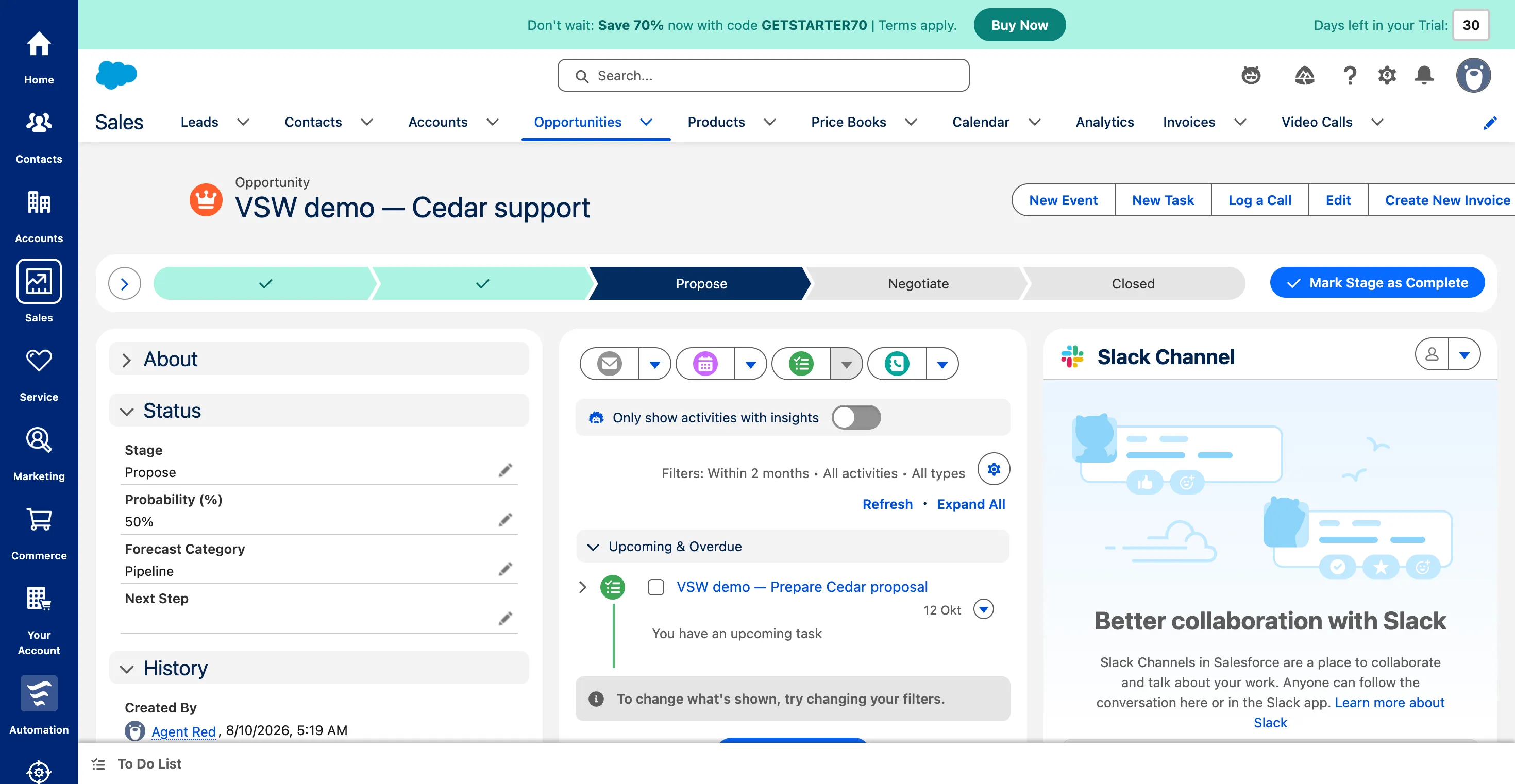
Opening Cedar put the work back into context. Its opportunity linked to the same demo customer as the other deals, while an upcoming proposal task gave us a concrete next step for October 12. The saved stage and task remained after reload, and list search retrieved Cedar on its own.
The useful outcome is the connection between progress and action. A pipeline meeting can start with the overview, then open the record to see what happens next. Our small fictional dataset does not establish forecasting accuracy or results for a large sales team.
How does the interface feel in everyday use?
The sales path is a helpful anchor in a busy record. In Qualify, it offered discovery questions about the customer’s problem and timing. At Propose, the guidance shifted toward whether the offer met the customer’s needs. Path guidance can be configured by an administrator, so teams can make those prompts fit their process.
The record also has plenty competing for attention: commercial fields, activity controls, related information and a Slack area. Collapsing the guidance gave the dated task more room on screen. That small choice illustrates the tradeoff: Salesforce can hold a rich working context, but the team benefits from deciding what needs to be visible each day.
Getting started involved guided setup and several onboarding prompts. The opportunity form also expected a linked account, a close date, a stage and a forecast category; an incomplete save identified the fields to finish. That structure supports useful records, while asking more of the person entering a new deal. Check the defaults—including currency and stages—before moving a real pipeline across.
How far does the wider platform go?
The trial navigation made the broader customer workspace hard to miss: Sales sat alongside Service, Marketing, Commerce and Automation. Starter Suite combines those customer functions, while higher editions introduce more ways to customize the process.
For sales leaders, Pipeline Inspection adds a workspace for metrics, changes and deal insights. Reports and forecasting support a broader revenue discussion. Quoting helps turn opportunity details into an offer, and Flow and Lightning App Builder allow the working process and pages to be adapted.
There is also a wider sales performance toolkit: capacity and quota planning, sales programs, Spiff for commissions and Maps for field selling. These are meaningful extensions for the right operation, with separate product or bundle requirements. The feature groups below distinguish that documented breadth from what we actually used.
What should buyers expect from Agentforce?
Salesforce’s AI direction goes beyond a chat box. Its agentic sales model describes agents for prospecting, engagement, pipeline management and account research. The attraction is relevant assistance inside the sales process: background on a prospect, a suggested next step or a proposed record update.
That potential needs a focused evaluation. Our Starter account presented an Agree and Enable step for generative AI, which we left disabled. We therefore make no claim about answer quality, autonomous outreach or how well its recommendations work with real customer history.
Use your own trial to answer a concrete question: does the licensed tool help your team make a better sales decision with its actual data? Check enablement, connected sources, human review and usage allowances before treating the advertised agent suite as part of the base subscription.
Which edition deserves a closer look?
Start with the job your team needs to do. Free Suite is a separate entry point for up to two users; Starter is the paid suite we explored. Starter and Pro are the natural comparison when a small team wants connected customer work and is deciding how much automation, customization, quoting and forecasting it needs.
The current US pricing page uses Core, Advanced and Max for the higher sales editions. Those options expand the operational toolkit, but an edition name alone is not a requirements checklist. Ask for a configuration that names the reports, agents, integrations and controls your workflow depends on.
Seeing a button in our trial establishes what the interface exposed. It does not prove that every edition includes the feature, that it needs no configuration or that a related product is already licensed.
What will the subscription really cost?
The plan cards below show the October 8 USD display and its billing units. Treat annual-billed monthly equivalents as an annual commitment when comparing costs. Starter’s monthly option offers a different starting point from the annual-only display for the higher editions.
For an illustrative five-person team, Starter at $25 per user/month is 5 × $25 = $125 per month. Over twelve months that is $1,500. Pro at the displayed $100 annual-billed rate is 5 × $100 × 12 = $6,000 for a year. These examples exclude tax, optional products, usage charges and implementation; they are not vendor quotes.
Budget for the whole operating model. Migration, field design, permissions, automation and ongoing administration can require work even when no separate software fee is shown. Price the integrations and AI capabilities you actually need, then compare the proposed configuration with a simpler CRM workflow.
Our buying recommendation
Shortlist Salesforce if your sales process benefits from a shared customer context and you want room to build around it. The trial gave us a useful connection between customer, deal, stage and next action. That is the foundation worth evaluating.
Keep the trial grounded in a real working day: add representative opportunities, agree the next action, compare the pipeline views and confirm the edition for your requirements. If that makes sales discussions clearer—and the team can support the setup—Salesforce has a strong case. If the need is just a lightweight tracker, weigh how much of this platform you will actually use.
Salesforce Sales features
27 features · 9 categories
Browse all 27 features
01
Customer relationships
3
Keep each customer relationship together
Starter trial tested
Connect companies, people and opportunities so a sales conversation starts with the right context.
In our test: All three demo opportunities linked to the same fictional Atlas Studio account.
Switch from a detailed table to stage columns with deal cards and amount totals.
In our test: Atlas, Beacon and Cedar appeared in Qualify, Meet & Present and Propose, making each deal’s place in the pipeline easy to see.
View full screenThree fictional opportunities, clearly grouped by sales stage with closing dates on each card. Tested on a Starter trial.Path and Kanban·Checked
03
Follow-up and communication
3
Keep the next action beside the opportunity
Starter trial tested
Create a dated follow-up and see it in the deal’s activity timeline.
In our test: Prepare Cedar proposal appeared as an unfinished upcoming task due October 12 and remained after reload.
No matching features. Try another term or clear the search.
Plans & pricing
USD prices checked October 8, 2026. Free Suite is separate from the 30-day Starter trial we tested. Starter supports monthly or annual billing; Pro, Core, Advanced and Max show annual billing. Edition, add-ons, credits and implementation affect the final cost.
Yes. Salesforce offers Free Suite for up to two users. It is separate from a time-limited paid-edition trial; our hands-on review used a 30-day Starter trial.
We tested a 30-day Salesforce Starter trial. Organization Edition showed Starter Edition. Our workflow used a fictional customer account, three opportunities and a proposal follow-up.
Does Starter include every Agentforce sales feature?
No. Agentforce capabilities have their own edition, license, usage and setup requirements. Our trial offered a separate generative-AI enablement step; we did not enable it or assess AI responses.
Teams that want customer context, structured opportunity management and room for a more connected sales operation should consider it. A lighter sales process may need less configuration than Salesforce’s broader platform invites.


 View full screen
 View full screen
 View full screen