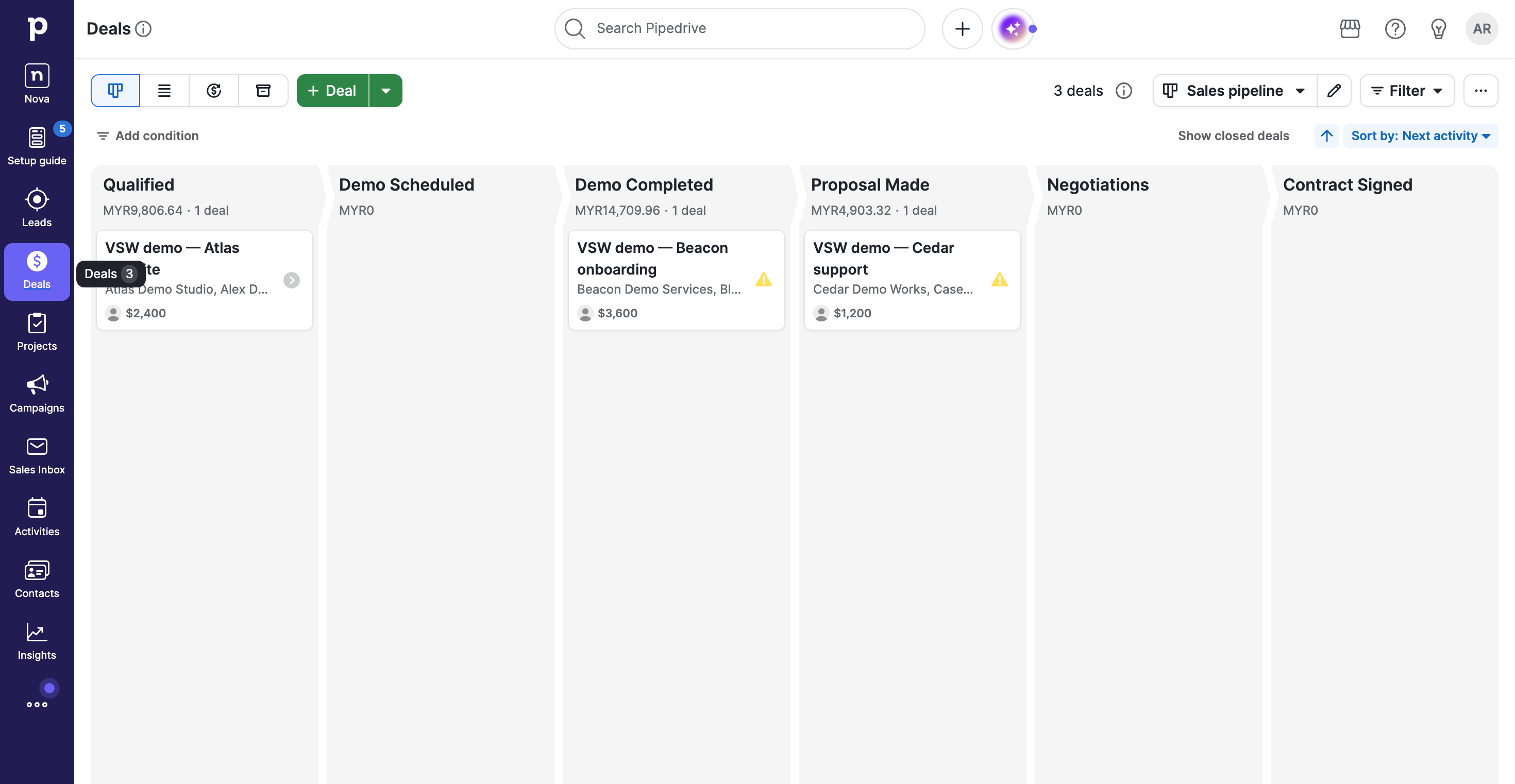
Pipeline · Three demo deals, with USD cards and MYR stage totals.
1 / 3
What is Pipedrive?
Pipedrive keeps sales work moving through a visual pipeline, with contacts, notes and follow-ups close to each deal. In our Premium-trial workflow, the board gave us the big picture and the deal page kept the next action in focus. It is a compelling fit for teams that want a practical sales workspace, with email, automation and a wider toolkit available as their process grows.
Pipedrive deserves a place on the shortlist when your team wants clearer opportunities and more consistent follow-up. Start by testing your actual sales stages and daily next actions. Growth is worth comparing when email and automation matter; Premium becomes interesting when scoring and its included add-ons match work you will really use. Let that workflow justify the plan.
How we tested PipedriveTested Oct 7, 2026
Assistant-led testing in desktop Chrome with fictional sales data. Billing confirmed a one-seat Premium 14-day trial. No purchase, invitations, outreach, mailbox/calendar connection or add-on trial. Screenshots capture the webpage only.
Three deals with linked people and companies; USD values and expected close dates; a saved stage change; an internal note and proposal task; reload; pipeline/list comparison; global search and Activities retrieval. Pulse feed and Nova entry screens inspected. Sales Assistant stopped at separate beta terms. Automation execution, lead capture, email delivery, reports, documents, projects, meetings, integrations, collaboration, scale, mobile and accessibility were not tested.
Screenshots captured on Oct 7, 2026 with fictional records and demo owners.
Pipedrive review: a clearer pipeline, with follow-up close at hand
Who should put Pipedrive on the shortlist?
Pipedrive is appealing when sales work needs a clearer rhythm: know where the opportunity stands, know who is involved, and know what to do next. Its pipeline gives that process a visible shape, while the deal page holds the detail behind it.
Our review focused on that everyday job. We created three fictional opportunities in a Premium trial and followed one through a saved note and a scheduled proposal task. The result was a useful sales workspace with a clear distinction between the pipeline overview and the work inside each deal. Teams looking for this kind of focus have a good reason to try it.
What stood out in our sales workflow?
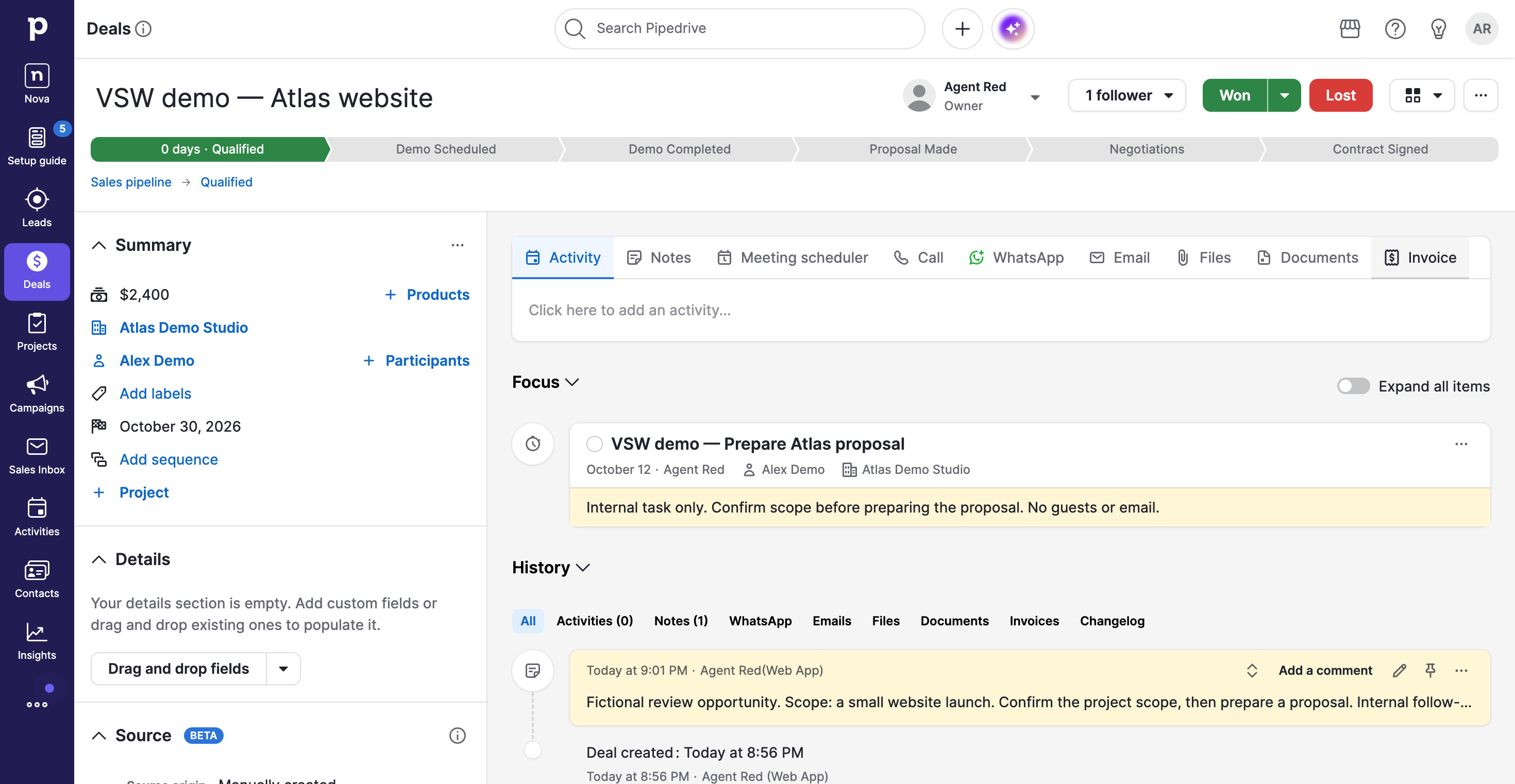
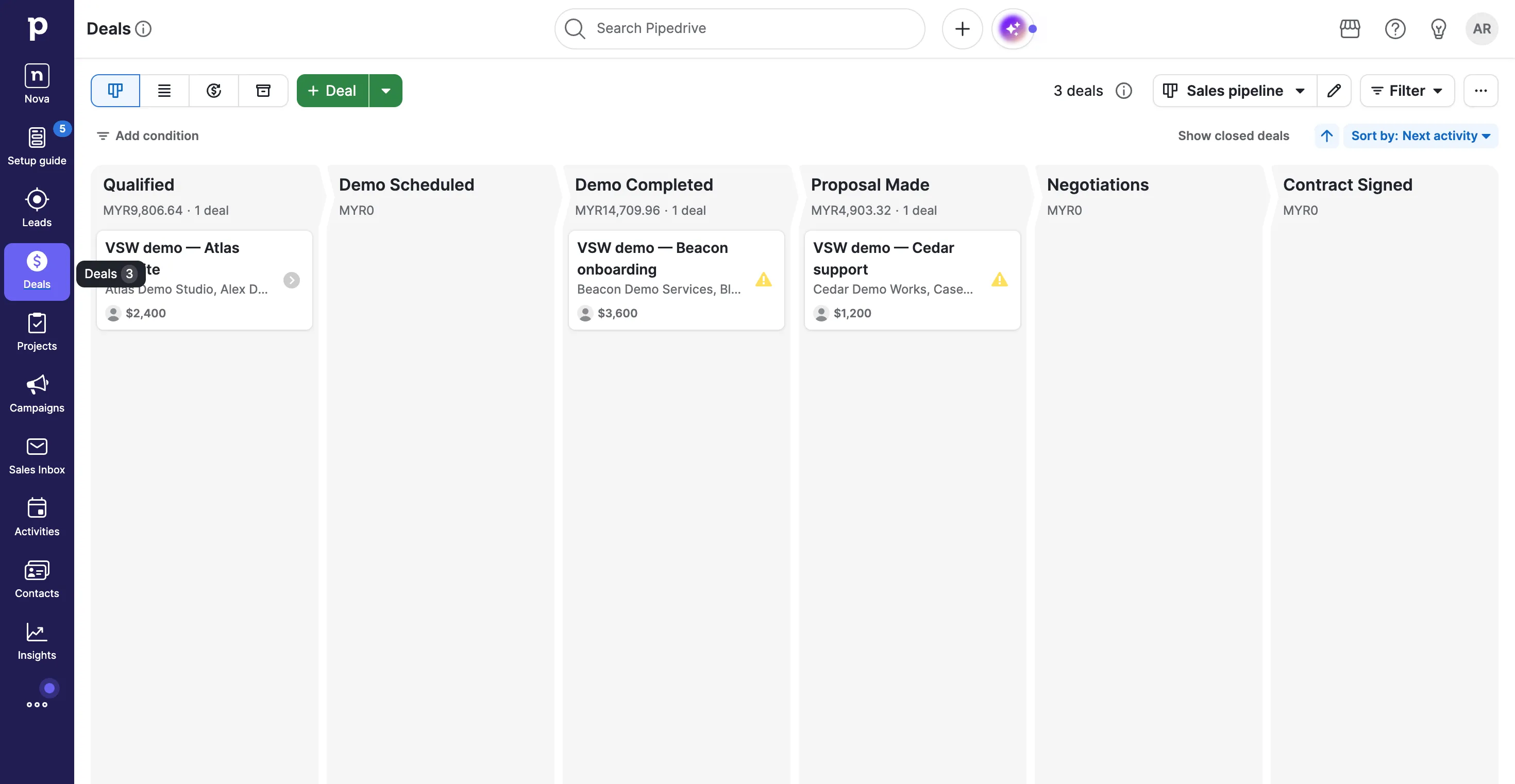
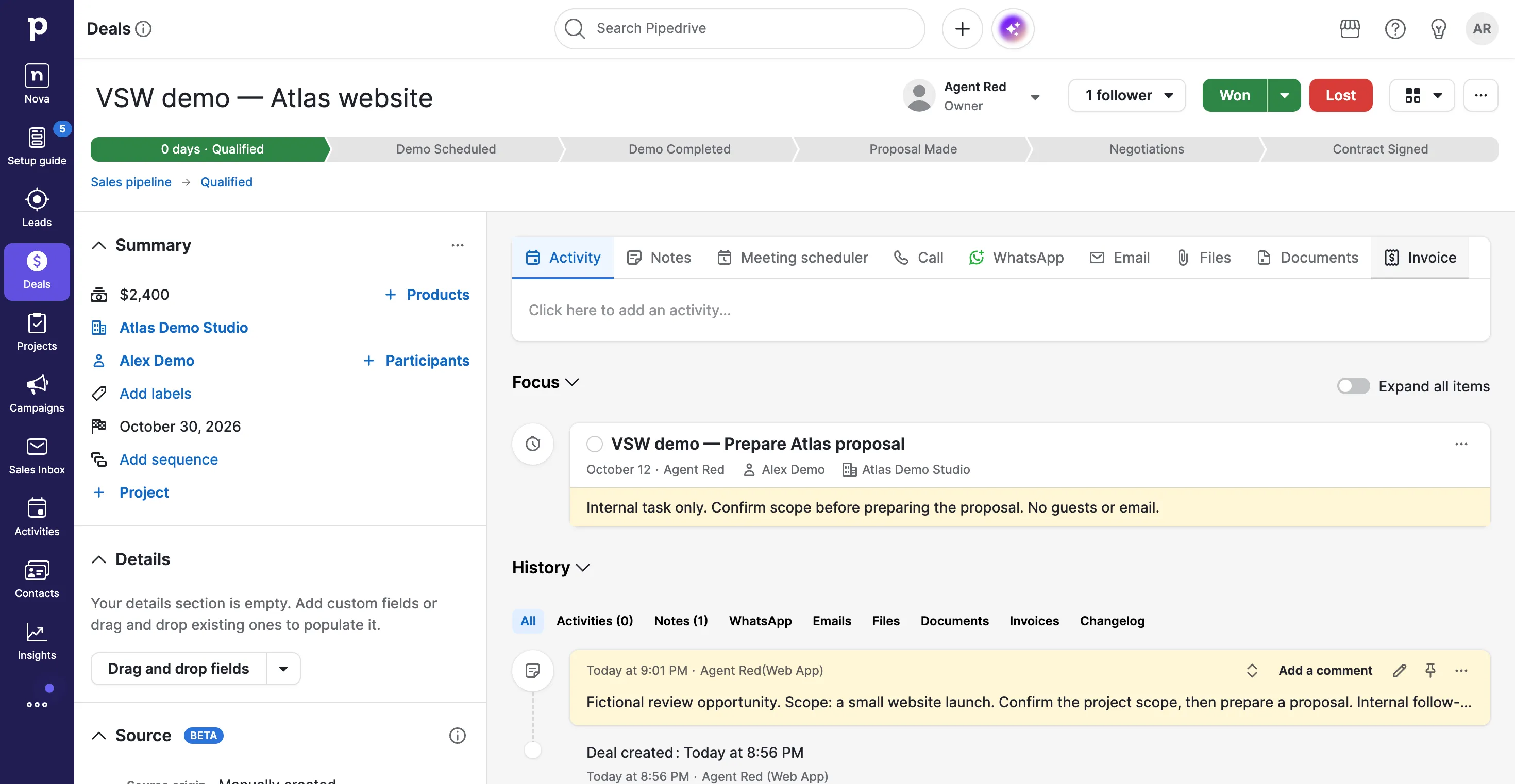
The board made three different conversations easy to place: Atlas was qualified, Beacon had completed a demo, and Cedar was at proposal stage. Opening Atlas brought its contact, company, value and expected close date into the same record as our notes and next task.
That proximity is the useful part. A salesperson can see the opportunity and the preparation it needs without reconstructing the context from separate documents. Our proposal task appeared in the deal’s Focus area, with an October 12 date and an internal brief. Activities also retrieved it as unfinished work.
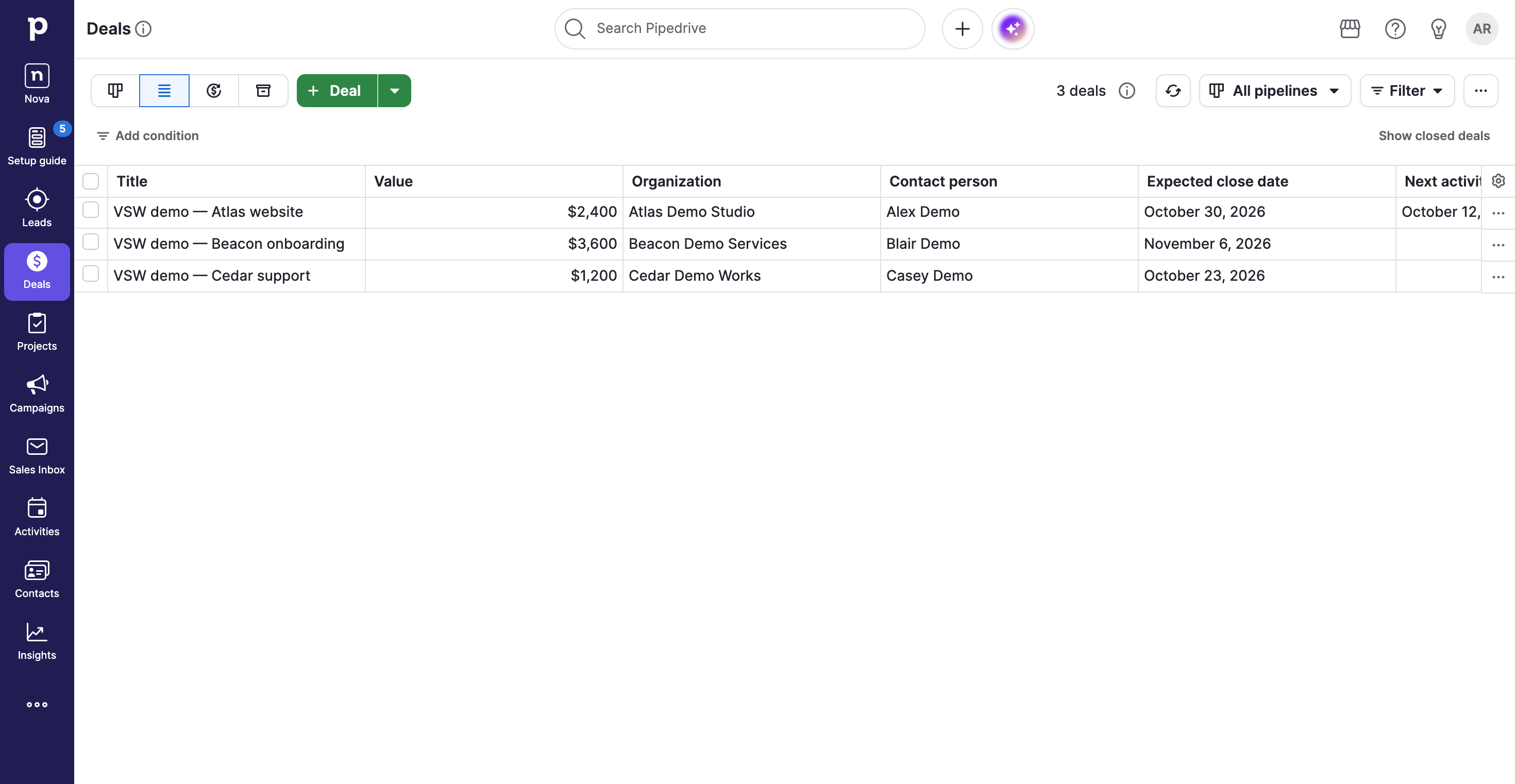
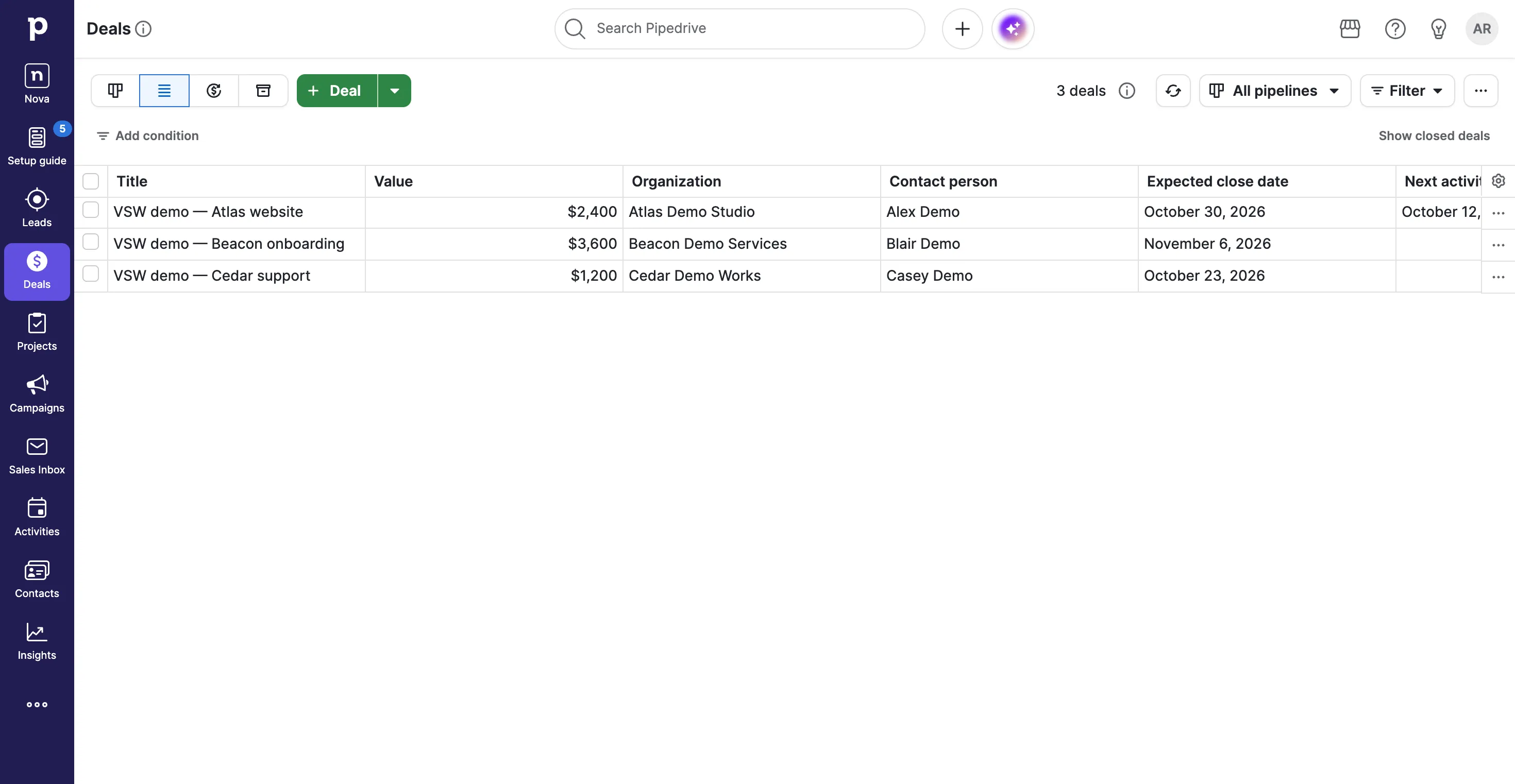
The list gave us another useful perspective: compare values and expected close dates across opportunities. Global search returned Cedar with its value, contact and saved Proposal Made stage. These observations came from a small fictional workflow; they establish what we used, rather than long-term team results.
How does the interface feel in everyday use?
The creation form lets you establish the deal, person and company together. That is a practical starting point when the opportunity arrives before the CRM record exists. The pipeline then keeps the stage easy to scan, while the record offers a much fuller working surface.
There are tradeoffs. The record has several action tabs and expandable sections, so you need to decide which information matters to your process. The deal list is wide enough to need horizontal scrolling. It is useful for comparisons, but the board is the easier starting point for seeing the sales journey.
One detail deserves attention in international sales: our cards retained USD values while stage totals appeared in the workspace’s MYR currency. Check the reporting currency before interpreting a pipeline total. And with Activities, record-level tasks and Pulse all offering ways into follow-up, agree on a daily routine so the team knows where to start.
Which plan makes the most sense?
Lite fits the core job of organizing opportunities and contacts. Growth is the more relevant comparison when the CRM needs to bring email and repeatable follow-up into that process: full email sync, automations, sequences and forecasting start there.
Premium adds qualification and customization tools, including scoring and company enrichment. It also includes LeadBooster, Smart Docs and Projects, which can matter more than another row in a feature table if your team needs lead capture, sales documents or a delivery handover. Ultimate adds contact enrichment and deeper security controls. Check the official plan comparison against a named requirement.
Our account was a Premium trial. Seeing a capability in that account does not establish that Lite includes it.
What will the subscription really cost?
Our October 7 check showed annual USD seat prices of $14 for Lite, $24 for Growth, $49 for Premium and $69 for Ultimate. Those are monthly equivalents paid yearly. Regional displays and account offers can differ, so use the pricing page and your checkout as the final reference.
As an illustration, three Growth seats at that display would cost 3 × $24 × 12 = $864 for a year. Three Premium seats would be 3 × $49 × 12 = $1,764. These are examples, excluding tax, optional add-ons and usage charges, rather than subscription quotes.
Compare the whole workflow before choosing. Projects, Smart Docs and LeadBooster are extras on Lite or Growth but included higher up; Campaigns remains separate. The billing guide explains how seats, billing cycles, add-ons and top-ups affect the bill.
What about Pulse, Sales Assistant and Nova?
Pipedrive’s broader direction is worth looking at. Pulse brings follow-ups and prioritization into a dedicated workspace. Our beta feed opened after one reload and showed no actions for today in the new account. We did not have enough activity history to judge its recommendations.
Sales Assistant offers conversational help, but our question triggered a separate Beta Services agreement. We stopped there, so this review makes no claim about answer quality.
Nova addresses another useful sales problem: meeting context. It offers preparation, capture and recaps, with proposed changes to existing CRM records for review. Our account showed access management, and we did not connect a meeting service. Treat these tools as capabilities to evaluate in your own account, with availability and setup checked first.
Does the wider toolkit change the decision?
The pipeline is only the beginning of the product. Leads Inbox separates qualification from active opportunities; email tools and automation support follow-up; Insights adds reporting; products and Smart Docs support the commercial offer. Projects carries work into delivery, while Campaigns extends into email marketing. The feature groups below show the plan boundaries and sources for those documented capabilities.
The question is which of them belongs in your actual sales process. A team needing only a clean opportunity tracker may find Lite sufficient. A team buying a connected sales routine should compare Growth and Premium using its mailbox, automation and add-on requirements. Avoid budgeting from the base seat price alone.
Our buying recommendation
Try Pipedrive with the stages and follow-up tasks your team already uses. Its clearest appeal in our test was the connection between an opportunity, its context and the next action. That is a stronger reason to buy than the size of the feature list.
Keep the trial focused: create representative deals, check the views your team will use, and price the tools the workflow actually needs. If the board makes sales discussions clearer and the record makes follow-up easier to carry out, Pipedrive has earned serious consideration.
Pipedrive features
24 features · 8 categories
Browse all 24 features
01
Pipelines and deal context
3
See the sales story at a glance
Premium trial tested
Arrange opportunities by stage so the next sales conversation starts with a clear picture of the pipeline.
In our test: Three fictional deals appeared in Qualified, Demo Completed and Proposal Made. Cedar’s saved stage change appeared on the board.
No matching features. Try another term or clear the search.
Plans & pricing
Annual USD display checked October 7, 2026: Lite $14, Growth $24, Premium $49 and Ultimate $69 per seat/month, paid yearly. Prices shown to other regions or accounts can differ; confirm checkout currency and offer. There is a 14-day trial, with no permanent free plan. Add-ons and usage top-ups can increase the bill. Our account was a one-seat Premium trial, not a paid subscription.
Prices in USD
Lite
Start with organized contacts and opportunities.
$14
seat / month · annual billing
Pipelines, contacts and activities
Core reporting
Custom fields
No full email sync or workflow automation.
Growth
Add communication and repeatable follow-up.
$24
seat / month · annual billing
Email sync and tracking
Automations and sequences
Revenue forecast
LeadBooster, Smart Docs and Projects are separate add-ons.
Premium
Add qualification tools and a broader sales toolkit.
$49
seat / month · annual billing
Deal scoring and company enrichment
Advanced customization
LeadBooster, Smart Docs and Projects included
Our test account used a Premium trial; paid subscription was not purchased.
Ultimate
Add deeper enrichment and administration.
$69
seat / month · annual billing
Contact enrichment
Security rules and alerts
Premium toolkit
Usage allowances and account pricing need checking before purchase.
Projects, Smart Docs and LeadBooster are included with Premium and Ultimate. They are paid add-ons for Lite and Growth; Campaigns remains a separate add-on.
We inspected the entry points. Sales Assistant required a separate beta agreement, which we did not accept, and Nova showed an access-management page. We did not test generated answers, meeting capture or AI updates.


 View full screen
 View full screen
 View full screen